material-components / material-components/material-components-android
[BottomNavigationView] The border or shadow cannot be set after BottomNavigationView sets the top bulge
Dieses Issue hat noch niemand übernommen.
- Vorherrschende Sprache
- Java
- Sterne
- 17.4k
- Forks
- 3.2k
- PR-Merge-Kennzahlen
- Keine gemergten PRs in 30 T.
Beschreibung
Description: Full description of issue here
I set the bulge for BottomNavigationView through the setTopEdge method of materialShapeDrawable, because the color of the page is similar to that of BottomNavigationView, so I need to set a border or shadow on top of the control, but I can't set the border or shadow on top of the control normally.
In addition, bottomNavigationView.invalidateOutline () seems to have some effect, but it seems to be only valid on Android12, and the lower version of Android cannot be used.

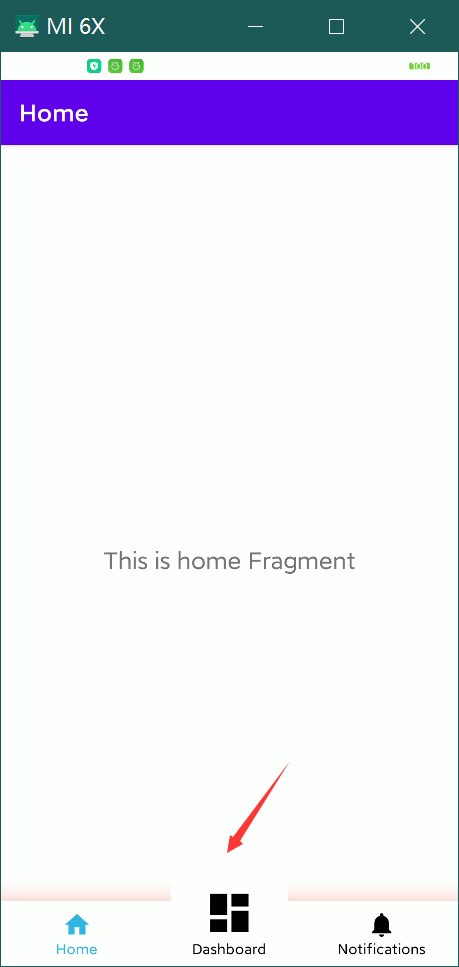
Expected behavior: Screenshots and/or description of expected behavior
I want the controls to be able to individually shape an edge as well as borders and shadows.
I hope api > = 21 can support similar effects.
Source code: The code snippet which is causing this issue
    val materialShapeDrawable = bottomNavigationView.background as MaterialShapeDrawable
    materialShapeDrawable.shapeAppearanceModel =
    materialShapeDrawable.shapeAppearanceModel
        .toBuilder()
        .setTopEdge(CutoutCircleEdgeTreatment(resources, 70.toFloat(), 10.toFloat()))
        .build()
    val backgroundDrawable =
        MaterialShapeDrawable(materialShapeDrawable.shapeAppearanceModel).apply {
            setTint(Color.WHITE)
            paintStyle = Paint.Style.FILL
            shadowCompatibilityMode = MaterialShapeDrawable.SHADOW_COMPAT_MODE_ALWAYS
            initializeElevationOverlay(this@MainActivity)
            setShadowColor(Color.RED)
            elevation = 100F
        }
    (bottomNavigationView.parent as? ViewGroup)?.clipChildren = false
    bottomNavigationView.background = backgroundDrawable
    bottomNavigationView.invalidateOutline()
class CutoutCircleEdgeTreatment(
res: Resources,
circleDiameterDp: Float,
circleLeftRightOffsetDp: Float
) : EdgeTreatment() {
    private val fabDiameter: Float
    private val offset: Float

    init {
        fabDiameter = TypedValue.applyDimension(
            TypedValue.COMPLEX_UNIT_DIP,
            circleDiameterDp,
            res.displayMetrics
        )
        offset = TypedValue.applyDimension(
            TypedValue.COMPLEX_UNIT_DIP,
            circleLeftRightOffsetDp,
            res.displayMetrics
        )
    }

    override fun getEdgePath(
        length: Float,
        center: Float,
        interpolation: Float,
        shapePath: ShapePath
    ) {
        //凸起半径
        val r = length / 10 // == center
        val halfLine = length / 2 - r
        //值越大转角处就越顺滑,但是必须小于等于r,这个大小可以多试试
        val offset = 30f
        //第一部分,直线,画到凹陷开始的地方
        shapePath.lineTo(halfLine - offset, 0f)
        //凸起开始的地方的转角,不处理的话看起来很尖锐
        shapePath.quadToPoint(halfLine, 0f, halfLine + offset, -offset)
        //凸起部分
        shapePath.quadToPoint(center, -r, halfLine + 2 * r - offset, -offset)
        //凸起结束的地方的转角
        shapePath.quadToPoint(halfLine + 2 * r, 0f, halfLine + 2 * r + offset, 0f)
// 最后一部分的直线,画到底
shapePath.lineTo(length, 0f)
}
}
Minimal sample app repro: Please consider attaching a minimal sample app that reproduces the issue. This will help narrow down the conditions required for reproducing the issue, and it will speed up the bug fix process. You may attach a zip file of the sample app or link to a GitHub repo that contains the sample app.
Android API version: Android API version here
28
Material Library version: Material Android Library version you are using here (e.g., 1.1.0-alpha07)
1.6.1
Device: Device on which the bug was encountered here
To help us triage faster, please check to make sure you are using the latest version of the library.
We also happily accept pull requests.
Beitragsleitfaden
Erste Schritte
- Lies das ganze Issue und danach den Beitragsleitfaden des Projekts.
- Schreib ins Issue, dass du es übernimmst — das erspart doppelte Arbeit.
- Forke das Repository und arbeite in einem Branch.
- Öffne einen Pull Request, der die Issue-Nummer nennt.
Rechercherichtung
Beginne damit, das Problem mit BottomNavigationView, MaterialShapeDrawable, setTopEdge und dem bereitgestellten API-28-Beispiel in Material Library 1.6.1 nachzustellen. Vergleiche das Verhalten von Rahmen und Schatten mit invalidateOutline() und der benutzerdefinierten Form. Als erledigt gilt die Aufgabe, wenn das Steuerelement seine benutzerdefinierte obere Kante beibehalten und gleichzeitig den angeforderten Rahmen oder Schatten auf API 21 und später anzeigen kann.
Vom Indexierungsmodell aus dem Issue-Text verfasst.
Bewertung
- Tech-Stack
- kotlin
- Bereich
- design, mobile
- Issue-Typ
- Bug
- Schwierigkeit
- 4/5
- Geschätzter Aufwand
- 3-5 Tage
- Aktivitätsstatus
- Veraltet
- Klarheit
- Muss geklärt werden
- Anfängerfreundlichkeit
- 25/100