Showing extra printers that don't print
Nobody has claimed this yet.
Assessment
- Difficulty
- 3/5
- Estimated time
- 1-2 days
- Newbie friendliness
- 35/100
Research direction
Start by reproducing the print dialog in Xreader 3.2.2 on Linux Mint with the Brother_MFC_J4540DW CUPS printer configured as described. Compare the two displayed printer entries and verify that the duplicate non-printing entry is removed or corrected and that documents print through the remaining printer.
Written by the indexing model from the issue text.
Description
 * Xreader 3.2.2
 * Distribution Linux Mint 20.3 Cinnamon
Issue
I have one printer. Printers shows it as Brother_MFC_J4540DW
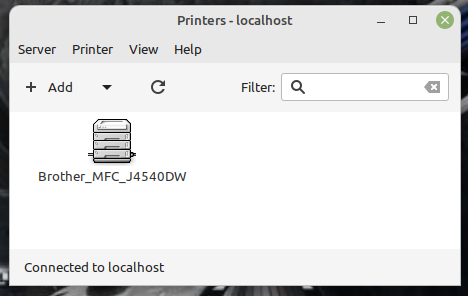
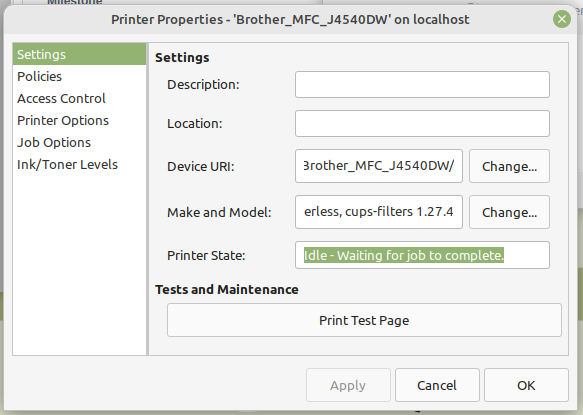
If I right-click on the printer icon and select properties it shows
Device URI: implicitclass://Brother_MFC_J4540DW/
Make and Model: Brother MFC-J4540DW, driverless, cups-filters 1.27.4
Printer State: Idle - Waiting for job to complete.
However when I try to print a document from Xreader 3.2.2 it shows two printers:
Brother-MFC-J4540DW has appeared.
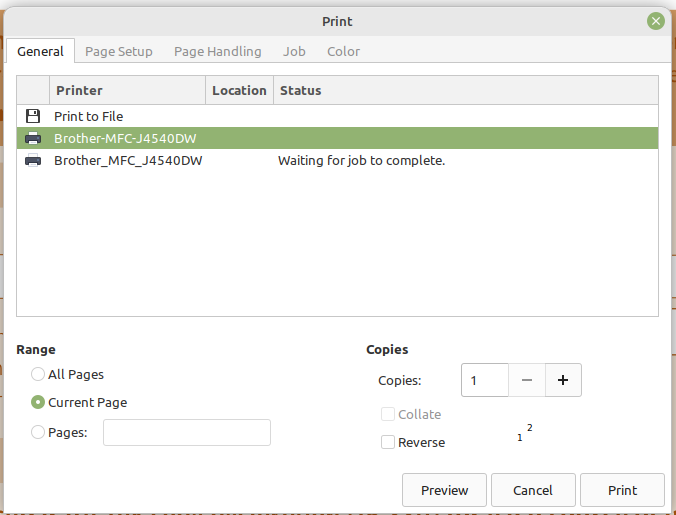
Any documents sent to this printer do not print.
- Dominant language
- C
- Stars
- 283
- Forks
- 82
- PR merge metrics
- No merged PRs in 30d
Contributor guide
No contributing guide indexed for this repository
First steps
- Read the whole issue, then the project's contributing guide.
- Comment on the issue to say you are picking it up — it saves two people doing the same work.
- Fork the repository and make your change on a branch.
- Open a pull request that references the issue number.
More from linuxmint/xreader
-
Cyrillic homoglyph characters used in place of ASCII <p> tags in Kazakh AppData description string Open
Difficulty 1/5 Under an hour Newbie friendliness 88/100
-
Difficulty 4/5 3-5 days Newbie friendliness 38/100
-
Difficulty 4/5 3-5 days Newbie friendliness 45/100
-
Difficulty 3/5 1-2 days Newbie friendliness 55/100
-
Difficulty 3/5 1-2 days Newbie friendliness 48/100
All issues in linuxmint/xreader
Similar issues
-
[adam] AdamNet network read doesn't cap to MAX_ADAM_PACKET_LEN, overflows client receive buffers Open
Difficulty 2/5 1-3 hours Newbie friendliness 88/100
FujiNetWIFI/fujinet-firmware#1649 · 2 comments ·
-
Difficulty 2/5 1-3 hours Newbie friendliness 68/100
HarbourMasters/Shipwright#7229 ·
-
Difficulty 2/5 1-3 hours Newbie friendliness 72/100
riscv-software-src/riscv-isa-sim#2435 · 1 comment ·
-
bug Self Built Image SNAPSHOT Supported Device target/ramips
Difficulty 2/5 1-3 hours Newbie friendliness 88/100
-
Difficulty 2/5 1-3 hours Newbie friendliness 76/100