ionic-team / ionic-team/ionic-cli
feat: node_modules out of sync
Chưa có ai nhận issue này.
- Ngôn ngữ chính
- TypeScript
- Star
- 2k
- Fork
- 681
- Chỉ số merge pull request
- Không có pull request nào được merge trong 30 ngày
Mô tả
**Description:**
Background:
In one project there can be a few active branches that team members are working on. Often it will happen that ionic is updated in one of the branches by a senior and then pulled into some other shared branch where everyone will merge to.
The problem is, often other team members are not aware that `packages.json` deps or ionic have indeed been updated. They will not know to run `npm install` unless someone has told them explicitly or they notice that there are dep changes. It happens more often than I would like. They then keep on running with old deps which can then cause problems.
Suggestion:
When running an ionic command, very similar to how you do the update ionic CLI check:
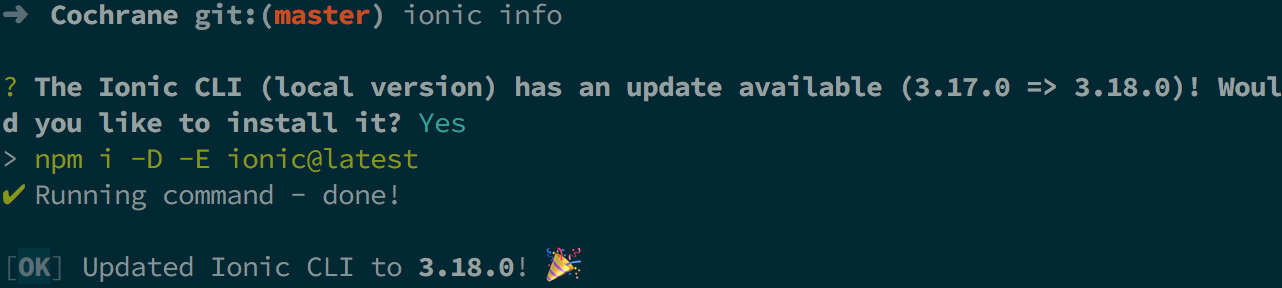
You should compare the ionic versions in `node_modules` and compare it to what's in `packages.json`. If there is any mismatch, a message should be shown such as:
"We have detected your installed dependencies are out of sync with packages. Would you like to fix?"
"Y/N"
If Y then simply run `npm install`.
In this way teams will have a notification that their deps are out of date, enabling much easier development work flow.
**My `ionic info`:**
```
li packages: (/Users/dylan/Desktop/Projects/Cochrane/node_modules)
@ionic/cli-utils : 1.18.0
ionic (Ionic CLI) : 3.18.0
global packages:
cordova (Cordova CLI) : 7.1.0
local packages:
@ionic/app-scripts : 3.0.1
Cordova Platforms : ios 4.5.3
Ionic Framework : ionic-angular 3.8.0
System:
ios-deploy : 1.9.2
ios-sim : 6.1.2
Node : v6.11.4
npm : 4.6.1
OS : macOS Sierra
Xcode : Xcode 9.1 Build version 9B55
Environment Variables:
ANDROID_HOME : not set
Misc:
backend : legacy
```
Hướng dẫn đóng góp
Bắt đầu từ đâu
- Đọc hết issue, rồi đọc hướng dẫn đóng góp của dự án.
- Bình luận trên issue rằng bạn sẽ nhận — tránh hai người làm cùng một việc.
- Fork repository và làm thay đổi trên một nhánh.
- Mở pull request có tham chiếu số hiệu của issue.
Hướng nghiên cứu
Bắt đầu bằng cách truy vết cơ chế kiểm tra cập nhật hiện có của Ionic CLI được đề cập trong issue, sau đó kiểm tra cách các dependency đã cài đặt được so sánh với package.json và cách npm install được gọi. Hoàn thành khi CLI phát hiện sự không khớp phiên bản dependency trong lúc chạy một lệnh Ionic, hỏi người dùng và chạy npm install sau khi được xác nhận.
Do mô hình lập chỉ mục viết ra từ nội dung của issue.
Đánh giá
- Công nghệ
- node.js, typescript
- Lĩnh vực
- cli
- Loại issue
- Tính năng
- Độ khó
- 4/5
- Thời gian dự kiến
- 3-5 ngày
- Mức độ hoạt động
- Đình trệ
- Độ rõ ràng
- Khá rõ ràng
- Mức phù hợp với người mới
- 35/100