flathub / flathub/com.visualstudio.code
Can't use host shell with launch.json, which makes node debugging impossible
- 主要语言
- Shell
- 星标
- 217
- 派生
- 82
- 平均合并
- 1 天 7 小时
- 30 天内合并 PR
- 1
描述
I have config keys below in settings.json
```json
"terminal.integrated.defaultProfile.linux": "toolbox",
"terminal.integrated.profiles.linux": {
"toolbox": {
"path": "/usr/bin/flatpak-spawn",
"args": ["--host", "toolbox", "enter"]
}
}
```
But these config won't be applied to debugging environment, seems VSCode ignored the change of default shell in launch.json. Without the toolbox environment, node debugging is impossible because there's no "node" in the PATH of VSCode flatpak and SDK.
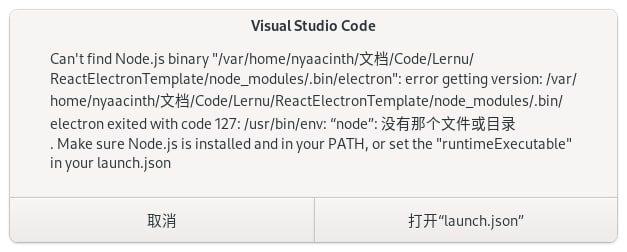
*Tips: "没有那个文件或目录" means "No such file or directory" in English*
launch.json
```json
{
"configurations": [
{
"name": "Electron Main",
"type": "node",
"request": "launch",
"program": "${workspaceFolder}/dist/main.js",
"runtimeExecutable": "${workspaceFolder}/node_modules/.bin/electron"
}
]
}
```
贡献指南
这个仓库没有索引到贡献指南
调研方向
首先使用提供的 settings.json 和 launch.json 在 Flatpak VS Code 中重现问题,重点关注 terminal.integrated Linux 配置文件如何到达 Node 调试环境。当启动 Electron Main 配置时能够遵循主机 shell 配置,并且运行时能够在 toolbox 环境中找到 node,即表示完成。
由索引模型根据 Issue 内容生成。
评估
- 技术栈
- shell, vscode
- 领域
- devtools
- Issue 类型
- 缺陷
- 难度
- 4/5
- 预计耗时
- 3-5 天
- 活跃度
- 停滞
- 描述清晰度
- 基本清楚
- 新手友好度
- 32/100