flathub / flathub/com.visualstudio.code
Can't use host shell with launch.json, which makes node debugging impossible
- Dominant language
- Shell
- Stars
- 217
- Forks
- 82
- Avg merge
- 1d 7h
- Merged PRs (30d)
- 1
Description
I have config keys below in settings.json
```json
"terminal.integrated.defaultProfile.linux": "toolbox",
"terminal.integrated.profiles.linux": {
"toolbox": {
"path": "/usr/bin/flatpak-spawn",
"args": ["--host", "toolbox", "enter"]
}
}
```
But these config won't be applied to debugging environment, seems VSCode ignored the change of default shell in launch.json. Without the toolbox environment, node debugging is impossible because there's no "node" in the PATH of VSCode flatpak and SDK.
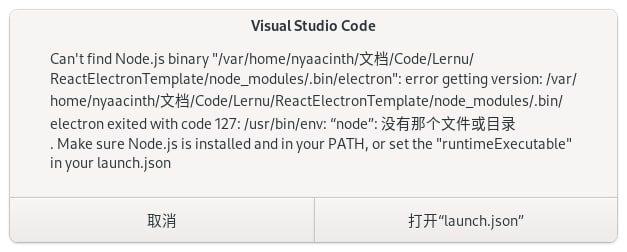
*Tips: "没有那个文件或目录" means "No such file or directory" in English*
launch.json
```json
{
"configurations": [
{
"name": "Electron Main",
"type": "node",
"request": "launch",
"program": "${workspaceFolder}/dist/main.js",
"runtimeExecutable": "${workspaceFolder}/node_modules/.bin/electron"
}
]
}
```
Contributor guide
No contributing guide indexed for this repository
Research direction
Start by reproducing the issue in Flatpak VS Code with the provided settings.json and launch.json, focusing on how the terminal.integrated Linux profile reaches the Node debugging environment. Done means the host shell configuration is honored when launching the Electron Main configuration and the runtime can find node in the toolbox environment.
Written by the indexing model from the issue text.
Assessment
- Tech stack
- shell, vscode
- Domain
- devtools
- Issue type
- Bug
- Difficulty
- 4/5
- Estimated time
- 3-5 days
- Activity status
- Stale
- Clarity
- Mostly clear
- Newbie friendliness
- 32/100