firebase / firebase/firebase-admin-node
type ChildUpdateFields within type UpdateData does not play nicely with nested interfaces
- 主要言語
- TypeScript
- スター
- 1.7k
- フォーク
- 419
- 平均マージ
- 3日 10時間
- マージ済み PR(30日)
- 16
説明
### Describe your environment
* Operating System version: MacOS Monterey 12.6
* Firebase SDK version: 11.19.0
* Firebase Product: Firebase Admin
* Node.js version: 16.15.0
* NPM version: 8.5.5
### Describe the problem
#### Steps to reproduce:
Create a simple environment to work with:
```bash
> npm init # go through the init steps
> npm install typescript # currently 4.9.4
> npm install firebase-admin # currently 11.4.0
```
#### Relevant Code:
Create a typescript file with the following:
```ts
interface UserSuccess {
name: {
first: string;
last: string;
};
}
interface UserFail {
name: Name;
}
interface Name {
first: string;
last: string;
}
```
Note how both `UserSuccess` and `UserFail` are technically identical in structure.
When using the `UpdateData` type, you are able to traverse interface objects to update a specific field within Firebase. For example, something like this:
`docRef.update({ "name.first": "John" });`
However, when working with an interface that has a nested Interface object, `UpdateData`, or more specifically, `ChildUpdateFields` within `UpdateData`, fails to generate the new expected `type` whenever there are interfaces with other interfaces.
**Success:**
```ts
const user: FirebaseFirestore.UpdateData = {
"name.first": "John",
};
```
The IDE even shows a list of helpful and expected suggestions:

**Failure:**
```ts
const user: FirebaseFirestore.UpdateData = {
"name.first": "John", // ERROR
};
```
This produces the following error:
```
Type '{ "name.first": string; }' is not assignable to type '{ name?: FieldValue | { first?: string | FieldValue | undefined; last?: string | FieldValue | undefined; } | undefined; }'.
Object literal may only specify known properties, and '"name.first"' does not exist in type '{ name?: FieldValue | { first?: string | FieldValue | undefined; last?: string | FieldValue | undefined; } | undefined; }'.
```
Secondly, the IDE does not show the intersected keys like above in the success state.

#### Possible Solution
Look at the `ChildUpdateFields` type.
```ts
export type ChildUpdateFields =
V extends Record
? AddPrefixToKeys>
: never;
```
Change `unknown` to `any`:
```ts
export type ChildUpdateFields =
V extends Record
? AddPrefixToKeys>
: never;
```
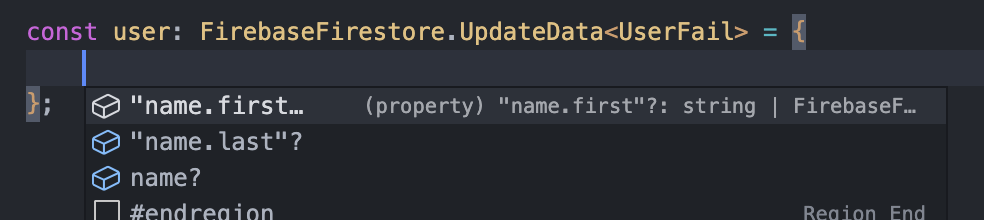
Suddenly, all problems described above are fixed. On top of that, the IDE also shows helpful and expected suggestions.
`UserFail` now behaves the same as `UserSuccess`:
```ts
const user: FirebaseFirestore.UpdateData = {
"name.first": "John", // no more errors
};
```
Proper suggestions are listed in the IDE:
コントリビューションガイド
評価
この issue はまだ評価されていません。