Sort symbols pane by location
- 主要語言
- Vala
- 星號
- 521
- 分支
- 118
- 平均合併
- 1 天 8 小時
- 30 天內合併 PR
- 14
描述
## Prerequisites
- [x] I have searched open and closed issues for duplicates.
## Feature
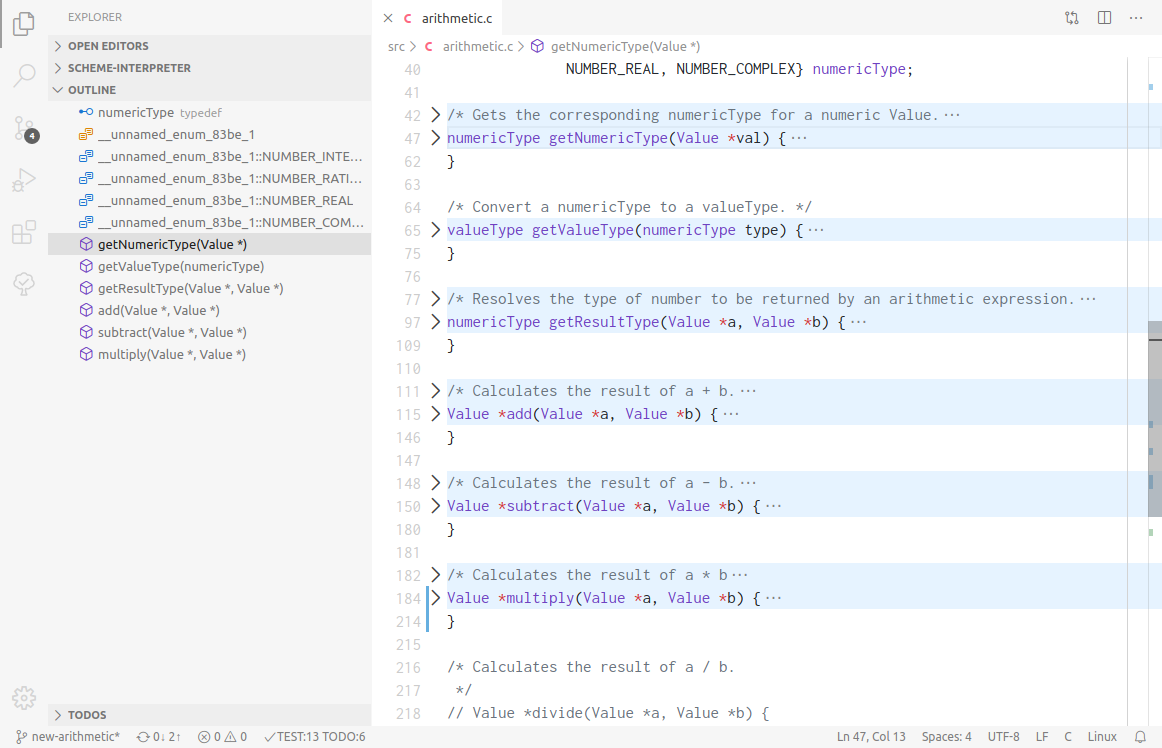
The symbols pane is very useful, but I find it difficult to use because it sorts the symbols alphabetically. In other code editors (like Builder and Visual Studio), the symbols outline is sorted by where it appears in the code, or there's an option to do so. So functions that appear at the top of the file appear at the top of the outline, and so on. I think of my code spatially, so this is much more natural to me than alphabetically hunting down the function I'm looking for.
Here's what it looks like in Visual Studio Code. I've included the file with functions collapsed, so you can see how the outline maps functions to their locations in code exactly.
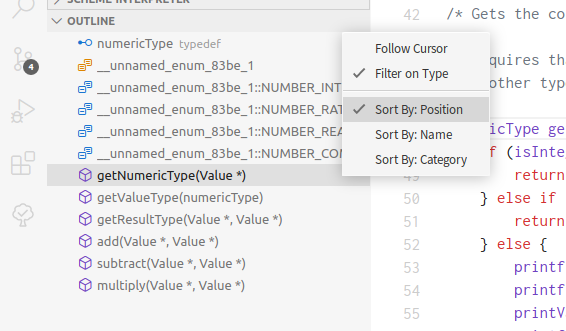
I don't expect this to be the only option, so it would probably require a switching interface of some sort. Again, here's what Visual Studio Code does:
貢獻指南
研究方向
從現有的符號窗格及其按字母順序排序的行為入手;追蹤符號位置的表示方式以及窗格控制項的建構方式。定義排序切換開關,並驗證符號可以依原始碼順序顯示,同時保留目前的字母順序選項。
由索引模型根據 Issue 內容生成。
評估
- 領域
- desktop, tooling
- Issue 類型
- 功能
- 難度
- 4/5
- 預估耗時
- 3-5 天
- 活躍度
- 停滯
- 描述清晰度
- 基本清楚
- 新手友好度
- 45/100