Sort symbols pane by location
- Linguagem predominante
- Vala
- Estrelas
- 521
- Forks
- 118
- Merge médio
- 1d 8h
- PRs com merge (30d)
- 14
Descrição
## Prerequisites
- [x] I have searched open and closed issues for duplicates.
## Feature
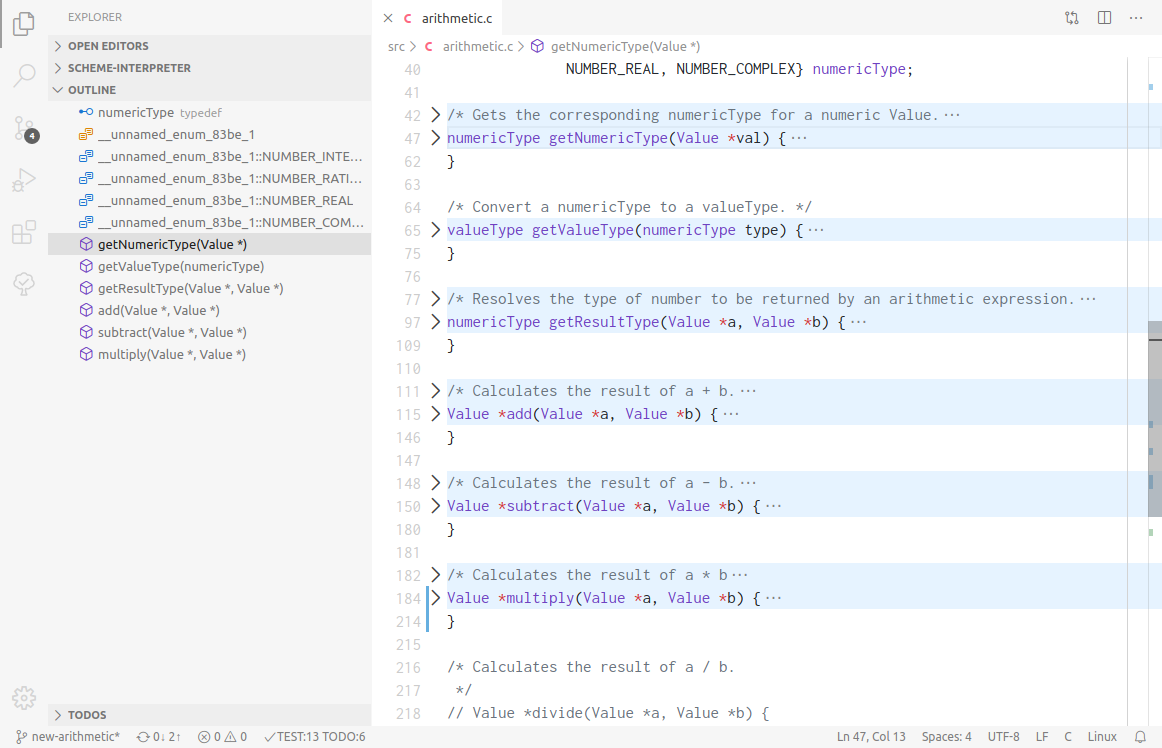
The symbols pane is very useful, but I find it difficult to use because it sorts the symbols alphabetically. In other code editors (like Builder and Visual Studio), the symbols outline is sorted by where it appears in the code, or there's an option to do so. So functions that appear at the top of the file appear at the top of the outline, and so on. I think of my code spatially, so this is much more natural to me than alphabetically hunting down the function I'm looking for.
Here's what it looks like in Visual Studio Code. I've included the file with functions collapsed, so you can see how the outline maps functions to their locations in code exactly.
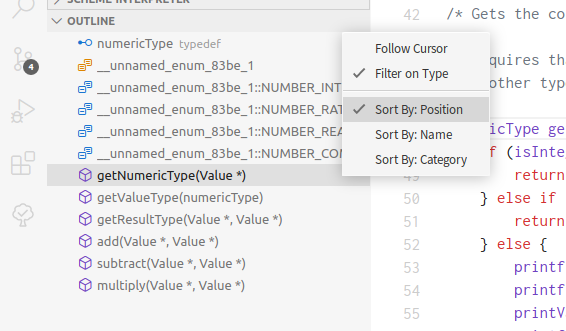
I don't expect this to be the only option, so it would probably require a switching interface of some sort. Again, here's what Visual Studio Code does:
Guia de contribuição
Direção de pesquisa
Comece pelo painel de símbolos existente e por seu comportamento de ordenação alfabética; rastreie como as localizações dos símbolos são representadas e como os controles do painel são construídos. Defina o alternador de ordenação e verifique se os símbolos podem ser exibidos na ordem do código-fonte, preservando a opção alfabética atual.
Escrita pelo modelo de indexação a partir do texto da issue.
Avaliação
- Domínio
- desktop, tooling
- Tipo de issue
- Funcionalidade
- Dificuldade
- 4/5
- Tempo estimado
- 3-5 dias
- Status de atividade
- Estagnada
- Clareza
- Razoavelmente clara
- Facilidade para iniciantes
- 45/100