apache / apache/dolphinscheduler-sdk-python
[impv] Auto create the whole task workspace to make the task the same workspace when running locally and on the DolphinScheduler platform
- 主要言語
- Python
- スター
- 71
- フォーク
- 26
- PR マージ指標
- 30日以内にマージされた PR はありません
説明
For example, If I have the workspace like this: https://github.com/pytorch/examples/tree/main/word_language_model
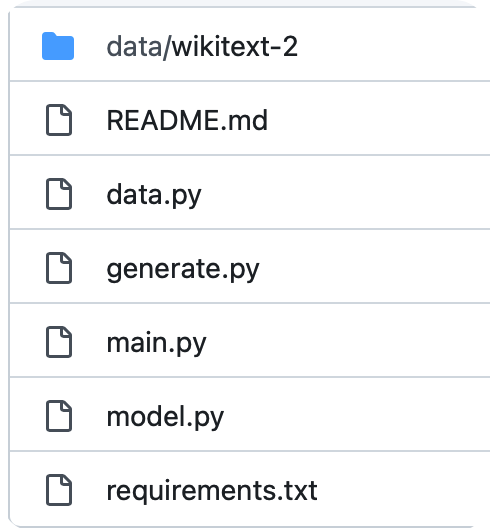
We can submit the task
```python
# [start workflow]
from pydolphinscheduler.core import Workflow
from pydolphinscheduler.core.resource import Resource, LocalResource
from pydolphinscheduler.tasks import Shell
with Workflow(
name="auto_resources_example",
) as workflow:
# [start use_exists_resources]
task_use_resource = Shell(
name="example",
command=f"python main.py --cuda",
auto_resource=True
)
# [end use_exists_resources]
workflow.run()
# [end workflow]
```
Then, all the files will be uploaded to the resource center.
And there is another best way to track the file version, If this is the git repository, we only record the git repository, version, and diff.
Then, we can reproduce the workspace in dolphinscheduler. (Inspired by ClearML)
So, After developing a project locally, we can directly submit it to DolphinScheduler and run it directly. Except for some inconsistent environment variables.
コントリビューションガイド
調査の方向性
例に示されている pydolphinscheduler.core.Workflow と tasks.Shell のエントリポイントから始め、workflow.run() と auto_resource=True も含めます。例のワークスペースは main.py を含む word_language_model です。現在 Resource Center がどのようにファイルを受け取っているかを確認し、そのうえで、ローカルワークスペースまたは Git リポジトリのバージョンと diff を DolphinScheduler 上で再現可能にするために必要なものを定義します。その際、環境変数に一貫性がないことも考慮します。
索引モデルが issue の本文から書いたものです。
評価
- 技術スタック
- git, python
- 領域
- backend, devops
- issue の種類
- 機能追加
- 難易度
- 5/5
- 見積もり時間
- 1週間以上
- 活発さ
- 停滞
- 明瞭さ
- おおむね明確
- 初心者へのやさしさ
- 35/100