MatPaginatedTabHeader doesn't scroll last tab fully into view
- Dominant language
- TypeScript
- Stars
- 25k
- Forks
- 6.8k
- Avg merge
- 1d 8h
- Merged PRs (30d)
- 91
Description
#### Reproduction
Use StackBlitz to reproduce your issue: https://stackblitz.com/edit/components-issue-wsbxpk
Steps to reproduce:
1. Set selectedIndex to last tab
2. Render
#### Expected Behavior

Selected tab is scrolled fully into view and righthand pagination button disabled just as if the user manually clicked on the last tab
#### Actual Behavior
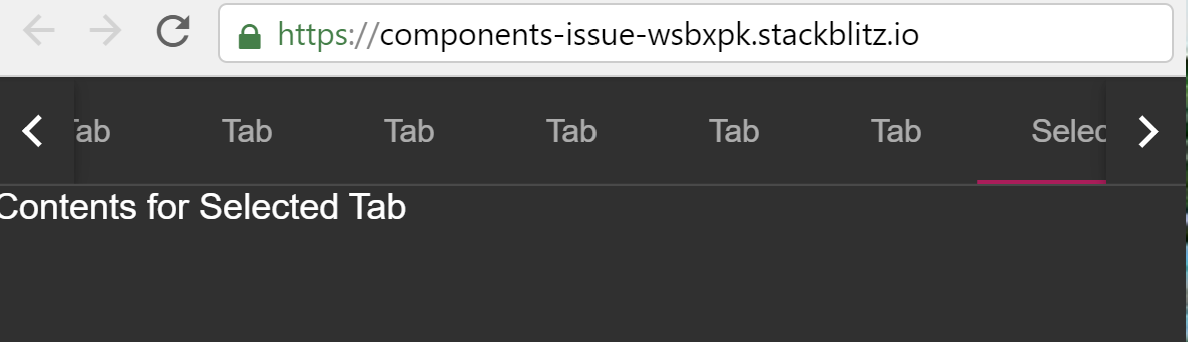
Tab is only partially visible and pagination button remains enabled. When tab titles vary in size only a few pixels of the last tab are visible. Clicking on the last tab manually scrolls it fully into view.
#### Environment
- Angular: 8.2.14
- CDK/Material: 8.2.3
- Browser(s): Chrome, Firefox, Internet Explorer 11, Safari
- Operating System (e.g. Windows, macOS, Ubuntu): All
Contributor guide
Research direction
Start with the linked StackBlitz reproduction and the MatPaginatedTabHeader implementation, setting selectedIndex to the last tab. Compare initial rendering with manually selecting the last tab, then verify that the selected tab is fully visible and the right pagination button is disabled.
Written by the indexing model from the issue text.
Assessment
- Tech stack
- angular, typescript
- Domain
- frontend
- Issue type
- Bug
- Difficulty
- 3/5
- Estimated time
- 1-2 days
- Activity status
- Stale
- Clarity
- Mostly clear
- Newbie friendliness
- 45/100