Check pathnames for illegal characters (e.g. outputPath for build files)
- 主要语言
- TypeScript
- 星标
- 27k
- 派生
- 11.8k
- 平均合并
- 14 小时 23 分钟
- 30 天内合并 PR
- 162
描述
# 🐞 Bug report
### Command (mark with an `x`)
- [ ] new
- [x] build
- [ ] serve
- [ ] test
- [ ] e2e
- [ ] generate
- [ ] add
- [ ] update
- [ ] lint
- [ ] extract-i18n
- [ ] run
- [ ] config
- [ ] help
- [ ] version
- [ ] doc
### Description
The Angular CLI should warn the user if a specified path is invalid for the current system.
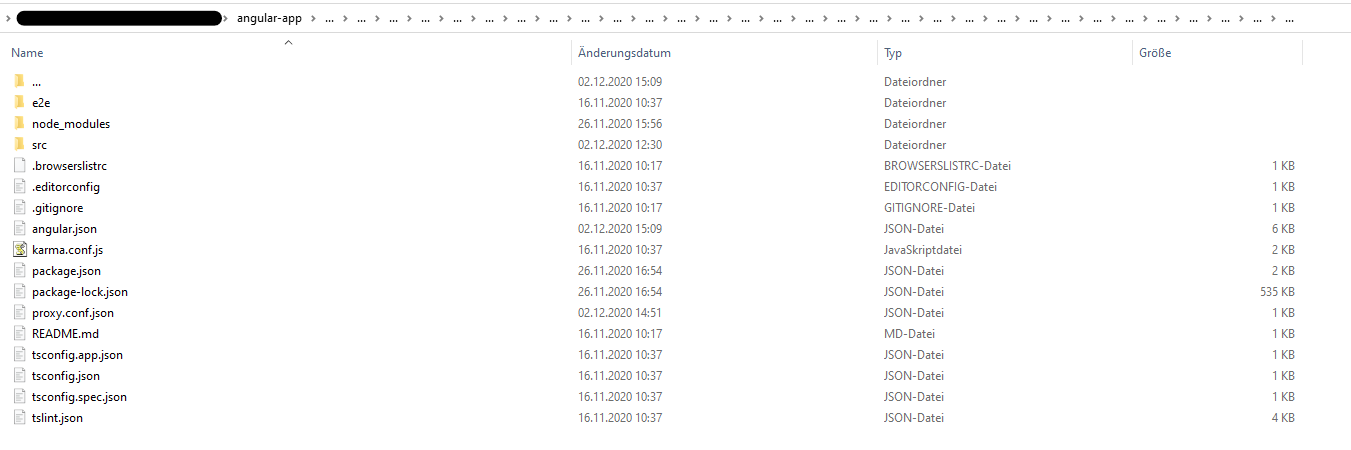
I accidently set `".../dist"` (three dots) as `outputPath` in `angular.json`. Correct is `"../dist"` (two dots). Running `ng build` created a huge mess. In the app root a folder has been created with `...` as name (ending a folder name in Windows with a dot is illegal). Inside of this three dot folder all of my project files were listed (including `node_modules` folder). There was also a folder named `...`, which again contained my whole project files. This recursively went to whatever level (I clicked throuhg the folder approximately 30 levels down, there was still a `...` folder). Deleting the first `...` folder lastet more than 15 minutes, then telling me the files which should be deleted aren't there anymore. Also my project files in the root directory were deleted in this process (luckily most of it in Git). That was the strangest thing, it felt like the content inside of `...` mirrored my root project somehow (like in https://superuser.com/questions/528502/cant-remove-three-dots-folder-on-my-hdd). I also tried reverting my files using Git which did not work at all. I managed to delete the whole repository locally with `rm -rf 'folder'` using the GitBash. After cloning the project again, my IDE (Webstorm) listed the `...` folder once again, which luckily could be deleted this time. The project looks fine right now, and with the correct `outputPath` the app builds correctly.
It would be nice if the CLI checks pathnames for illegal characters. I did not try any other illegal characters inside of the path name.
## 🔬 Minimal Reproduction
Caution: Try in a sandbox environment with unimported files only to prevent loss of data!
1. Change the `"outputPath"` in `angular.json` to `".../dist"` (three dots)
2. Run `ng build`
## 🌍 Your Environment
Angular CLI: 11.0.1

Node: 14.15.0

OS: win32 x64

Angular: 11.0.0

... animations, common, compiler, compiler-cli, core, forms

... platform-browser, platform-browser-dynamic, router

Ivy Workspace: Yes

Package                         Version

---------------------------------------------------------

@angular-devkit/architect       0.1100.1

@angular-devkit/build-angular   0.1100.1

@angular-devkit/core            11.0.1

@angular-devkit/schematics      11.0.1

@angular/cdk                    11.0.1

@angular/cli                    11.0.1

@angular/material               11.0.1

@schematics/angular             11.0.1

@schematics/update              0.1100.1

rxjs                            6.6.3

typescript                      4.0.5
**Anything else relevant?**
贡献指南
调研方向
首先,在 Windows 沙盒中使用 issue 中描述的 `angular.json` 配置,复现将 `outputPath` 设置为 `.../dist` 的 `ng build` 命令。跟踪构建如何处理该路径,并验证无效的路径名会在创建文件或目录之前产生警告或错误。
由索引模型根据 Issue 内容生成。
评估
- 技术栈
- angular, typescript
- 领域
- build-system, cli
- Issue 类型
- 缺陷
- 难度
- 3/5
- 预计耗时
- 1-2 天
- 活跃度
- 停滞
- 描述清晰度
- 描述清楚
- 新手友好度
- 35/100