REditorSupport / REditorSupport/vscode-R
Send code to terminal by `Ctrl + ENTER` but don't run
Nessuno ha ancora preso questa issue.
- Lingua principale
- TypeScript
- Stelle
- 1.2k
- Fork
- 139
- Merge medio
- 2h 46m
- PR unite (30g)
- 5
Descrizione
Describe the bug
When I send code to terminal by Ctrl + ENTER, it just send code but don't run code, and we should move focus to terminal and input ENTER manually to run the code.
To Reproduce
Steps to reproduce the behavior:
- create a terminal
- run this code below:
library(IlluminaHumanMethylation450kanno.ilmn12.hg19)
## sorry for this, I have tried other code which don't rely on any package data to reproduce this problem but it failed.
## this package is from bioconductor
## so we should install it by  BiocManager::install("IlluminaHumanMethylation450kanno.ilmn12.hg19")

library(tidyverse)
After loading packages, try this code below several times, the frequency of problem is almost 1/2, so it won't be hard to reproduce this problems
probe_with_one_more_gene <- Other$UCSC_RefGene_Name %>%
  purrr::map(~ unique(str_split(., pattern = ";")[[1]])) %>%
  purrr::map_lgl(
    ~ length(.) >= 2
  ) %>%
  { # nolint
    rownames(Other)[.]
  }
- See error (it seems vscode-r just run code before line
rownames(Other)[.]and after code wasn't run, as we could see a character+after the linerownames(Other)[.]which indicates the line before should have been run.)
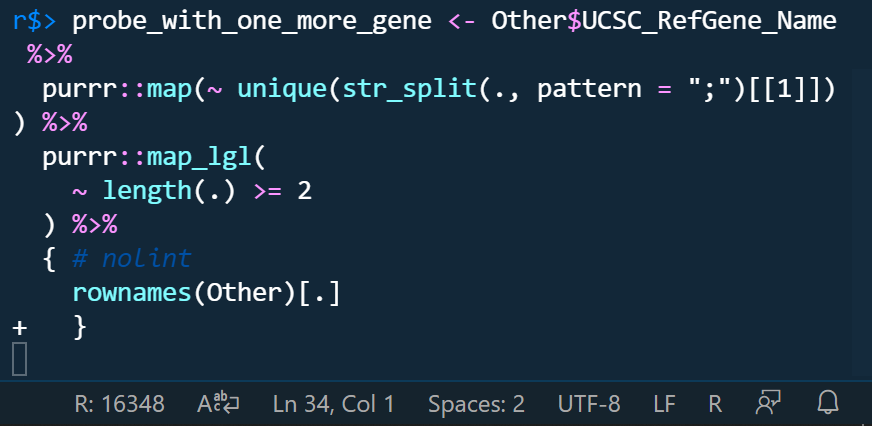
if we don't run it manully, we can even delete code like this.
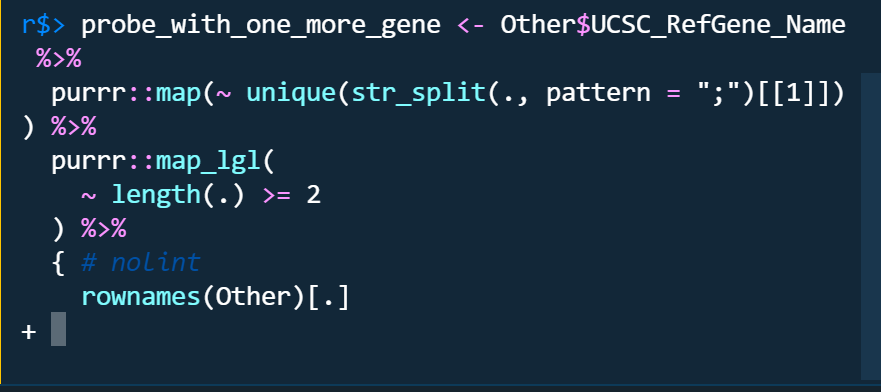
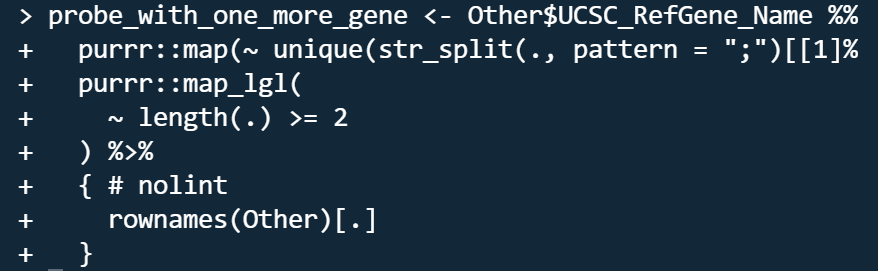
The problems only occured in radian terminal no matter I turn on or off r.bracketedPaste setting. the code run by raw r terminal is like this which looks like raw r terminal run code line by line as indicated by the character +.
Do you want to fix by self? (We hope your help!)
Yes, I want to be helpful.
(If yes,) what kind of help do you want? (e.g. Which file should I fix, Survey (related documents)
(If related)setting.json
    "[r]": {
        "editor.rulers": [
            80
        ],
        "editor.wordWrap": "bounded",
        "editor.wordSeparators": "`~!@#%$^&*()-=+[{]}\\|;:'\",<>/?",
        "rewrap.autoWrap.enabled": true,
        "rewrap.wrappingColumn": 80,
        "rewrap.doubleSentenceSpacing": true
    },
    "r.alwaysUseActiveTerminal": true,
    // "r.bracketedPaste": true,
    "r.rpath.windows": "C:\\Yun\\R\\R-4.1.1\\bin\\x64\\R.exe",
    "r.rterm.windows": "C:\\Users\\****\\AppData\\Local\\Programs\\Python\\Python39\\Scripts\\radian.exe",
    // "r.rterm.windows": "C:\\Yun\\R\\R-4.1.1\\bin\\x64\\Rterm.exe",
    "r.rterm.option": [
        "--no-save",
        "--no-restore",
        "--local-history",
        "--r-binary=C:\\Yun\\R\\R-4.1.1\\bin\\x64\\R.exe"
    ],
    "r.plot.useHttpgd": true,
    "r.session.levelOfObjectDetail": "Detailed",
    "r.session.objectLengthLimit": 100,
    "r.session.viewers.viewColumn": {
        "plot": "Active",
        "viewer": "Active",
        "view": "Active",
        "helpPanel": "Active"
    }
Expected behavior
Run code directly when sending code by typing Ctrl + ENTER
Environment (please complete the following information):
- OS: Windows 19042.1237
- VSCode Version: 1.61.0
- R Version: 4.1.1
- vscode-R version: v2.3.1
Additional context
If we could run code line by line like raw r terminal when sending code?
Guida per i contributori
Apri la guida per i contributori
Come iniziare
- Leggi tutta la issue e poi la guida ai contributi del progetto.
- Commenta sulla issue per dire che te ne occupi tu — evita che due persone facciano lo stesso lavoro.
- Fai un fork del repository e lavora su un branch.
- Apri una pull request che faccia riferimento al numero della issue.
Direzione di ricerca
Inizia riproducendo il comportamento di Ctrl+Enter con la configurazione R e radian riportata, quindi confrontalo con il comportamento grezzo del terminale R. Ispeziona il settings.json dell’estensione e il percorso send-code di Ctrl+Enter; il lavoro è concluso quando il codice inviato a un terminale radian viene eseguito direttamente e in modo coerente senza richiedere un Enter manuale.
Scritto dal modello di indicizzazione a partire dal testo della issue.
Valutazione
- Stack tecnologico
- r, typescript, vscode
- Ambito
- cli, developer-experience, tooling
- Tipo di issue
- Bug
- Difficoltà
- 4/5
- Tempo stimato
- 3-5 giorni
- Stato di attività
- Ferma
- Chiarezza
- Abbastanza chiara
- Idoneità per principianti
- 25/100