REditorSupport / REditorSupport/vscode-R
Send code to terminal by `Ctrl + ENTER` but don't run
Dieses Issue hat noch niemand übernommen.
- Vorherrschende Sprache
- TypeScript
- Sterne
- 1.2k
- Forks
- 139
- Ø Merge
- 3 Std. 33 Min.
- Gemergte PRs (30 T.)
- 6
Beschreibung
Describe the bug
When I send code to terminal by Ctrl + ENTER, it just send code but don't run code, and we should move focus to terminal and input ENTER manually to run the code.
To Reproduce
Steps to reproduce the behavior:
- create a terminal
- run this code below:
library(IlluminaHumanMethylation450kanno.ilmn12.hg19)
## sorry for this, I have tried other code which don't rely on any package data to reproduce this problem but it failed.
## this package is from bioconductor
## so we should install it by  BiocManager::install("IlluminaHumanMethylation450kanno.ilmn12.hg19")

library(tidyverse)
After loading packages, try this code below several times, the frequency of problem is almost 1/2, so it won't be hard to reproduce this problems
probe_with_one_more_gene <- Other$UCSC_RefGene_Name %>%
  purrr::map(~ unique(str_split(., pattern = ";")[[1]])) %>%
  purrr::map_lgl(
    ~ length(.) >= 2
  ) %>%
  { # nolint
    rownames(Other)[.]
  }
- See error (it seems vscode-r just run code before line
rownames(Other)[.]and after code wasn't run, as we could see a character+after the linerownames(Other)[.]which indicates the line before should have been run.)
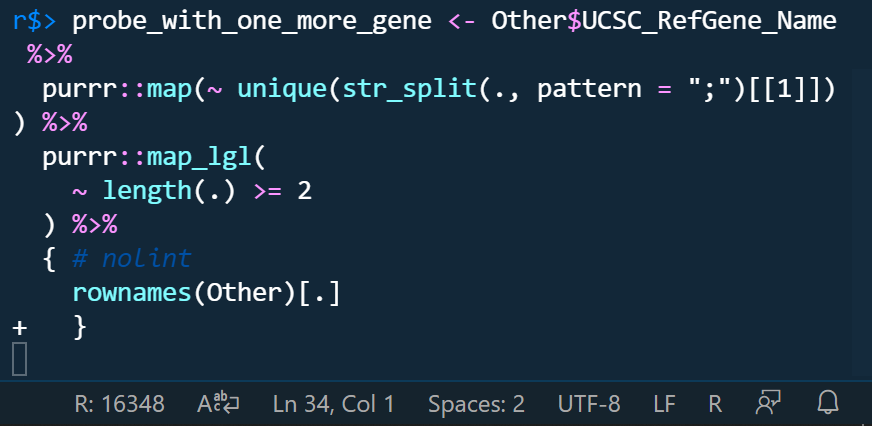
if we don't run it manully, we can even delete code like this.
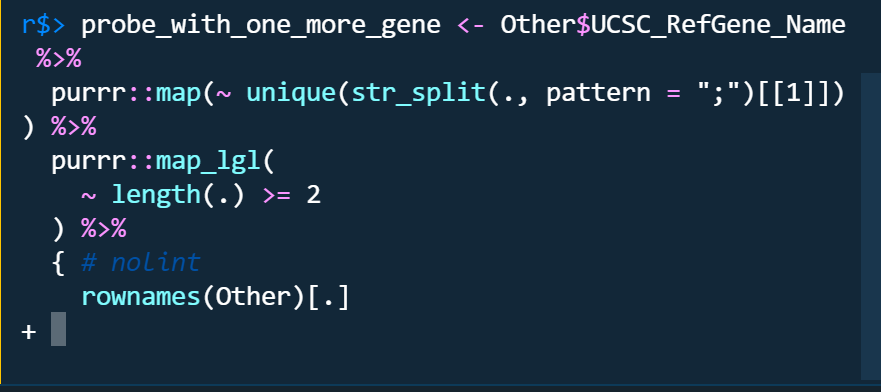
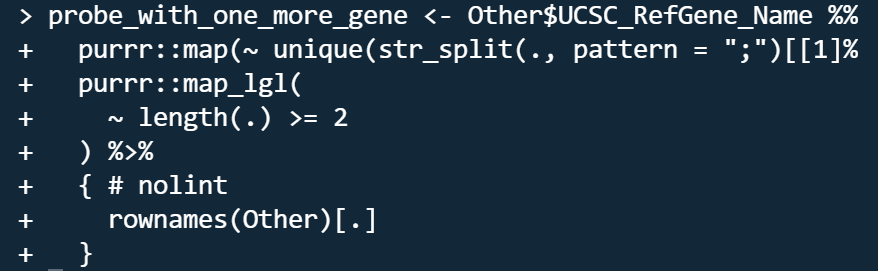
The problems only occured in radian terminal no matter I turn on or off r.bracketedPaste setting. the code run by raw r terminal is like this which looks like raw r terminal run code line by line as indicated by the character +.
Do you want to fix by self? (We hope your help!)
Yes, I want to be helpful.
(If yes,) what kind of help do you want? (e.g. Which file should I fix, Survey (related documents)
(If related)setting.json
    "[r]": {
        "editor.rulers": [
            80
        ],
        "editor.wordWrap": "bounded",
        "editor.wordSeparators": "`~!@#%$^&*()-=+[{]}\\|;:'\",<>/?",
        "rewrap.autoWrap.enabled": true,
        "rewrap.wrappingColumn": 80,
        "rewrap.doubleSentenceSpacing": true
    },
    "r.alwaysUseActiveTerminal": true,
    // "r.bracketedPaste": true,
    "r.rpath.windows": "C:\\Yun\\R\\R-4.1.1\\bin\\x64\\R.exe",
    "r.rterm.windows": "C:\\Users\\****\\AppData\\Local\\Programs\\Python\\Python39\\Scripts\\radian.exe",
    // "r.rterm.windows": "C:\\Yun\\R\\R-4.1.1\\bin\\x64\\Rterm.exe",
    "r.rterm.option": [
        "--no-save",
        "--no-restore",
        "--local-history",
        "--r-binary=C:\\Yun\\R\\R-4.1.1\\bin\\x64\\R.exe"
    ],
    "r.plot.useHttpgd": true,
    "r.session.levelOfObjectDetail": "Detailed",
    "r.session.objectLengthLimit": 100,
    "r.session.viewers.viewColumn": {
        "plot": "Active",
        "viewer": "Active",
        "view": "Active",
        "helpPanel": "Active"
    }
Expected behavior
Run code directly when sending code by typing Ctrl + ENTER
Environment (please complete the following information):
- OS: Windows 19042.1237
- VSCode Version: 1.61.0
- R Version: 4.1.1
- vscode-R version: v2.3.1
Additional context
If we could run code line by line like raw r terminal when sending code?
Beitragsleitfaden
Erste Schritte
- Lies das ganze Issue und danach den Beitragsleitfaden des Projekts.
- Schreib ins Issue, dass du es übernimmst — das erspart doppelte Arbeit.
- Forke das Repository und arbeite in einem Branch.
- Öffne einen Pull Request, der die Issue-Nummer nennt.
Rechercherichtung
Beginne damit, das Verhalten von Ctrl+Enter mit dem gemeldeten R- und radian-Setup zu reproduzieren, und vergleiche es anschließend mit dem Verhalten des unveränderten R-Terminals. Untersuche die settings.json der Erweiterung und den send-code-Pfad von Ctrl+Enter; als erledigt gilt die Aufgabe, wenn an ein radian-Terminal gesendeter Code direkt und konsistent ausgeführt wird, ohne dass ein manuelles Enter erforderlich ist.
Vom Indexierungsmodell aus dem Issue-Text verfasst.
Bewertung
- Tech-Stack
- r, typescript, vscode
- Bereich
- cli, developer-experience, tooling
- Issue-Typ
- Bug
- Schwierigkeit
- 4/5
- Geschätzter Aufwand
- 3-5 Tage
- Aktivitätsstatus
- Veraltet
- Klarheit
- Größtenteils klar
- Anfängerfreundlichkeit
- 25/100