REditorSupport / REditorSupport/vscode-R
Send code to terminal by `Ctrl + ENTER` but don't run
Nobody has claimed this yet.
- Dominant language
- TypeScript
- Stars
- 1.2k
- Forks
- 139
- Avg merge
- 2h 46m
- Merged PRs (30d)
- 5
Description
Describe the bug
When I send code to terminal by Ctrl + ENTER, it just send code but don't run code, and we should move focus to terminal and input ENTER manually to run the code.
To Reproduce
Steps to reproduce the behavior:
- create a terminal
- run this code below:
library(IlluminaHumanMethylation450kanno.ilmn12.hg19)
## sorry for this, I have tried other code which don't rely on any package data to reproduce this problem but it failed.
## this package is from bioconductor
## so we should install it by  BiocManager::install("IlluminaHumanMethylation450kanno.ilmn12.hg19")

library(tidyverse)
After loading packages, try this code below several times, the frequency of problem is almost 1/2, so it won't be hard to reproduce this problems
probe_with_one_more_gene <- Other$UCSC_RefGene_Name %>%
  purrr::map(~ unique(str_split(., pattern = ";")[[1]])) %>%
  purrr::map_lgl(
    ~ length(.) >= 2
  ) %>%
  { # nolint
    rownames(Other)[.]
  }
- See error (it seems vscode-r just run code before line
rownames(Other)[.]and after code wasn't run, as we could see a character+after the linerownames(Other)[.]which indicates the line before should have been run.)
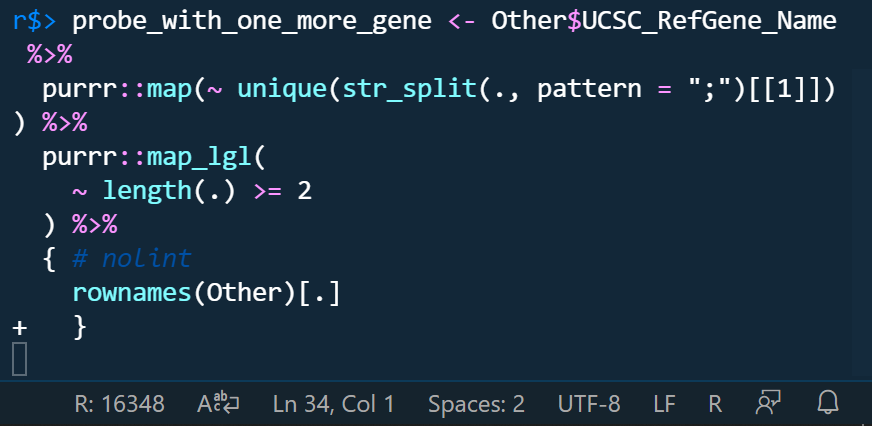
if we don't run it manully, we can even delete code like this.
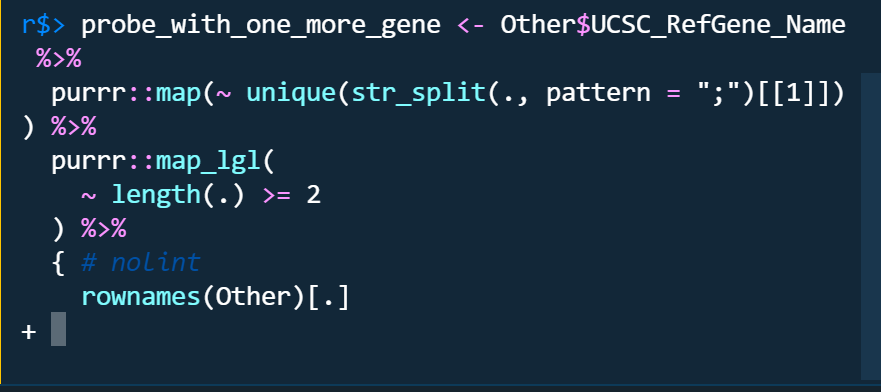
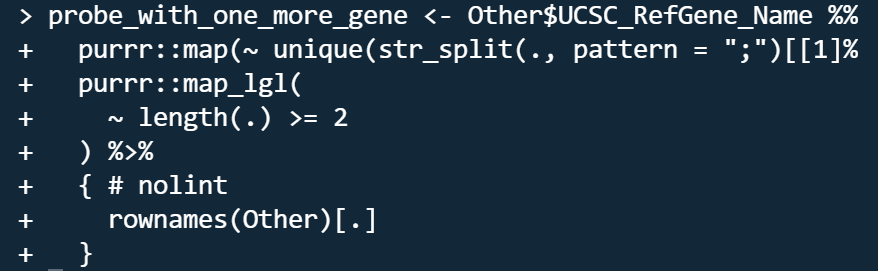
The problems only occured in radian terminal no matter I turn on or off r.bracketedPaste setting. the code run by raw r terminal is like this which looks like raw r terminal run code line by line as indicated by the character +.
Do you want to fix by self? (We hope your help!)
Yes, I want to be helpful.
(If yes,) what kind of help do you want? (e.g. Which file should I fix, Survey (related documents)
(If related)setting.json
    "[r]": {
        "editor.rulers": [
            80
        ],
        "editor.wordWrap": "bounded",
        "editor.wordSeparators": "`~!@#%$^&*()-=+[{]}\\|;:'\",<>/?",
        "rewrap.autoWrap.enabled": true,
        "rewrap.wrappingColumn": 80,
        "rewrap.doubleSentenceSpacing": true
    },
    "r.alwaysUseActiveTerminal": true,
    // "r.bracketedPaste": true,
    "r.rpath.windows": "C:\\Yun\\R\\R-4.1.1\\bin\\x64\\R.exe",
    "r.rterm.windows": "C:\\Users\\****\\AppData\\Local\\Programs\\Python\\Python39\\Scripts\\radian.exe",
    // "r.rterm.windows": "C:\\Yun\\R\\R-4.1.1\\bin\\x64\\Rterm.exe",
    "r.rterm.option": [
        "--no-save",
        "--no-restore",
        "--local-history",
        "--r-binary=C:\\Yun\\R\\R-4.1.1\\bin\\x64\\R.exe"
    ],
    "r.plot.useHttpgd": true,
    "r.session.levelOfObjectDetail": "Detailed",
    "r.session.objectLengthLimit": 100,
    "r.session.viewers.viewColumn": {
        "plot": "Active",
        "viewer": "Active",
        "view": "Active",
        "helpPanel": "Active"
    }
Expected behavior
Run code directly when sending code by typing Ctrl + ENTER
Environment (please complete the following information):
- OS: Windows 19042.1237
- VSCode Version: 1.61.0
- R Version: 4.1.1
- vscode-R version: v2.3.1
Additional context
If we could run code line by line like raw r terminal when sending code?
Contributor guide
First steps
- Read the whole issue, then the project's contributing guide.
- Comment on the issue to say you are picking it up — it saves two people doing the same work.
- Fork the repository and make your change on a branch.
- Open a pull request that references the issue number.
Research direction
Start by reproducing the Ctrl+Enter behavior with the reported R and radian setup, then compare it with the raw R terminal behavior. Inspect the extension's settings.json and the Ctrl+Enter send-code path; done means code sent to a radian terminal runs directly and consistently without requiring a manual Enter.
Written by the indexing model from the issue text.
Assessment
- Tech stack
- r, typescript, vscode
- Domain
- cli, developer-experience, tooling
- Issue type
- Bug
- Difficulty
- 4/5
- Estimated time
- 3-5 days
- Activity status
- Stale
- Clarity
- Mostly clear
- Newbie friendliness
- 25/100