PowerShell / PowerShell/vscode-powershell
Add CopyVariable PAth to clip option in debugger pane
Nessuno ha ancora preso questa issue.
- Lingua principale
- TypeScript
- Stelle
- 1.9k
- Fork
- 548
- Metriche di merge delle PR
- Nessuna PR unita negli ultimi 30g
Descrizione
Summary of the new feature
A clear and concise description of what the problem is that the new feature would solve.
Try formulating it in user story style (if applicable):
As a user, I would like to be able to have access to the path of variable when I am exploring it in the debugging pane of VSCode.
Story:
I often use the debugger to help me find out where I can find the information I need to then add it into my code. For that, I like to add a breakpoint, and go look into the object directly, and then I memorize the name, and simply use intelisense to get to the right spot and add the access to that property / method into my script.
A clear and concise description of what you want to happen:
What would be great thought, is that if it was possible to have access to the path of the dot notation path directly via a right click menu in the debugger pane, something like this:
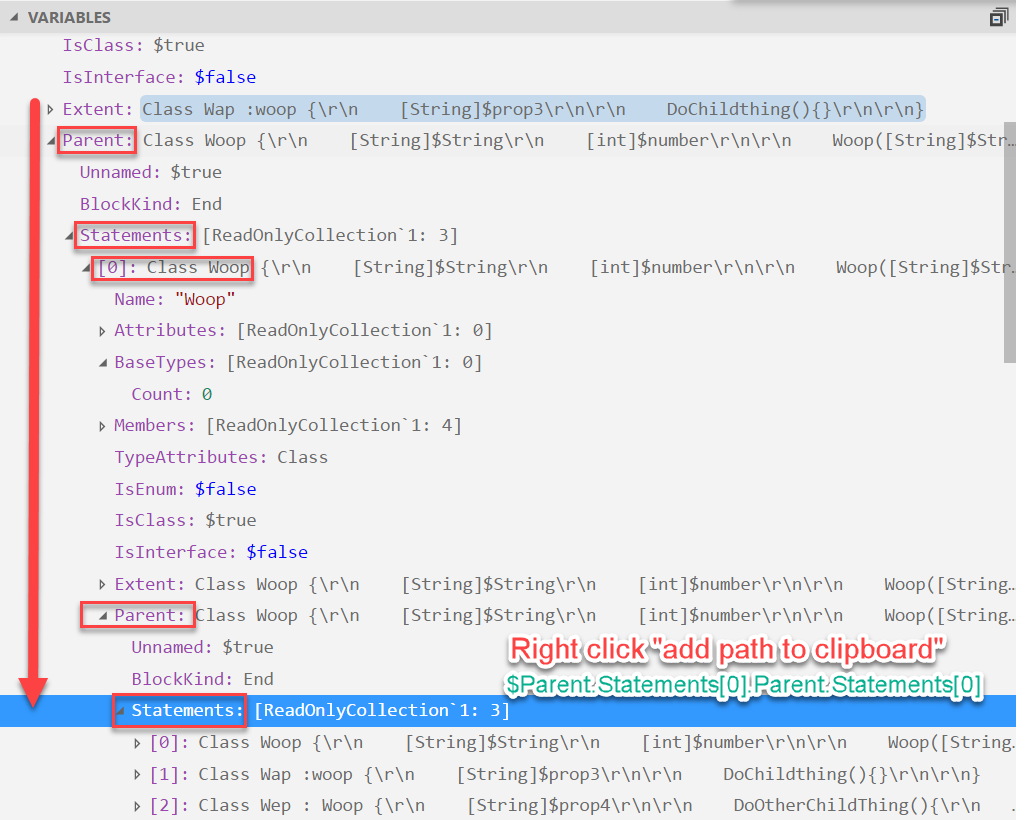
In red you have the path + the option, and the green text would more or less be what would be copied into the clip board.
Proposed technical implementation details (optional)
I am not sure how this could be done, but if I have some guidance, I would be glad to give it a try ;)
Guida per i contributori
Apri la guida per i contributori
Come iniziare
- Leggi tutta la issue e poi la guida ai contributi del progetto.
- Commenta sulla issue per dire che te ne occupi tu — evita che due persone facciano lo stesso lavoro.
- Fai un fork del repository e lavora su un branch.
- Apri una pull request che faccia riferimento al numero della issue.
Direzione di ricerca
L’issue riguarda il riquadro del debugger di VS Code e richiede un’opzione accessibile con il clic destro che copi il percorso di una variabile in notazione puntata. Non sono indicati file o test, quindi bisogna prima individuare l’integrazione del riquadro del debugger e i relativi punti di ingresso del menu contestuale. Il lavoro è completato quando l’azione del menu è disponibile mentre si esplora una variabile e copia il percorso richiesto negli appunti.
Scritto dal modello di indicizzazione a partire dal testo della issue.
Valutazione
- Stack tecnologico
- powershell, typescript, vscode
- Ambito
- devtools
- Tipo di issue
- Funzionalità
- Difficoltà
- 4/5
- Tempo stimato
- 3-5 giorni
- Stato di attività
- Ferma
- Chiarezza
- Abbastanza chiara
- Idoneità per principianti
- 30/100