PowerShell / PowerShell/vscode-powershell
Add CopyVariable PAth to clip option in debugger pane
Dieses Issue hat noch niemand übernommen.
- Vorherrschende Sprache
- TypeScript
- Sterne
- 1.9k
- Forks
- 548
- PR-Merge-Kennzahlen
- Keine gemergten PRs in 30 T.
Beschreibung
Summary of the new feature
A clear and concise description of what the problem is that the new feature would solve.
Try formulating it in user story style (if applicable):
As a user, I would like to be able to have access to the path of variable when I am exploring it in the debugging pane of VSCode.
Story:
I often use the debugger to help me find out where I can find the information I need to then add it into my code. For that, I like to add a breakpoint, and go look into the object directly, and then I memorize the name, and simply use intelisense to get to the right spot and add the access to that property / method into my script.
A clear and concise description of what you want to happen:
What would be great thought, is that if it was possible to have access to the path of the dot notation path directly via a right click menu in the debugger pane, something like this:
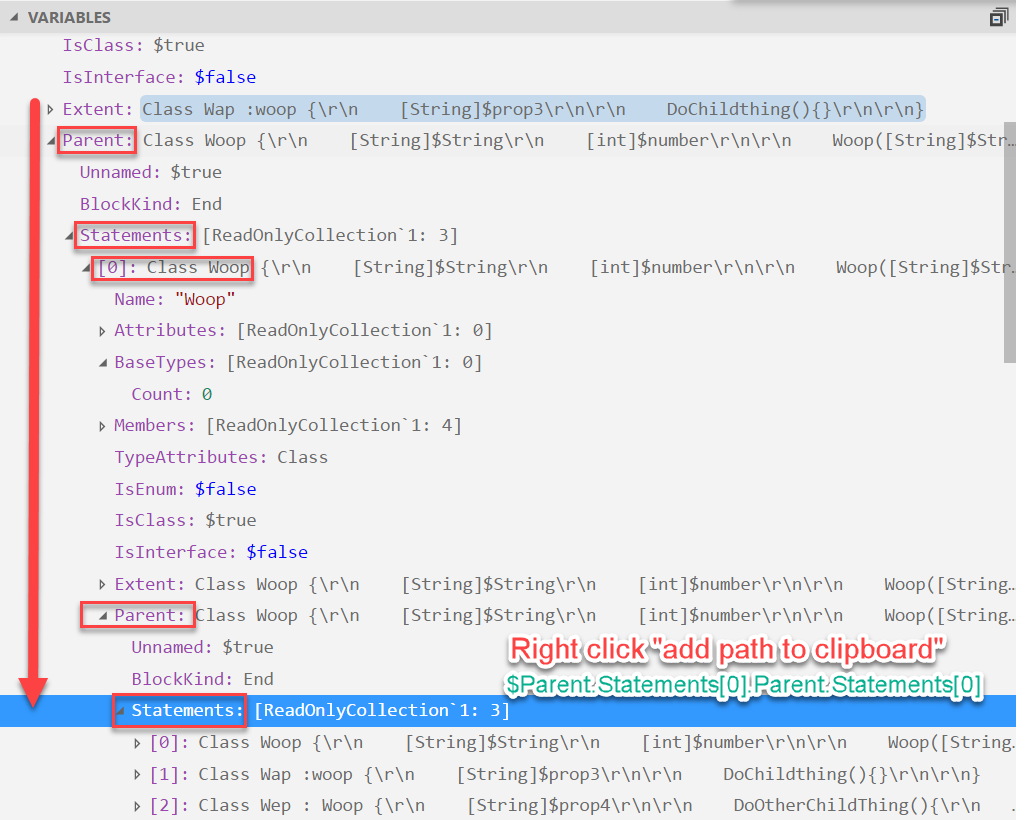
In red you have the path + the option, and the green text would more or less be what would be copied into the clip board.
Proposed technical implementation details (optional)
I am not sure how this could be done, but if I have some guidance, I would be glad to give it a try ;)
Beitragsleitfaden
Erste Schritte
- Lies das ganze Issue und danach den Beitragsleitfaden des Projekts.
- Schreib ins Issue, dass du es übernimmst — das erspart doppelte Arbeit.
- Forke das Repository und arbeite in einem Branch.
- Öffne einen Pull Request, der die Issue-Nummer nennt.
Rechercherichtung
Das Issue zielt auf den VS Code-Debuggerbereich ab und fordert eine Option per Rechtsklick, die den Pfad einer Variable in Punktnotation kopiert. Es wird keine Datei und kein Test genannt, daher sollte zuerst die Integration des Debuggerbereichs und ihre Einstiegspunkte für Kontextmenüs ermittelt werden. Als erledigt gilt die Aufgabe, wenn die Menüaktion beim Untersuchen einer Variable verfügbar ist und den angeforderten Pfad in die Zwischenablage kopiert.
Vom Indexierungsmodell aus dem Issue-Text verfasst.
Bewertung
- Tech-Stack
- powershell, typescript, vscode
- Bereich
- devtools
- Issue-Typ
- Feature
- Schwierigkeit
- 4/5
- Geschätzter Aufwand
- 3-5 Tage
- Aktivitätsstatus
- Veraltet
- Klarheit
- Größtenteils klar
- Anfängerfreundlichkeit
- 30/100