PowerShell / PowerShell/vscode-powershell
Add CopyVariable PAth to clip option in debugger pane
Nobody has claimed this yet.
- Dominant language
- TypeScript
- Stars
- 1.9k
- Forks
- 547
- PR merge metrics
- No merged PRs in 30d
Description
Summary of the new feature
A clear and concise description of what the problem is that the new feature would solve.
Try formulating it in user story style (if applicable):
As a user, I would like to be able to have access to the path of variable when I am exploring it in the debugging pane of VSCode.
Story:
I often use the debugger to help me find out where I can find the information I need to then add it into my code. For that, I like to add a breakpoint, and go look into the object directly, and then I memorize the name, and simply use intelisense to get to the right spot and add the access to that property / method into my script.
A clear and concise description of what you want to happen:
What would be great thought, is that if it was possible to have access to the path of the dot notation path directly via a right click menu in the debugger pane, something like this:
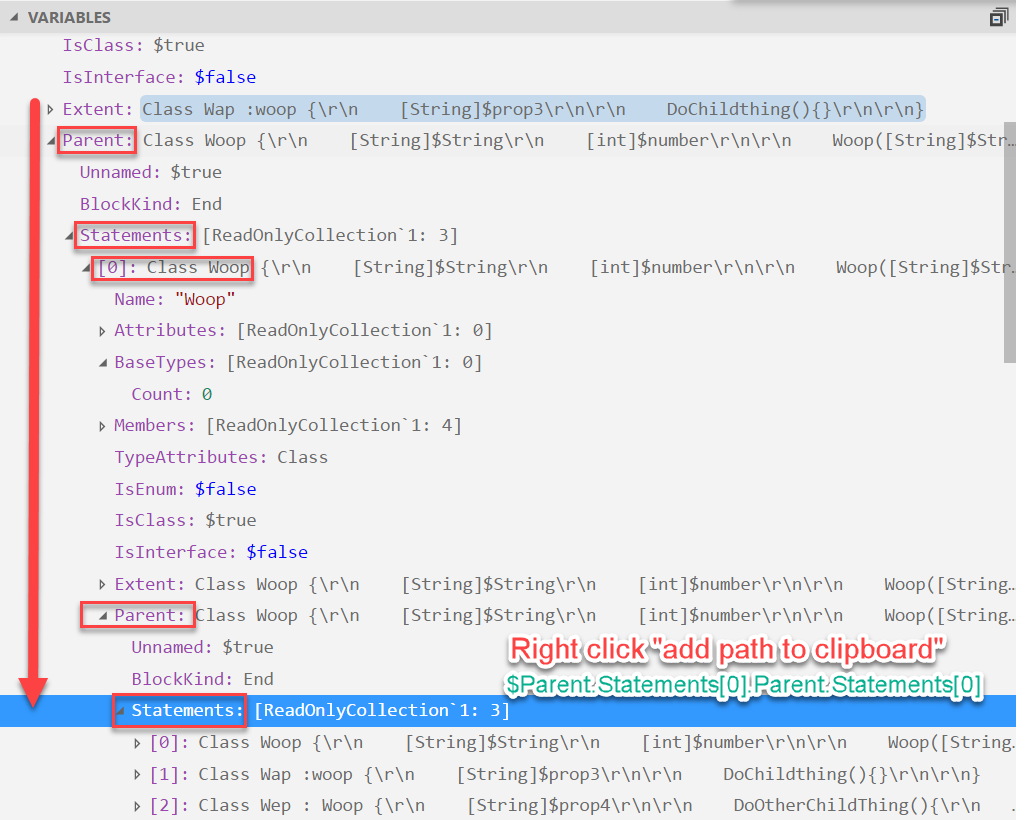
In red you have the path + the option, and the green text would more or less be what would be copied into the clip board.
Proposed technical implementation details (optional)
I am not sure how this could be done, but if I have some guidance, I would be glad to give it a try ;)
Contributor guide
First steps
- Read the whole issue, then the project's contributing guide.
- Comment on the issue to say you are picking it up — it saves two people doing the same work.
- Fork the repository and make your change on a branch.
- Open a pull request that references the issue number.
Research direction
The issue targets the VS Code debugger pane and asks for a right-click option that copies a variable's dot-notation path. No file or test is named, so first locate the debugger-pane integration and its context-menu entry points. Done means the menu action is available while exploring a variable and copies the requested path to the clipboard.
Written by the indexing model from the issue text.
Assessment
- Tech stack
- powershell, typescript, vscode
- Domain
- devtools
- Issue type
- Feature
- Difficulty
- 4/5
- Estimated time
- 3-5 days
- Activity status
- Stale
- Clarity
- Mostly clear
- Newbie friendliness
- 30/100