PowerShell / PowerShell/PSResourceGet
Can't update modules
Aperta
Nessuno ha ancora preso questa issue.
Status-Investigating
- Lingua principale
- C#
- Stelle
- 576
- Fork
- 114
- Merge medio
- 1g 2h
- PR unite (30g)
- 7
Descrizione
Prerequisites
- Write a descriptive title.
- Make sure you are able to repro it on the latest released version
- Search the existing issues.
Steps to reproduce
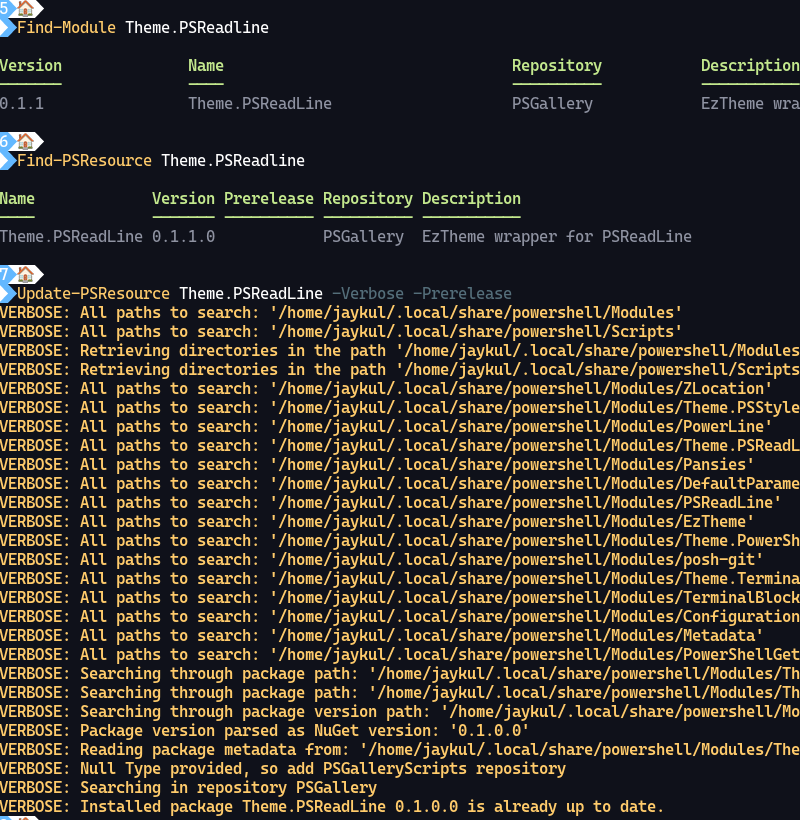
I just published a new version of a module, and can't install it with Update-PSResource?
Expected behavior
PS> Update-PSResource Theme.PSReadLine
Found Theme.PSReadLine version 0.1.0 installed
Found Theme.PSReadLine version 0.1.1 on the PSGallery
Installed Theme.PSReadLine version 0.1.1

PS>
Actual behavior
PS> Update-PSResource Theme.PSReadLine
PS>
Error details
NOTHING HAPPENS.
Environment data
# Are you sure you don't want me to do
# `Get-Module PowerShellGet | Out-Default; $PSVersionTable` instead?
# Ok, here goes...
> Get-Module PowerShellGet; $PSVersionTable

ModuleType Version    PreRelease Name                                ExportedCommands
---------- -------    ---------- ----                                ----------------
Binary     3.0.19     beta19     PowerShellGet                       {Find-PSResource, Get-PSResource, Get-PSResourceRepository, Get-PSScriptFileInfo…}
Script     2.2.5                 PowerShellGet                       {Find-Command, Find-DscResource, Find-Module, Find-RoleCapability…}

Key   : PSVersion
Value : 7.3.3
Name  : PSVersion


Key   : PSEdition
Value : Core
Name  : PSEdition


Key   : GitCommitId
Value : 7.3.3
Name  : GitCommitId


Key   : OS
Value : Linux 5.15.90.1-microsoft-standard-WSL2 #1 SMP Fri Jan 27 02:56:13 UTC 2023
Name  : OS


Key   : Platform
Value : Unix
Name  : Platform


Key   : PSCompatibleVersions
Value : {1.0, 2.0, 3.0, 4.0…}
Name  : PSCompatibleVersions


Key   : PSRemotingProtocolVersion
Value : 2.3
Name  : PSRemotingProtocolVersion


Key   : SerializationVersion
Value : 1.1.0.1
Name  : SerializationVersion


Key   : WSManStackVersion
Value : 3.0
Name  : WSManStackVersion
Visuals
Guida per i contributori
Apri la guida per i contributori
Come iniziare
- Leggi tutta la issue e poi la guida ai contributi del progetto.
- Commenta sulla issue per dire che te ne occupi tu — evita che due persone facciano lo stesso lavoro.
- Fai un fork del repository e lavora su un branch.
- Apri una pull request che faccia riferimento al numero della issue.
Direzione di ricerca
Inizia riproducendo il comando segnalato Update-PSResource Theme.PSReadLine nell'ambiente descritto con PowerShell 7.3.3 e PowerShellGet 3.0.19. Traccia il punto di ingresso dell'aggiornamento e la gestione delle versioni installate e delle versioni di PSGallery. Il lavoro è completato quando il comando segnala la versione disponibile e la installa come mostrato nel comportamento previsto.
Scritto dal modello di indicizzazione a partire dal testo della issue.
Valutazione
- Stack tecnologico
- powershell
- Ambito
- cli
- Tipo di issue
- Bug
- Difficoltà
- 3/5
- Tempo stimato
- 1-2 giorni
- Stato di attività
- Ferma
- Chiarezza
- Abbastanza chiara
- Idoneità per principianti
- 35/100