PowerShell / PowerShell/PSResourceGet
Can't update modules
Open
Nobody has claimed this yet.
Status-Investigating
- Dominant language
- C#
- Stars
- 576
- Forks
- 114
- Avg merge
- 1d 2h
- Merged PRs (30d)
- 7
Description
Prerequisites
- Write a descriptive title.
- Make sure you are able to repro it on the latest released version
- Search the existing issues.
Steps to reproduce
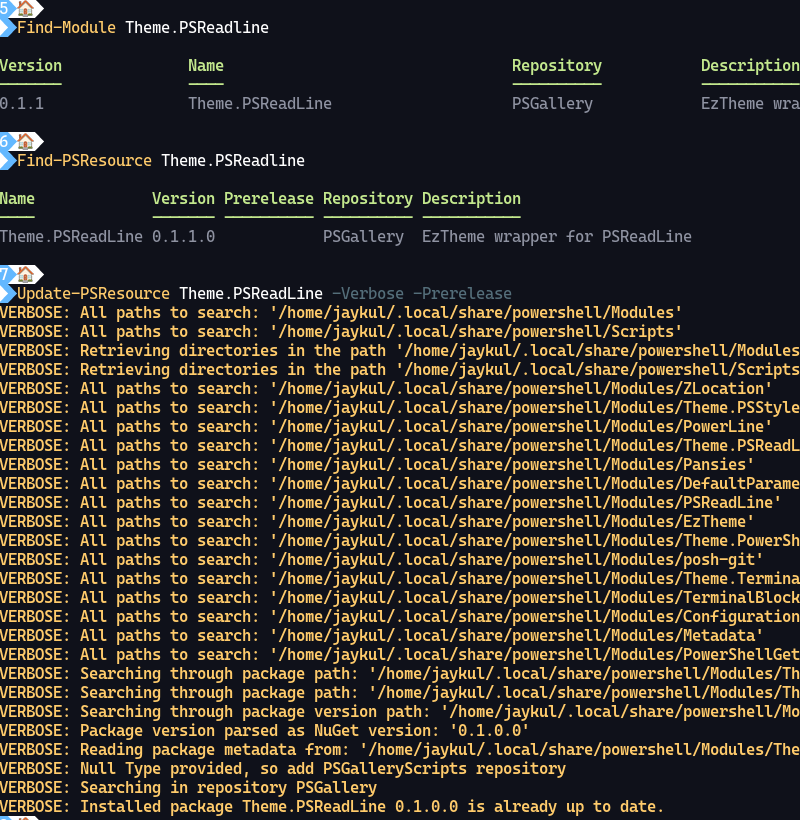
I just published a new version of a module, and can't install it with Update-PSResource?
Expected behavior
PS> Update-PSResource Theme.PSReadLine
Found Theme.PSReadLine version 0.1.0 installed
Found Theme.PSReadLine version 0.1.1 on the PSGallery
Installed Theme.PSReadLine version 0.1.1

PS>
Actual behavior
PS> Update-PSResource Theme.PSReadLine
PS>
Error details
NOTHING HAPPENS.
Environment data
# Are you sure you don't want me to do
# `Get-Module PowerShellGet | Out-Default; $PSVersionTable` instead?
# Ok, here goes...
> Get-Module PowerShellGet; $PSVersionTable

ModuleType Version    PreRelease Name                                ExportedCommands
---------- -------    ---------- ----                                ----------------
Binary     3.0.19     beta19     PowerShellGet                       {Find-PSResource, Get-PSResource, Get-PSResourceRepository, Get-PSScriptFileInfo…}
Script     2.2.5                 PowerShellGet                       {Find-Command, Find-DscResource, Find-Module, Find-RoleCapability…}

Key   : PSVersion
Value : 7.3.3
Name  : PSVersion


Key   : PSEdition
Value : Core
Name  : PSEdition


Key   : GitCommitId
Value : 7.3.3
Name  : GitCommitId


Key   : OS
Value : Linux 5.15.90.1-microsoft-standard-WSL2 #1 SMP Fri Jan 27 02:56:13 UTC 2023
Name  : OS


Key   : Platform
Value : Unix
Name  : Platform


Key   : PSCompatibleVersions
Value : {1.0, 2.0, 3.0, 4.0…}
Name  : PSCompatibleVersions


Key   : PSRemotingProtocolVersion
Value : 2.3
Name  : PSRemotingProtocolVersion


Key   : SerializationVersion
Value : 1.1.0.1
Name  : SerializationVersion


Key   : WSManStackVersion
Value : 3.0
Name  : WSManStackVersion
Visuals
Contributor guide
First steps
- Read the whole issue, then the project's contributing guide.
- Comment on the issue to say you are picking it up — it saves two people doing the same work.
- Fork the repository and make your change on a branch.
- Open a pull request that references the issue number.
Research direction
Start by reproducing the reported Update-PSResource Theme.PSReadLine command in the PowerShell 7.3.3, PowerShellGet 3.0.19 environment described. Trace the update entry point and its handling of installed and PSGallery versions. Done means the command reports the available version and installs it as shown in the expected behavior.
Written by the indexing model from the issue text.
Assessment
- Tech stack
- powershell
- Domain
- cli
- Issue type
- Bug
- Difficulty
- 3/5
- Estimated time
- 1-2 days
- Activity status
- Stale
- Clarity
- Mostly clear
- Newbie friendliness
- 35/100