PathOfBuildingCommunity / PathOfBuildingCommunity/PathOfBuilding
'Master Set' to aid in gear change and build comparison
Dieses Issue hat noch niemand übernommen.
- Vorherrschende Sprache
- Lua
- Sterne
- 5.4k
- Forks
- 2.4k
- Ø Merge
- 1 T. 12 Std.
- Gemergte PRs (30 T.)
- 26
Beschreibung
Check for duplicates
- I've checked for duplicate issues by using the search function of the issue tracker
Is your feature request related to a problem?
When making multi-faceted gear changes, it is difficult to isolate the updates, and compare to the original state.
Example:
If I'm adding the capacity to gain Frenzy Charges, I need to not only change gear, but also add the check box for "Do you use Frenzy Charges?"
When checking to see how this affects my damage, I need to compare DPS while wearing the new gear that adds this capacity (equipment set), and then check the box for Frenzy Charges. (See issue #4874 for the custom modifiers on the configuration tab - this request is for the whole tab, and more.)
Describe the solution you'd like
IT would be easier to compare upgrades that span multiple sets or non-set related items if there were:
sets for Configuration settings,
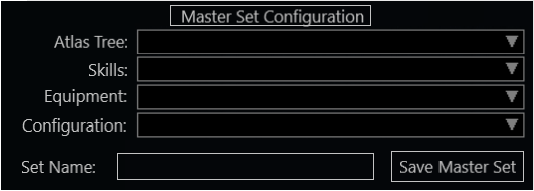
and a "Master Set" that combines multiple sets into one easy to swap to configuration.
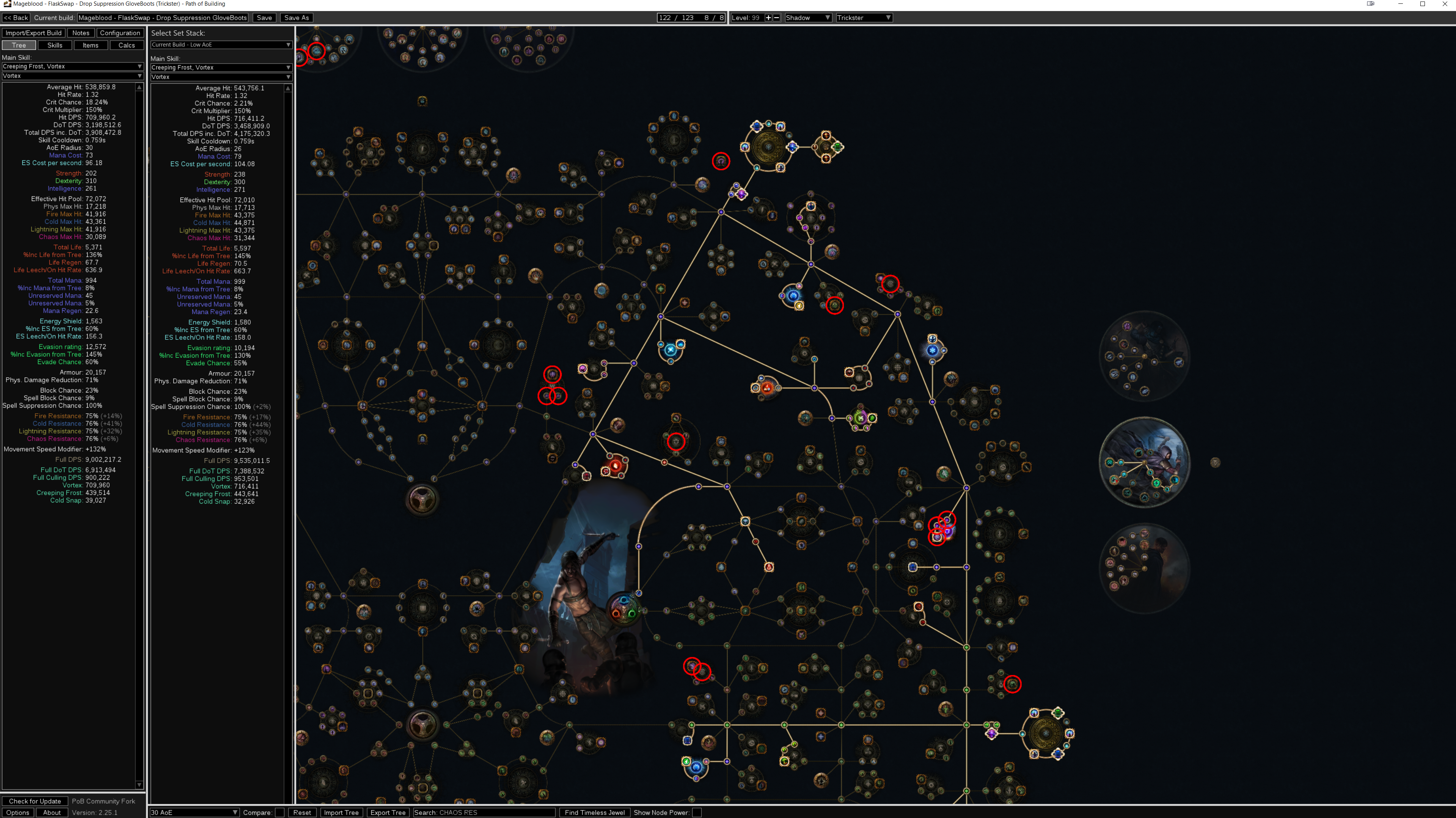
In the example above, I could create a new gear set (exists), a new configuration set (does not exist), and a "Master Set" that automatically switches to a defined set of each type. Ideally, this would allow for mouseover stat differences, or a side by side comparison of the stat window (left hand side skill/hp/resist preview).
Currently existing sets:
Gear
Skills
Atlas Passives
Needed Sets:
Configuration
"Master Set"
Describe alternatives you've considered
Currently, I can either open two instances of the program with the same save file (sketchy, and prone to odd behaviors), or save my build, take screenshots, then adjust settings. Both of these options are clunky and less than optimal. When working with a single monitor, this is even more difficult.
As an alternative programmatic solution, I would suggest the capacity for adding a "freeze frame" of the left side stat window, so that the original state can be viewed and compared side by side. A further enhancement would be an option to highlight changed stats, such as +55 (+1%) Life.
Additional context
Example of Master Set Configuration:
Example of Build Comparison
Beitragsleitfaden
Erste Schritte
- Lies das ganze Issue und danach den Beitragsleitfaden des Projekts.
- Schreib ins Issue, dass du es übernimmst — das erspart doppelte Arbeit.
- Forke das Repository und arbeite in einem Branch.
- Öffne einen Pull Request, der die Issue-Nummer nennt.
Rechercherichtung
Im Issue sind keine Dateien, Tests oder Einstiegspunkte identifiziert. Beginne damit, die bestehenden Implementierungen der Gear-, Skills- und Atlas-Passives-Sets sowie den Konfigurations-Tab zu finden. Die Aufgabe wäre erledigt, wenn ein funktionsfähiger Configuration set- und Master Set-Ablauf vorhanden ist und das angeforderte Verhalten für den Build-Vergleich definiert und durch geeignete Tests abgedeckt ist.
Vom Indexierungsmodell aus dem Issue-Text verfasst.
Bewertung
- Tech-Stack
- lua
- Bereich
- desktop-dev
- Issue-Typ
- Feature
- Schwierigkeit
- 5/5
- Geschätzter Aufwand
- Über eine Woche
- Aktivitätsstatus
- Veraltet
- Klarheit
- Größtenteils klar
- Anfängerfreundlichkeit
- 25/100