PathOfBuildingCommunity / PathOfBuildingCommunity/PathOfBuilding
Gem selection not always reverting to original value when pressing escape
Nessuno ha ancora preso questa issue.
- Lingua principale
- Lua
- Stelle
- 5.4k
- Fork
- 2.4k
- Merge medio
- 1g 12h
- PR unite (30g)
- 26
Descrizione
Check version
- I'm running the latest version of Path of Building and I've verified this by checking the changelog
Check for duplicates
- I've checked for duplicate issues by using the search function of the issue tracker
What is the expected behaviour/value?
When pressing escape on an expanded selection box in the skill selection, the selection should go back to the original selection from when the box was expanded.
This seem to be related to that the functionality of escape is based on selection index and text in the gem name box. Which can be affected by filtering, and doesnt take into account the boxes level/variant:
GemSelectControl.lua:652:
 function GemSelectClass:OnFocusGained()
 ...
 self.initialBuf = self.buf
 self.initialIndex = self.selIndex
GemSelectControl.lua:710
 elseif key == "ESCAPE" then
 self.dropped = false
 self:BuildList("")
 self.buf = self.initialBuf
 self.selIndex = self.initialIndex
 self:UpdateGem(false,true)
 return
What is the actual behaviour/value?
The following examples are gifs below:
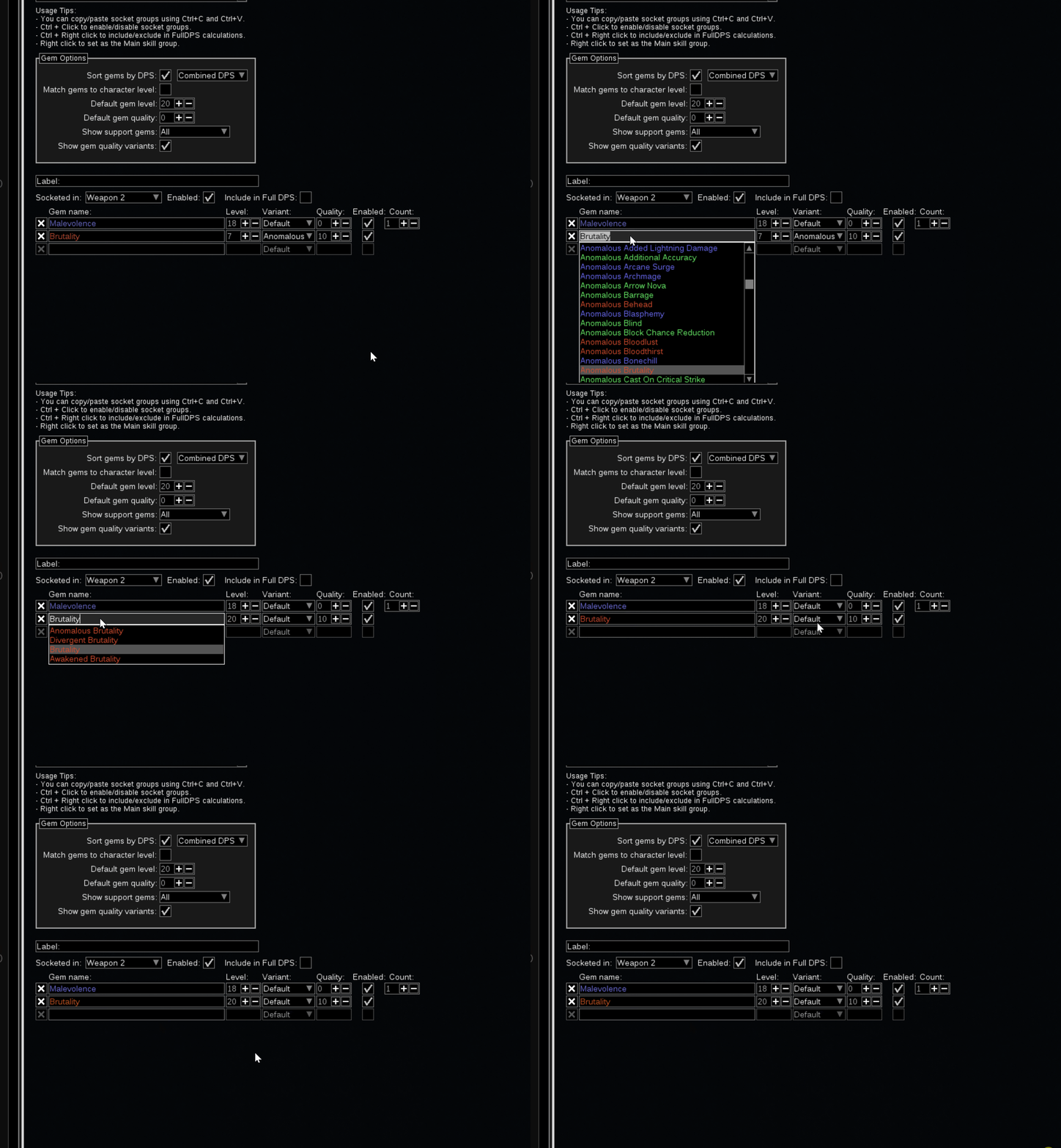
When filtering out the active skill, selecting that skill and pressing escape, the skill changes to something allowed by the filter
When not filtering, there is still an issue with levels and variant reverted to defaults based on what has been marked when moving up and down the list before escaping:
How to reproduce the issue
As discussed in #863.
Do the following steps:
- Choose a non-awakened skill (for instance brutality)
- set show support gems to "awakened"
- expand the brutality selection box,
- Press escape
And the second example
- Chose a skill (for instance brutality)
- set the level to 7
- expand the selection list
- move up and down through the list (and see that level and variant changes)
- press escape and see that the changes have stuck
Character build code
https://pobb.in/ijj1-ZwhHsWD
Screenshots

Guida per i contributori
Apri la guida per i contributori
Come iniziare
- Leggi tutta la issue e poi la guida ai contributi del progetto.
- Commenta sulla issue per dire che te ne occupi tu — evita che due persone facciano lo stesso lavoro.
- Fai un fork del repository e lavora su un branch.
- Apri una pull request che faccia riferimento al numero della issue.
Direzione di ricerca
Inizia in GemSelectControl.lua, nella gestione di OnFocusGained ed ESCAPE vicino alle righe 652 e 710. Riproduci sia i casi di filtraggio sia quelli di livello/variante riportati nell’issue, quindi verifica che premendo Escape vengano ripristinati la selezione della skill, il livello e la variante originali; usa come riferimento gli esempi collegati e il codice di build.
Scritto dal modello di indicizzazione a partire dal testo della issue.
Valutazione
- Stack tecnologico
- lua
- Ambito
- desktop
- Tipo di issue
- Bug
- Difficoltà
- 3/5
- Tempo stimato
- 1-2 giorni
- Stato di attività
- Ferma
- Chiarezza
- Specificata chiaramente
- Idoneità per principianti
- 45/100