PathOfBuildingCommunity / PathOfBuildingCommunity/PathOfBuilding
Gem selection not always reverting to original value when pressing escape
Nadie ha tomado este issue todavía.
- Lenguaje dominante
- Lua
- Estrellas
- 5.4k
- Forks
- 2.4k
- Merge medio
- 1 d 12 h
- PR fusionados (30 d)
- 26
Descripción
Check version
- I'm running the latest version of Path of Building and I've verified this by checking the changelog
Check for duplicates
- I've checked for duplicate issues by using the search function of the issue tracker
What is the expected behaviour/value?
When pressing escape on an expanded selection box in the skill selection, the selection should go back to the original selection from when the box was expanded.
This seem to be related to that the functionality of escape is based on selection index and text in the gem name box. Which can be affected by filtering, and doesnt take into account the boxes level/variant:
GemSelectControl.lua:652:
 function GemSelectClass:OnFocusGained()
 ...
 self.initialBuf = self.buf
 self.initialIndex = self.selIndex
GemSelectControl.lua:710
 elseif key == "ESCAPE" then
 self.dropped = false
 self:BuildList("")
 self.buf = self.initialBuf
 self.selIndex = self.initialIndex
 self:UpdateGem(false,true)
 return
What is the actual behaviour/value?
The following examples are gifs below:
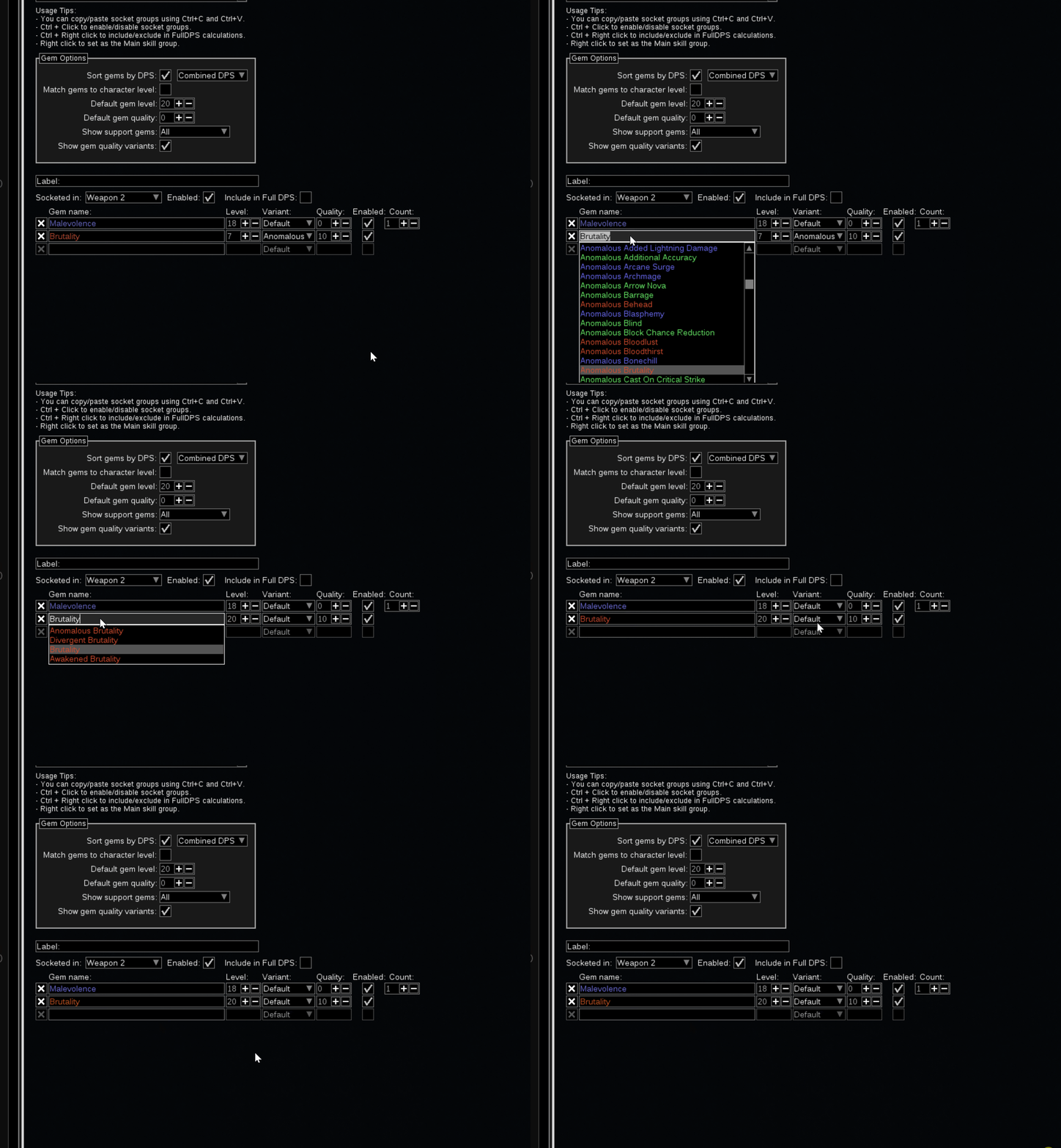
When filtering out the active skill, selecting that skill and pressing escape, the skill changes to something allowed by the filter
When not filtering, there is still an issue with levels and variant reverted to defaults based on what has been marked when moving up and down the list before escaping:
How to reproduce the issue
As discussed in #863.
Do the following steps:
- Choose a non-awakened skill (for instance brutality)
- set show support gems to "awakened"
- expand the brutality selection box,
- Press escape
And the second example
- Chose a skill (for instance brutality)
- set the level to 7
- expand the selection list
- move up and down through the list (and see that level and variant changes)
- press escape and see that the changes have stuck
Character build code
https://pobb.in/ijj1-ZwhHsWD
Screenshots

Guía de contribución
Primeros pasos
- Lee el issue completo y luego la guía de contribución del proyecto.
- Comenta en el issue que vas a ocuparte — evita que dos personas hagan lo mismo.
- Haz un fork del repositorio y trabaja en una rama.
- Abre un pull request que haga referencia al número del issue.
Línea de trabajo
Comienza en GemSelectControl.lua, alrededor del manejo de OnFocusGained y ESCAPE cerca de las líneas 652 y 710. Reproduce tanto los casos de filtrado como los de nivel/variante del issue y, después, verifica que al pulsar Escape se restauren la selección de skill, el nivel y la variante originales; usa como referencia los ejemplos enlazados y el código de build.
Escrito por el modelo de indexación a partir del texto del issue.
Evaluación
- Stack tecnológico
- lua
- Área
- desktop
- Tipo de issue
- Error
- Dificultad
- 3/5
- Tiempo estimado
- 1-2 días
- Estado de actividad
- Estancado
- Claridad
- Bien especificado
- Aptitud para principiantes
- 45/100