NativeScript / NativeScript/nativescript-cli
tns run/devices fails (w/ fix info)
@rosen-vladimirov がすでに取り組んでいます。
2019年4月15日 から。
- 主要言語
- JavaScript
- スター
- 1.1k
- フォーク
- 204
- 平均マージ
- 1日 9時間
- マージ済み PR(30日)
- 8
説明
Environment
- CLI: 5.3.1
Describe the bug
After upgrading to the latest version of the Android Studio Emulator, Images, SDK;
tns devices fails with the following error:
Connected devices & emulators
Searching for devices...
Cannot find connected devices. Reconnect any connected devices, verify that your system recognizes them, and run this command again.
tns run android fails with:
Searching for devices...
Cannot find connected devices.
Emulator start failed with: No emulator image available for device identifier 'undefined'.
To list currently connected devices and verify that the specified identifier exists, run 'tns device'.
To list available emulator images, run 'tns device <Platform> --available-devices'.
Doing a tns devices --log full gives me this:
spawn: /home/.../Android/Sdk/platform-tools/adb "devices"
Error while checking for devices. TypeError [ERR_INVALID_ARG_TYPE]: The "path" argument must be of type string. Received type undefined
    at assertPath (path.js:39:11)
    at Object.join (path.js:1155:7)
    at AndroidVirtualDeviceService.<anonymous> (/usr/local/lib/node_modules/nativescript/lib/common/mobile/android/android-virtual-device-service.js:65:38)
    at Generator.next (<anonymous>)
    at fulfilled (/usr/local/lib/node_modules/nativescript/lib/common/mobile/android/android-virtual-device-service.js:10:58)
    at process._tickCallback (internal/process/next_tick.js:68:7)
Cannot find connected devices. Reconnect any connected devices, verify that your system recognizes them, and run this command again.
(node:14038) [DEP0079] DeprecationWarning: Custom inspection function on Objects via .inspect() is deprecated
Key line being: android-virtual-device-service.js:65
tns doctor shows no issues.
adb devices -- does show the running emulators properly...
To Reproduce
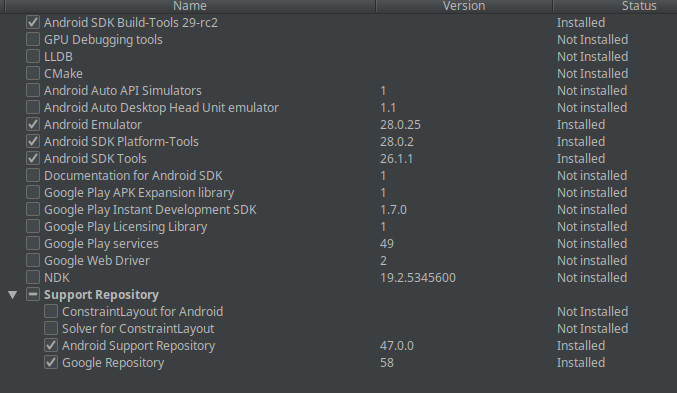
Upgrade to the latest sdk, tools:
Expected behavior
It actually works. 😀
Additional context
Setting the
ANDROID_AVD_HOME & ANDROID_SDK_ROOT fixes the issue. From what I can gather ANDROID_HOME is now depreciated... So this might need to be an added error in TNS doctor; and a warning here instead of throwing an error that is unhelpful...
ANDROID_SDK_ROOT should be the same value as ANDROID_HOME
ANDROID_AVD_HOME on my Linux machine ends up being /home/<USER_NAME>/.android/avd/
On mac, it will probably be /Users/<USER_NAME>/.android/avd/
コントリビューションガイド
はじめの一歩
- issue を最後まで読み、次にプロジェクトのコントリビューションガイドを読みます。
- 着手することを issue にコメントします — 二人が同じ作業をするのを防げます。
- リポジトリをフォークし、ブランチを切って変更します。
- issue 番号を参照したプルリクエストを送ります。
評価
この issue はまだ評価されていません。