Azure / Azure/MachineLearningNotebooks
Document or provide guidance on expanding/theming cell for a larger height
- 主要語言
- Jupyter Notebook
- 星號
- 4.4k
- 分支
- 2.6k
- PR 合併指標
- 30 天內沒有已合併 PR
描述
Within a Notebook in AML it doesn't appear possible to customize the height of the rendered Cell, at least within the context of rendering html, but likely in general. If I render html, the css that controls the max-height is above the rendered cell dom, making it impossible to override with css.
The notebook theme is:
```
.nteract-cell-outputs:not(.expanded) {
max-height: var(--theme-layout-output-max-height);
}
```
I know this is the correct place to alter since altering it manually in the DOM increases the cell size to anything I want, but it's not possible to override this in the dom since the rendered cell is a child.
- Can I override this by providing a custom theme?
- The selector would indicate that there is the ability to expand the cell, but I see no such option in the UI.
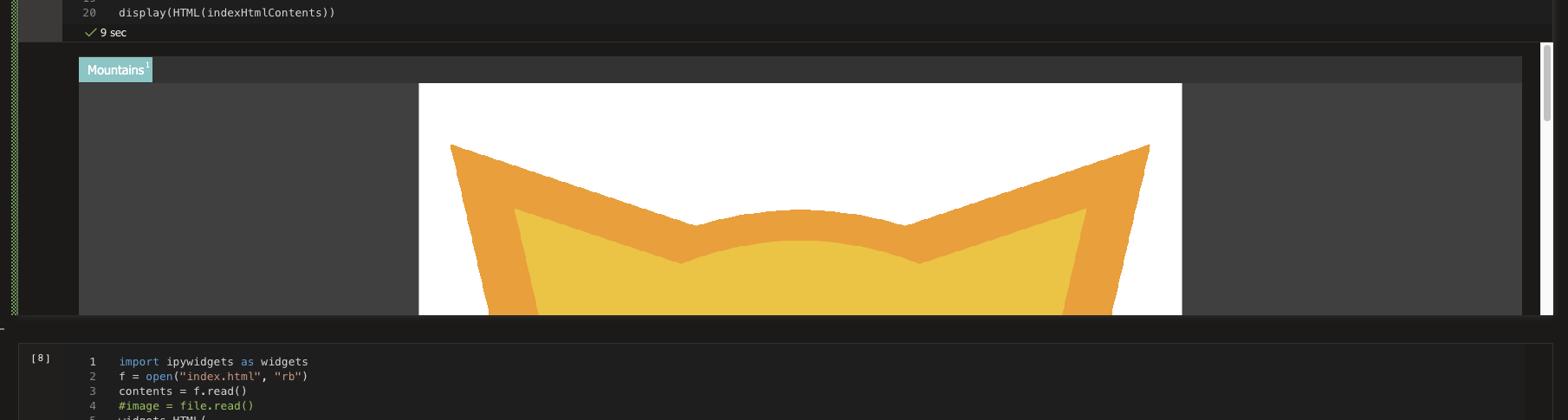
Below is a screenshot of the rendered cell where you can see the image is cut off, I want to show probably least 1000px or 90% of the vh.
貢獻指南
這個儲存庫沒有索引到貢獻指南
研究方向
首先,在 AML Notebook 中重現已渲染的 HTML 儲存格,並檢查 `.nteract-cell-outputs:not(.expanded)` 規則和 `--theme-layout-output-max-height`。確定自訂主題是否可以覆寫高度,以及 UI 中是否存在展開控制項。完成標準是記錄顯示較高輸出的受支援方式,或明確說明限制與可用的 workaround。
由索引模型根據 Issue 內容生成。
評估
- 技術堆疊
- jupyter-notebook
- 領域
- documentation
- Issue 類型
- 文件
- 難度
- 3/5
- 預估耗時
- 1-2 天
- 活躍度
- 停滯
- 描述清晰度
- 基本清楚
- 新手友好度
- 30/100