AirtestProject / AirtestProject/AirtestIDE
win - Keys pressed during recording aren't recorded in the script
- 主要言語
- 言語のデータがありません
- スター
- 236
- フォーク
- 40
- PR マージ指標
- 30日以内にマージされた PR はありません
説明
**Describe the bug**
When I start recording with Airtest, the key events I press aren't recorded, only the mouse clicks. I can start recording with F6 but I can't stop it. When I click on finish recording, the click on the recording button is recorded.
**Screenshots**
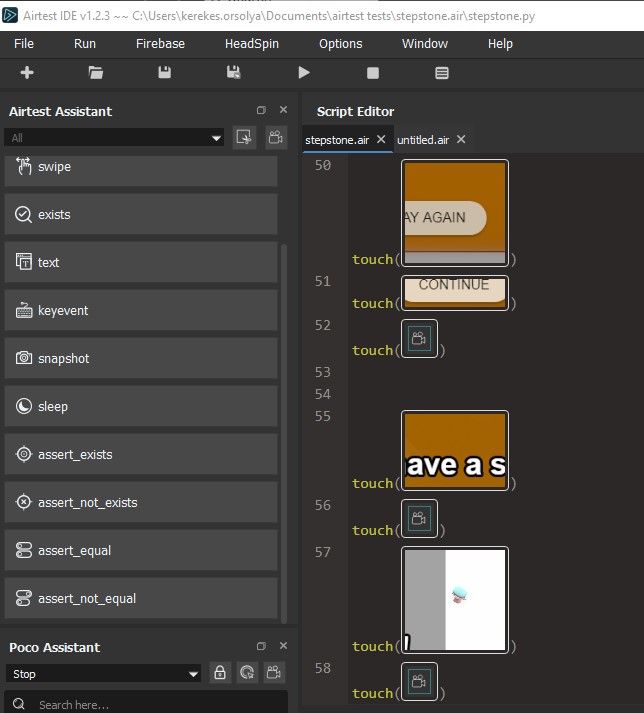
**To Reproduce**
Steps to reproduce the behaviour:
* Have Windows desktop connected as the device
* Start the recording with the button or F6
* Click on the game and use the keyboard
* Finish recording by clicking on the recording icon
**Expected behaviour**
The recording only makes screenshots of the clicks, and doesn't log the keys I've pressed during recording and for how long was I pressing them. In my game, the character goes around with the wasd buttons, so I need to write by hand which keys were pressed and for how long and it makes the recording just half-done. Additionally, recording can't be ended by pressing F6 again, and the script records clicking on the recording button as part of the script (see attached image).
**AirtestIDE version:** `1.2.3`
**Platform:** `Windows 10 64bit, etc.`
**Additional context**
If this feature is not supported yet, is there a plan to include it?
Thank you very much!
コントリビューションガイド
このリポジトリのコントリビューションガイドは索引されていません
評価
この issue はまだ評価されていません。