Date tickformats automatically replaces newline \n with <br>. Causing the same value on the second line to repeat.
還沒有人認領這個 Issue。
評估
- 難度
- 3/5
- 預估耗時
- 1-2 天
- 新手友好度
- 45/100
- Issue 類型
- 缺陷
- 描述清晰度
- 基本清楚
- 活躍度
- 停滯
- 技術堆疊
- javascript, r
研究方向
從 issue #2115 中的 R 最小範例開始,使用 plotly_json() 檢查其輸出,重點關注 x 軸 tickformat 如何轉換 \n。將結果與連結的 JavaScript 和 Python 行為進行比較;當 R 保留 \n,使重複的日期值按照文件所述的行為顯示時,即表示完成。
由索引模型根據 Issue 內容生成。
描述
Custom date tickformat does not respect the newline character \n and automatically replaces it by a break-tag <br />. This has the consequence that values after the specified newline get repeated for each tick-label even though the value is the same.
As this python plotly documentation mentions:
Date axis tick labels have the special property that any portion after the first instance of '\n' in tickformat will appear on a second line only once per unique value, as with the year numbers in the example below. To have the year number appear on every tick label, '<br>' should be used instead of '\n'.
Ploty python and javascript respect the \n but not R.
Minimal example:
library(plotly)
#> loading comments I have committed for this reprex
dt <- data.frame(
    x = as.Date(c('2013-02-04', '2013-04-05', '2013-06-06', '2013-08-07', '2013-10-02')),
    y = c(1,4,5,6,2)
  )
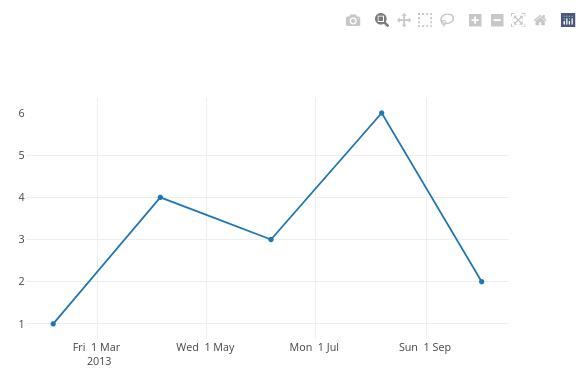
plot_ly(data = dt, x = ~x, y = ~y, type = 'scatter', mode = 'lines') %>%
  layout(xaxis = list(tickformat = '%a %e %b \n %Y'))

Created on 2022-03-31 by the reprex package (v2.0.1)
In specting the above object with plotly_json() and search for tickformat reveals that the format has been updated to: %a %e %b <br /> %Y.
This reprex is an example taken from the javascript documentation where the example shows the correct behaviour of only showing the year 2013 once.
- 主要語言
- R
- 星號
- 2.7k
- 分支
- 641
- PR 合併指標
- 30 天內沒有已合併 PR
貢獻指南
從這裡開始
- 先讀完整個 Issue,再讀專案的貢獻指南。
- 在 Issue 下留言說明你要接手 —— 這能避免兩個人做同樣的事。
- Fork 儲存庫,在一個分支上完成修改。
- 送出 Pull Request,並在描述裡引用這個 Issue 編號。
plotly/plotly.R 的其他 Issue
-
難度 2/5 1-3 小時 新手友好度 62/100
-
難度 4/5 3-5 天 新手友好度 35/100
-
難度 3/5 1-2 天 新手友好度 68/100
-
難度 3/5 1-2 天 新手友好度 72/100
-
save_image Error 未關閉
難度 3/5 1-2 天 新手友好度 52/100
相似的 Issue
-
難度 2/5 1-3 小時 新手友好度 82/100
r-lib/pkgdepends#485 · 3 則留言 ·
-
難度 1/5 1 小時以內 新手友好度 92/100
-
beginners blocker
難度 2/5 1-3 小時 新手友好度 78/100
-
enviPathR 未關閉Build Error Build OK Build Warning policies-accepted pre-review precheck-passed
難度 1/5 1 小時以內 新手友好度 84/100
Bioconductor/BiocContributions#207 · 6 則留言 ·
-
難度 2/5 1-3 小時 新手友好度 74/100
datacarpentry/semester-biology#1255 ·