Pages List: List doesn't consistently load on first try
Nobody has claimed this yet.
Assessment
- Difficulty
- 3/5
- Estimated time
- 1-2 days
- Newbie friendliness
- 38/100
- Issue type
- Bug
- Clarity
- Mostly clear
- Activity status
- Stale
- Tech stack
- android, kotlin
- Domain
- mobile-dev
Research direction
Start by reproducing the issue through My Site > Home or My Site > Menu > Pages on the tested Android setup, then trace the Pages List loading path. Done means all published pages load consistently, or a "Fetching pages" message remains visible until loading completes, with refresh and navigation recovering when needed.
Written by the indexing model from the issue text.
Description
Expected behavior
Whenever I open the Pages List, it will load all my pages.
If the pages are not able to load immediately, I expect to see a "Fetching pages" message.
Actual behavior
Sometimes, no pages are loaded and I see "You haven't published any pages yet" notice. Sometimes, only a few pages are loaded out of many.
Steps to reproduce the behavior
- Restart the app
- Head into My Site > Home or My Site > Menu select "Pages".
- Note whether all your pages are displayed
- Try it again
I had no pages, or only a few pages, ~60% of the time, across probably 20 tries in 5 languages. (I noticed this when doing i18n smoke testing)
When a few pages had already loaded, waiting a few seconds generally allowed the rest to appear.
When no pages were loaded, I needed to pull-to-refresh. A few times, this didn't work and I needed to navigate away from and back to the pages list.
Occasionally, all my pages loaded, or I got the "Fetching pages" message as expected when loading.
This is from a site with ~20 published pages:
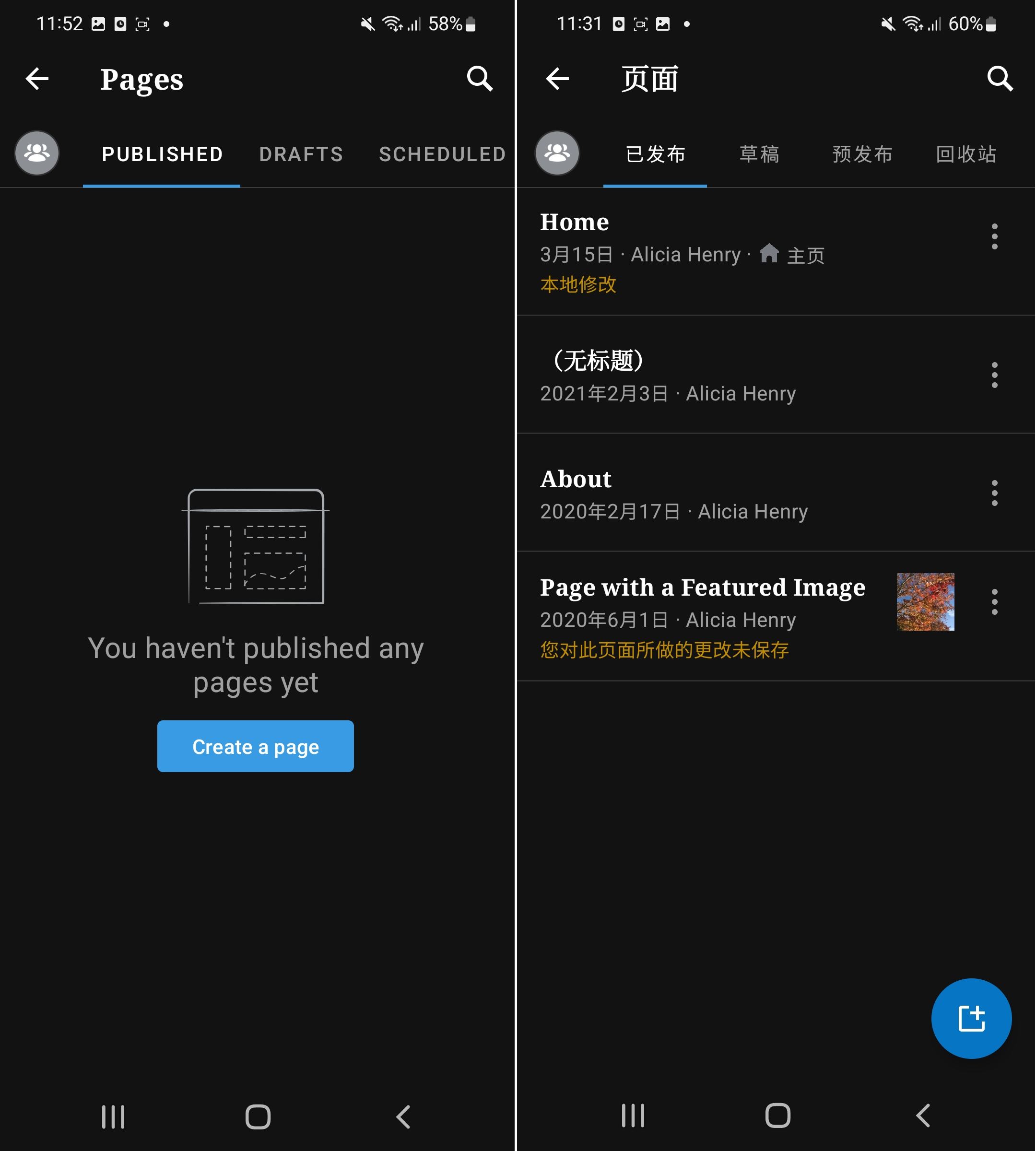
Tested on Samsung Galaxy S21, Android 12, WPAndroid 19.9-rc-4
- Dominant language
- Kotlin
- Stars
- 3.2k
- Forks
- 1.4k
- Avg merge
- 1d 11h
- Merged PRs (30d)
- 69
Contributor guide
First steps
- Read the whole issue, then the project's contributing guide.
- Comment on the issue to say you are picking it up — it saves two people doing the same work.
- Fork the repository and make your change on a branch.
- Open a pull request that references the issue number.
More from wordpress-mobile/WordPress-Android
-
[Type] Bug Blogging Prompts
Difficulty 2/5 1-3 hours Newbie friendliness 76/100
wordpress-mobile/WordPress-Android#23014 · 1 comment ·
-
[Pri] Low [Type] Enhancement Good First Issue Media
Difficulty 2/5 1-3 hours Newbie friendliness 72/100
wordpress-mobile/WordPress-Android#16212 · 2 comments ·
-
[Type] Bug Posting/Editing
Difficulty 1/5 Under an hour Newbie friendliness 68/100
wordpress-mobile/WordPress-Android#11342 · 1 comment ·
-
[Status] Stale [Type] Task Documentation
Difficulty 2/5 1-3 hours Newbie friendliness 62/100
wordpress-mobile/WordPress-Android#10979 · 1 comment ·
-
[Status] Stale [Type] Enhancement
Difficulty 2/5 1-3 hours Newbie friendliness 64/100
wordpress-mobile/WordPress-Android#10102 · 2 comments ·
All issues in wordpress-mobile/WordPress-Android
Similar issues
-
Difficulty 2/5 1-3 hours Newbie friendliness 82/100
-
Good First Issue
Difficulty 2/5 1-3 hours Newbie friendliness 84/100
ankidroid/Anki-Android#21942 ·
-
bug
Difficulty 2/5 1-3 hours Newbie friendliness 84/100
libre-tube/LibreTube#8781 · 1 comment ·
-
enhancement
Difficulty 2/5 1-3 hours Newbie friendliness 84/100
MetrolistGroup/Metrolist#4396 ·
-
Difficulty 2/5 1-3 hours Newbie friendliness 68/100