redhat-developer / redhat-developer/vscode-java
Cannot resolve javax.smartcardio / sun.security.jca not accessible
还没有人认领这个 Issue。
- 主要语言
- TypeScript
- 星标
- 2.3k
- 派生
- 546
- 平均合并
- 20 小时 1 分钟
- 30 天内合并 PR
- 11
描述
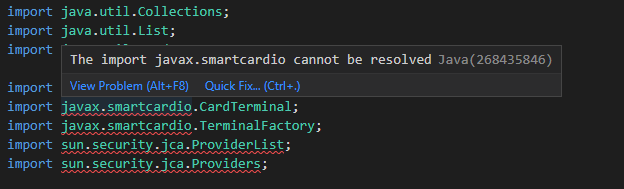
Hi, I'm running into an issue where I'm getting error highlighting that javax.smartcardio.* cannot be resolved and sun.security.jca.* is not accessible. This error only shows up in the editor. I am using gradle to compile and run my application. When I compile with gradle, my project compiles and runs without issues. I have an unmodularized project so a module-info.java file would preferably not work. So, I assume this is an issue with a setting for the jvm on vscode side. I need help figuring out how to not get errors to show up when they aren't errors.
Environment
- Operating System: Windows
- JDK version: 17.0.5.8, (gradle project java compatibility 11)
- Visual Studio Code version: 1.74.1
- Java extension version: 1.13.0


贡献指南
从这里开始
- 先读完整个 Issue,再读项目的贡献指南。
- 在 Issue 下留言说明你要接手 —— 这能避免两个人做同样的事。
- Fork 仓库,在一个分支上完成修改。
- 提交 Pull Request,并在描述里引用这个 Issue 编号。
调研方向
没有指定源文件或测试。首先在所述的未模块化 Gradle 项目中重现编辑器诊断,并将 VS Code Java 设置与报告中列出的 JDK 和 Java 兼容版本进行比较。当有效的 javax.smartcardio 和 sun.security.jca 引用不再被标记为问题,同时 Gradle 编译和执行仍然成功时,即视为完成。
由索引模型根据 Issue 内容生成。
评估
- 技术栈
- java, vscode
- 领域
- developer-experience, tooling
- Issue 类型
- 缺陷
- 难度
- 4/5
- 预计耗时
- 3-5 天
- 活跃度
- 停滞
- 描述清晰度
- 需要澄清
- 新手友好度
- 25/100