redhat-developer / redhat-developer/vscode-java
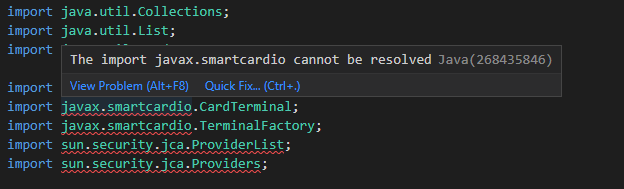
Cannot resolve javax.smartcardio / sun.security.jca not accessible
Nobody has claimed this yet.
- Dominant language
- TypeScript
- Stars
- 2.3k
- Forks
- 546
- Avg merge
- 20h 1m
- Merged PRs (30d)
- 11
Description
Hi, I'm running into an issue where I'm getting error highlighting that javax.smartcardio.* cannot be resolved and sun.security.jca.* is not accessible. This error only shows up in the editor. I am using gradle to compile and run my application. When I compile with gradle, my project compiles and runs without issues. I have an unmodularized project so a module-info.java file would preferably not work. So, I assume this is an issue with a setting for the jvm on vscode side. I need help figuring out how to not get errors to show up when they aren't errors.
Environment
- Operating System: Windows
- JDK version: 17.0.5.8, (gradle project java compatibility 11)
- Visual Studio Code version: 1.74.1
- Java extension version: 1.13.0


Contributor guide
First steps
- Read the whole issue, then the project's contributing guide.
- Comment on the issue to say you are picking it up — it saves two people doing the same work.
- Fork the repository and make your change on a branch.
- Open a pull request that references the issue number.
Research direction
No source file or test is named. Start by reproducing the editor diagnostics in the described unmodularized Gradle project and compare the VS Code Java settings with the JDK and Java compatibility versions listed in the report. Done means valid javax.smartcardio and sun.security.jca references are no longer flagged while Gradle compilation and execution remain successful.
Written by the indexing model from the issue text.
Assessment
- Tech stack
- java, vscode
- Domain
- developer-experience, tooling
- Issue type
- Bug
- Difficulty
- 4/5
- Estimated time
- 3-5 days
- Activity status
- Stale
- Clarity
- Needs clarification
- Newbie friendliness
- 25/100