redhat-developer / redhat-developer/vscode-java
Git changes highlighting missing when Java project is open
未关闭
还没有人认领这个 Issue。
highlighting
- 主要语言
- TypeScript
- 星标
- 2.3k
- 派生
- 547
- 平均合并
- 20 小时 1 分钟
- 30 天内合并 PR
- 11
描述
While working with Java in VS Code, I noticed Git changes highlighting missing when Java project is open.
Environment
- Operating System: Windows 10
- JDK version: OpenJDK
java version "17.0.2" 2022-01-18 LTS
Java(TM) SE Runtime Environment (build 17.0.2+8-LTS-86)
Java HotSpot(TM) 64-Bit Server VM (build 17.0.2+8-LTS-86, mixed mode, sharing)
- Visual Studio Code version:
1.66.0 - Java extension version:
v0.22.2
Steps To Reproduce
- Open or create basic Java project (with Gradle?).
- Initialize git in the project directory.
- Create initial commit.
- Do some changes.
Current Result
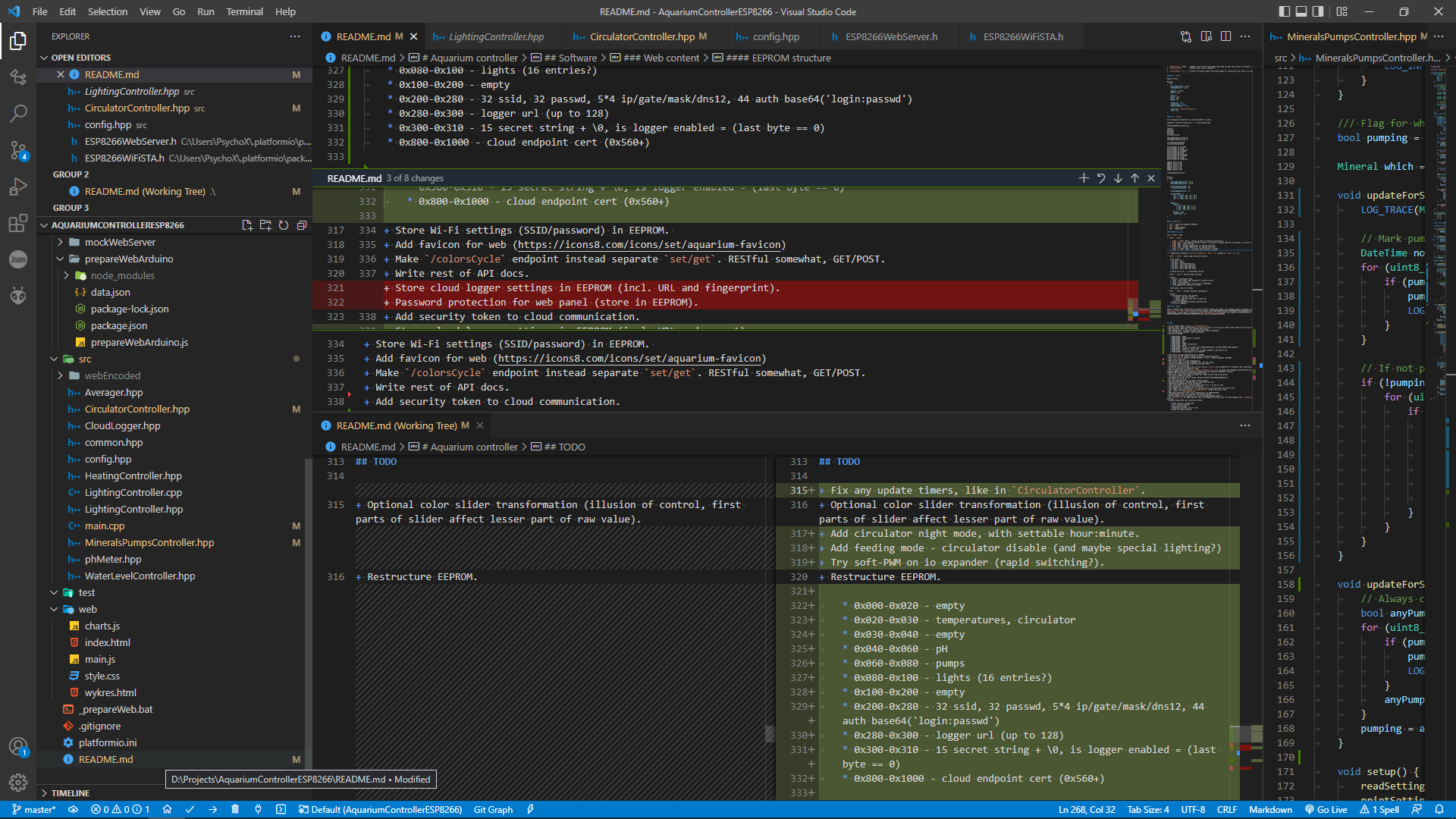
No difference colours while in editor with Java project open:

Meanwhile other editor (without Java project open):
Expected Result
I wish Java extensions haven't mess up Git highlighting...
Additional Information
If logs are necessary, what should I include for visual bugs?
贡献指南
从这里开始
- 先读完整个 Issue,再读项目的贡献指南。
- 在 Issue 下留言说明你要接手 —— 这能避免两个人做同样的事。
- Fork 仓库,在一个分支上完成修改。
- 提交 Pull Request,并在描述里引用这个 Issue 编号。
调研方向
使用为 Java 项目和 Git 提供的步骤,在列出的 Windows 10、JDK 17、VS Code 1.66.0 和 Java extension v0.22.2 环境中复现缺失的 Git 更改高亮显示。将 Java 项目编辑器与非 Java 编辑器进行比较,然后确定相关的扩展入口点,并验证已更改的文件是否显示预期的编辑器颜色。
由索引模型根据 Issue 内容生成。
评估
- 技术栈
- git, java, typescript, vscode
- 领域
- developer-experience, tooling
- Issue 类型
- 缺陷
- 难度
- 4/5
- 预计耗时
- 3-5 天
- 活跃度
- 停滞
- 描述清晰度
- 需要澄清
- 新手友好度
- 25/100