Enable references to Tabs
Nadie ha tomado este issue todavía.
- Lenguaje dominante
- JavaScript
- Estrellas
- 3.1k
- Forks
- 455
- Merge medio
- 5 h 9 min
- PR fusionados (30 d)
- 2
Descripción
The Problem
I am using react tabs to create a simple tab view stepper where the user has to fill in a form in each of the steps.
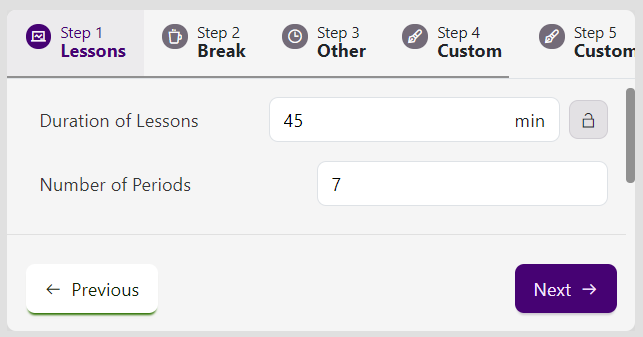
While developing the UI, I tried to make the tabs responsive by allowing for scrolling which I am still busy developing, but seems to be working fairly well at the moment. My only problem is that if I set selectedIndex to a tab that is not within view, the TabList will not update to show that Tab heading.
Current design:
I decided that to fix this problem I would make use of useEffect, React refs and some javascript document manipulation (ie document.scrollToView), unfortunately, I am unable to get an instance of the tab elements so that I can call scrollIntoView; I have also considered accessing the scrollLeft property of the containing element (ie TabList), but there is ref function available for that element and I would still need access to the child Tab element to tell how much the TabList should scroll.
The Solutions
After realising the problem, I went straight to your code to see if there was any way to accomplish what I set out to do. This led to me creating my own types for the package because the version of @types/react-tabs currently available is made for react-tabs 2.3 (or something like that) while the latest version of react-tabs is version 3.2.3.
I then looked throughout the codebase and realised that there was a perfect infrastructure for getting access to the tab inside the UncontrolledTabs.js file, with the only problem being that there was no way of actually getting access to the particular instance of UncontrolledTabs that was being rendered. An alternative to using the instance of the UncontrolledTabs class would be to have direct ref access to the tabs themselves, which is possible and would be a very simple change to make.
Option 1: Getting access to the UncontrolledTabs instance.
Option 1.1: Getting instance using domRef
In the code for the Tabs component, there is a property called domRef which is a function that gets passed directly to UncontrolledTabs and which gets called when creating the dom element for the UncontrolledTabs component.
UncontrolledTabs.js (lines 374 - 397)
      selectedTabClassName, // unused
      selectedTabPanelClassName, // unused
      environment, // unused
      disableUpDownKeys, // unused
      ...attributes
    } = this.props;

    return (
      <div
        {...attributes}
        className={cx(className)}
        onClick={this.handleClick}
        onKeyDown={this.handleKeyDown}
        ref={(node) => {
          this.node = node;
          *** if (domRef) domRef(node);
        }}
        data-rttabs
      >
        {this.getChildren()}
      </div>
    );
  }
}
Inside UncontrolledTabs, you can add a static function, e.g. getInstanceFromDomRef(node: HTMLDivElement), this function would basically see if the supplied node is the same as the node of that instance and would then return that instance of the component.
Basically, you would add the following as a function to the UncontrolledTabs class:
static getInstanceFromDomRef(node) {
    if (node === this.node) return this;
    return null;
}
Option 1.2: Adding componentRef property
This option is self-explanatory, you would include a componentRef property to the Tabs component which would lead to an instance of either the Tabs or UncontrolledTabs components which could then be used to access the necessary methods.
Option 2: Allow custom tabRef functions to be passed to Tabs that are children of UncontrolledTabs
In the UncontrolledTabs file, there is a function called getChildren which loops through all of the children passed to the UncontrolledTabs component and ensures that they meet certain criteria while also modifying them slightly. For the Tab component, UncontrolledTabs takes the supplied Tab component and changes the tabRef function to a custom one used by UncontrolledTabs, thus removing the tabRef function supplied by the developer, to fix this would be as simple as the following:
UncontrolledTabs.js (lines 222 - 246)
        result = cloneElement(child, {
          children: deepMap(child.props.children, (tab) => {
            const key = `tabs-${listIndex}`;
            const selected = selectedIndex === listIndex;

            const props = {
              tabRef: (node) => {
                this.tabNodes[key] = node;
+++             if (tab.props.tabRef) tab.props.tabRef(node)
              },
              id: this.tabIds[listIndex],
              panelId: this.panelIds[listIndex],
              selected,
              focus: selected && (focus || wasTabFocused),
            };

            if (selectedTabClassName)
              props.selectedClassName = selectedTabClassName;
            if (disabledTabClassName)
              props.disabledClassName = disabledTabClassName;

            listIndex++;

            return cloneElement(tab, props);
          }),
        });
Those are my suggested solutions which should be a partial fix to the problem of programmatically managing the scroll of the TabList container.
This is a great package and is really useful for quickly creating tabs.
Guía de contribución
No hay ninguna guía de contribución indexada para este repositorio
Primeros pasos
- Lee el issue completo y luego la guía de contribución del proyecto.
- Comenta en el issue que vas a ocuparte — evita que dos personas hagan lo mismo.
- Haz un fork del repositorio y trabaja en una rama.
- Abre un pull request que haga referencia al número del issue.
Línea de trabajo
Empieza revisando UncontrolledTabs.js, especialmente getChildren y la gestión de tabRef, junto con la propiedad domRef del componente Tabs. Determina qué API de referencias debería admitirse para acceder a los elementos de las pestañas y, después, verifica que un consumidor pueda usarla para hacer visible una pestaña seleccionada que está fuera del área visible.
Escrito por el modelo de indexación a partir del texto del issue.
Evaluación
- Stack tecnológico
- javascript, react
- Área
- frontend
- Tipo de issue
- Nueva funcionalidad
- Dificultad
- 4/5
- Tiempo estimado
- 3-5 días
- Estado de actividad
- Estancado
- Claridad
- Bastante claro
- Aptitud para principiantes
- 35/100