react-navigation / react-navigation/react-navigation.github.io
Indicator not aligned with text in createMaterialTopTabNavigator
未關閉
還沒有人認領這個 Issue。
- 主要語言
- JavaScript
- 星號
- 324
- 分支
- 2k
- PR 合併指標
- 30 天內沒有已合併 PR
描述
I am trying to implement the top tab with scrollable tabs which are dynamic in number.
Following is my code:
<View style={{flex: 1}}>
        {categories.length > 0 && (
          <Tab.Navigator
            lazy
            tabBarOptions={{
              labelStyle: {
                fontSize: 13,
                fontFamily: gothamMedium,
                textTransform: 'none',
                alignSelf: 'center',
                textAlign: 'center',
              },
              indicatorStyle: {
                backgroundColor: colors.AQUAMARINE,
                height: 4,
              },
              activeTintColor: colors.GREYISH_BROWN,
              inactiveTintColor: colors.WARM_GREY,
              scrollEnabled: true,
            }}>
            {categories.map(category => (
              <Tab.Screen
                options={{
                  title: category.title,
                }}
                name={category.title}
                component={() => <TabList tabData={category} />}
              />
            ))}
          </Tab.Navigator>
        )}  </View>
Which works fine for the first tab:
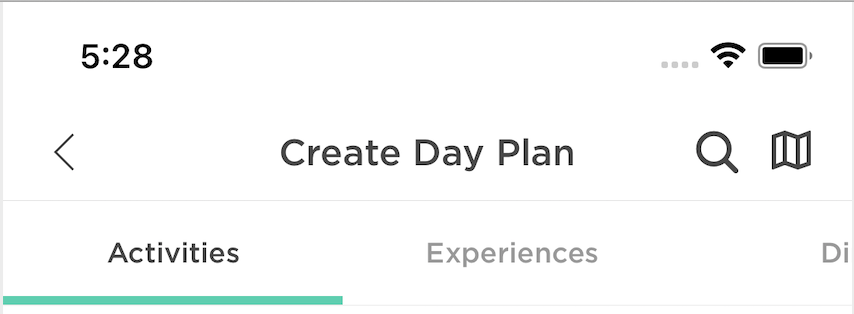
And here is how second tab looks like:
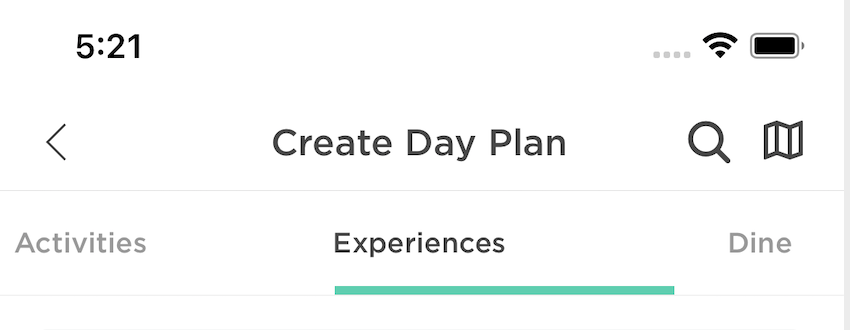
And it gets worse scrolled to 3rd and beyond
貢獻指南
這個儲存庫沒有索引到貢獻指南
從這裡開始
- 先讀完整個 Issue,再讀專案的貢獻指南。
- 在 Issue 下留言說明你要接手 —— 這能避免兩個人做同樣的事。
- Fork 儲存庫,在一個分支上完成修改。
- 送出 Pull Request,並在描述裡引用這個 Issue 編號。
研究方向
首先使用 issue 中所示的動態 categories 和 Tab.Navigator 設定,重現使用 createMaterialTopTabNavigator 時回報的 indicator 對齊問題。比較第一個、第二個以及後續可捲動 tab,並在 indicator 與每個 tab 的文字都能保持一致對齊時,視為 issue 已完成。
由索引模型根據 Issue 內容生成。
評估
- 技術堆疊
- javascript, react, react-native
- 領域
- mobile
- Issue 類型
- 缺陷
- 難度
- 3/5
- 預估耗時
- 1-2 天
- 活躍度
- 停滯
- 描述清晰度
- 基本清楚
- 新手友好度
- 38/100