pythonnet / pythonnet/pythonnet
Memory leak in CLRObject
還沒有人認領這個 Issue。
- 主要語言
- C#
- 星號
- 5.5k
- 分支
- 780
- PR 合併指標
- 30 天內沒有已合併 PR
描述
Environment
- Pythonnet version: 2.4 master
- Python version: 3.7
- Operating System: Win10 x64
Details
-
Describe what you were trying to get done.
Hello, we are using PythonNet to execute custom python scripts in our C# application. We pass a set of large .net objects (such as DataTable with a big bunch of data) as a script locals. When we execute such sctripts multiple times we got an OutOfMemoryException
-
What commands did you run to trigger this issue? If you can provide a
Minimal, Complete, and Verifiable example
this will help us understand the issue.
    public void Execute(string script, IDictionary<string, object> locals, List<string> searchPaths)
        {
            var modifiedScript = $"{script}{Environment.NewLine}{string.Format(PythonSnippets.SystemEventHandler, pySystemHandlerGuid)}";

            _scriptLocals = new PyDict();

            using (Py.GIL())
            {
                if (locals != null)
                    foreach (var local in locals)
                        _scriptLocals[local.Key] = local.Value.ToPython();

                _pythonScope = Py.CreateScope();
                _pythonScope.Exec(modifiedScript, _scriptLocals);
            }
        }
Here we cache PyScope and PyDict. Pydict contains our large .net objects, translated to Python
    public void ClearCache()
        {
            using (Py.GIL())
            {
                _pythonScope.Exec($"vars().clear()");

                foreach (PyObject pObject in _scriptLocals.Items())
                {
                    pObject.Dispose();
                }

                dynamic gc = Py.Import("gc");
                gc.collect();

                _scriptLocals.Dispose();

                _pythonScope.Dispose();

                gc.collect();
            }
        }
This method we execute each time, after we finished our work with script. As you can see, I tried different way to clean up resources, but memory leak still occures, after multiple executions.
I did a snapshot of memory with .net profiler, and found that there a references to my DataTables from the CLRObject and I did not find a way how to release it.
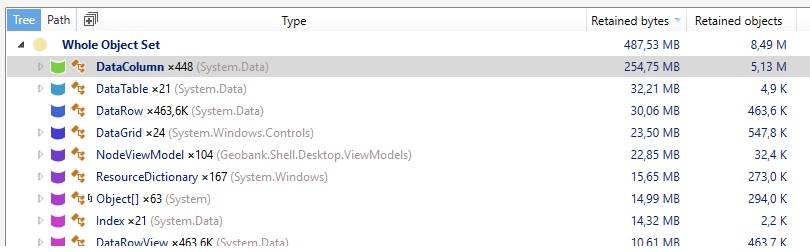
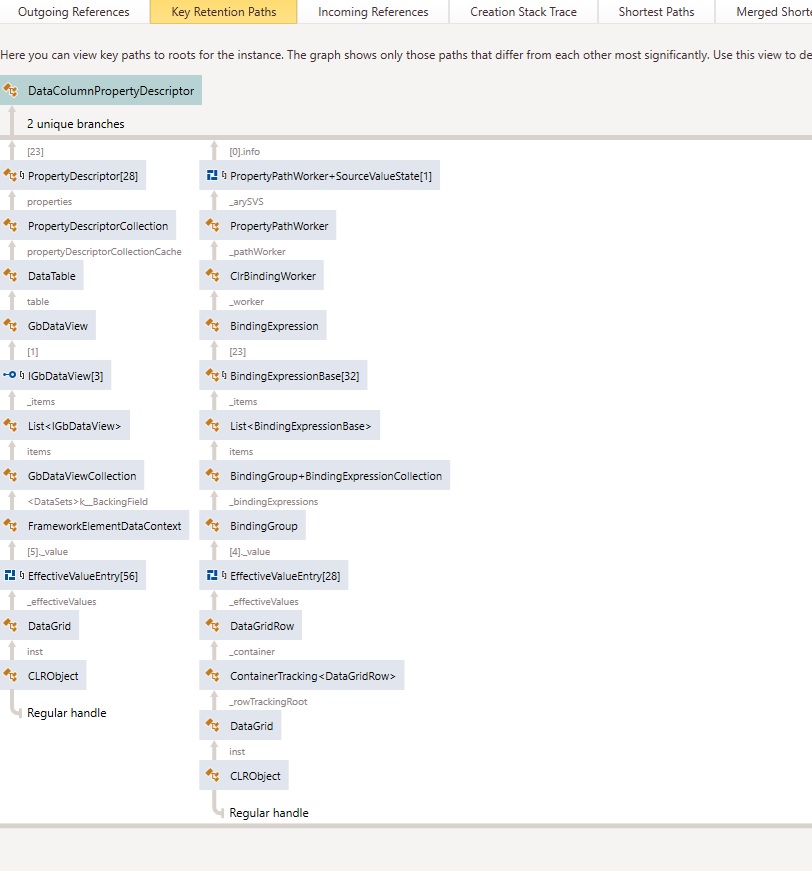
StackTrace
Exception of type 'System.OutOfMemoryException' was thrown.

System.OutOfMemoryException: Exception of type 'System.OutOfMemoryException' was thrown.
   at System.Data.RBTree`1.TreePage..ctor(Int32 size)
   at System.Data.RBTree`1.AllocPage(Int32 size)
   at System.Data.RBTree`1.GetNewNode(K key)
   at System.Data.DataTable.SetNewRecordWorker(DataRow row, Int32 proposedRecord, DataRowAction action, Boolean isInMerge, Boolean suppressEnsurePropertyChanged, Int32 position, Boolean fireEvent, Exception& deferredException)
   at System.Data.DataTable.InsertRow(DataRow row, Int64 proposedID, Int32 pos, Boolean fireEvent)
   at System.Data.DataTable.LoadDataRow(Object[] values, Boolean fAcceptChanges)
   at System.Data.ProviderBase.SchemaMapping.LoadDataRow()
   at System.Data.Common.DataAdapter.FillLoadDataRow(SchemaMapping mapping)
   at System.Data.Common.DataAdapter.FillFromReader(DataSet dataset, DataTable datatable, String srcTable, DataReaderContainer dataReader, Int32 startRecord, Int32 maxRecords, DataColumn parentChapterColumn, Object parentChapterValue)
   at System.Data.Common.DataAdapter.Fill(DataTable[] dataTables, IDataReader dataReader, Int32 startRecord, Int32 maxRecords)
   at System.Data.Common.DbDataAdapter.FillInternal(DataSet dataset, DataTable[] datatables, Int32 startRecord, Int32 maxRecords, String srcTable, IDbCommand command, CommandBehavior behavior)
   at System.Data.Common.DbDataAdapter.Fill(DataTable[] dataTables, Int32 startRecord, Int32 maxRecords, IDbCommand command, CommandBehavior behavior)
   at System.Data.Common.DbDataAdapter.Fill(DataTable dataTable)
   at Geobank.Shared.Data.Server.GetTableFillSchema(IConnection connection, DbConnection cn, DbTransaction tr, String sql, SqlParameter[] parameters)
   at Geobank.Shared.Data.Server.GetTableFillSchema(IConnection connection, String sql, SqlParameter[] parameters)
   at Geobank.Module.Forms.Services.FormDataViewCacheRepository.GenerateDataView(Guid dataSetGuid)
   at Geobank.Module.Forms.Services.FormDataViewCacheRepository.AddDataSetComponent(Guid guid)
   at Geobank.Module.Forms.Services.FormDataViewCacheRepository.Add(Guid DataSetGuid)
   at Geobank.Module.Forms.Services.FormDesignerExecuteManager.InitializeDataViewsRepository(IDataSource dataSource, IEnumerable`1 dataBindings)
   at Geobank.Module.Forms.Services.FormDesignerExecuteManager.CreateExecutableForm(IFormDesignerComponent formDesignerComponent, IDataSource dataSource, IDictionary`2 locals)
   at Geobank.Module.Forms.ViewModels.FormDesignerEditViewModel.ExecuteForm(Object sender)
   at Geobank.Shared.Helpers.RelayCommand.Execute(Object parameter)
   at DevExpress.Xpf.Bars.Native.CommandSourceHelper.Execute(ICommand command, Object commandParameter, IInputElement commandTarget)
   at DevExpress.Xpf.Bars.BarItem.ExecuteCommand(ICommand commandToExecute, Object commandParameterToExecute, IInputElement actualCommandTarget)
   at DevExpress.Xpf.Bars.BarItem.<>c__DisplayClass308_0.<OnItemClick>b__0()
   at DevExpress.Xpf.Bars.BarItem.OnItemClick(BarItemLink link, IBarItemLinkControl linkControl)
   at DevExpress.Xpf.Bars.BarItemLinkBase.OnClick(IBarItemLinkControl linkControl)
   at DevExpress.Xpf.Bars.BarItemLinkControlStrategy.OnClick()
   at DevExpress.Xpf.Bars.BarButtonItemLinkControlStrategy.OnMouseLeftButtonUp(MouseButtonEventArgs args)
   at DevExpress.Xpf.Bars.BarItemLinkControlBase.OnMouseLeftButtonUp(MouseButtonEventArgs e)
   at System.Windows.UIElement.OnMouseLeftButtonUpThunk(Object sender, MouseButtonEventArgs e)
   at System.Windows.Input.MouseButtonEventArgs.InvokeEventHandler(Delegate genericHandler, Object genericTarget)
   at System.Windows.RoutedEventArgs.InvokeHandler(Delegate handler, Object target)
   at System.Windows.RoutedEventHandlerInfo.InvokeHandler(Object target, RoutedEventArgs routedEventArgs)
   at System.Windows.EventRoute.InvokeHandlersImpl(Object source, RoutedEventArgs args, Boolean reRaised)
   at System.Windows.UIElement.ReRaiseEventAs(DependencyObject sender, RoutedEventArgs args, RoutedEvent newEvent)
   at System.Windows.UIElement.OnMouseUpThunk(Object sender, MouseButtonEventArgs e)
   at System.Windows.Input.MouseButtonEventArgs.InvokeEventHandler(Delegate genericHandler, Object genericTarget)
   at System.Windows.RoutedEventArgs.InvokeHandler(Delegate handler, Object target)
   at System.Windows.RoutedEventHandlerInfo.InvokeHandler(Object target, RoutedEventArgs routedEventArgs)
   at System.Windows.EventRoute.InvokeHandlersImpl(Object source, RoutedEventArgs args, Boolean reRaised)
   at System.Windows.UIElement.RaiseEventImpl(DependencyObject sender, RoutedEventArgs args)
   at System.Windows.UIElement.RaiseTrustedEvent(RoutedEventArgs args)
   at System.Windows.UIElement.RaiseEvent(RoutedEventArgs args, Boolean trusted)
   at System.Windows.Input.InputManager.ProcessStagingArea()
   at System.Windows.Input.InputManager.ProcessInput(InputEventArgs input)
   at System.Windows.Input.InputProviderSite.ReportInput(InputReport inputReport)
   at System.Windows.Interop.HwndMouseInputProvider.ReportInput(IntPtr hwnd, InputMode mode, Int32 timestamp, RawMouseActions actions, Int32 x, Int32 y, Int32 wheel)
   at System.Windows.Interop.HwndMouseInputProvider.FilterMessage(IntPtr hwnd, WindowMessage msg, IntPtr wParam, IntPtr lParam, Boolean& handled)
   at System.Windows.Interop.HwndSource.InputFilterMessage(IntPtr hwnd, Int32 msg, IntPtr wParam, IntPtr lParam, Boolean& handled)
   at MS.Win32.HwndWrapper.WndProc(IntPtr hwnd, Int32 msg, IntPtr wParam, IntPtr lParam, Boolean& handled)
   at MS.Win32.HwndSubclass.DispatcherCallbackOperation(Object o)
   at System.Windows.Threading.ExceptionWrapper.InternalRealCall(Delegate callback, Object args, Int32 numArgs)
   at System.Windows.Threading.ExceptionWrapper.TryCatchWhen(Object source, Delegate callback, Object args, Int32 numArgs, Delegate catchHandler)
貢獻指南
從這裡開始
- 先讀完整個 Issue,再讀專案的貢獻指南。
- 在 Issue 下留言說明你要接手 —— 這能避免兩個人做同樣的事。
- Fork 儲存庫,在一個分支上完成修改。
- 送出 Pull Request,並在描述裡引用這個 Issue 編號。
研究方向
從報告中顯示的 Execute 和 ClearCache 方法開始,使用大型 .NET 物件重現指令碼的重複執行,並在 .NET 記憶體分析器中檢查 CLRObject 參考。完成的標準是識別並修正保留的 DataTable 參考,使重複執行不再累積記憶體或以 OutOfMemoryException 結束。
由索引模型根據 Issue 內容生成。
評估
- 技術堆疊
- csharp, python
- 領域
- backend
- Issue 類型
- 缺陷
- 難度
- 4/5
- 預估耗時
- 3-5 天
- 活躍度
- 停滯
- 描述清晰度
- 需要釐清
- 新手友好度
- 25/100