Bug in updating express visualization with facet row and animation frame
Open
Nobody has claimed this yet.
bug
P3
- Dominant language
- Python
- Stars
- 18.8k
- Forks
- 2.8k
- Avg merge
- 16h 26m
- Merged PRs (30d)
- 21
Description
Description
Running facet row plot with an animation frame using plotly express will fail updating the features in case of values missing in one category.
Reproduce
- plotly : 4.1.1
import plotly.express as px

df = px.data.tips()
fig = px.scatter(
    df,
    x="total_bill",
    y="tip",
    facet_row="day",
    animation_frame="time",
    #                  facet_col="time"
)
fig.show()
Results
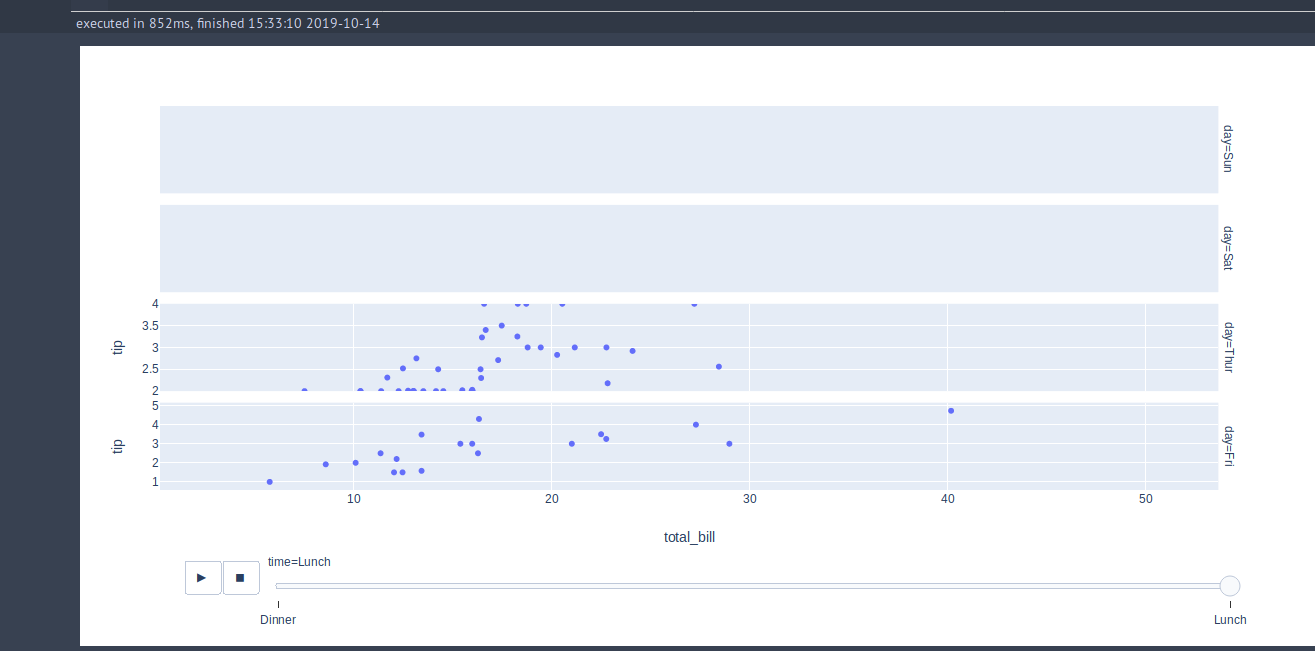
expected : When setting the cursor back to dinner, it fails to update the row which had missing values in day for lunch.
I have no idea if this is related to plotly express, widgets or something else. Thank you !
Contributor guide
First steps
- Read the whole issue, then the project's contributing guide.
- Comment on the issue to say you are picking it up — it saves two people doing the same work.
- Fork the repository and make your change on a branch.
- Open a pull request that references the issue number.
Research direction
Start by running the provided plotly.express.scatter reproduction with facet_row="day" and animation_frame="time". Trace the facet and animation update path, then verify that moving the cursor back to dinner updates the row that was missing lunch values without failure.
Written by the indexing model from the issue text.
Assessment
- Tech stack
- python
- Domain
- data-visualization
- Issue type
- Bug
- Difficulty
- 4/5
- Estimated time
- 3-5 days
- Activity status
- Stale
- Clarity
- Mostly clear
- Newbie friendliness
- 35/100