[FEATURE] Add config option to disable behavior where rectangular zoom selection becomes full height selection if mouse Δy is close to 0
Nobody has claimed this yet.
- Dominant language
- JavaScript
- Stars
- 18.3k
- Forks
- 2k
- Avg merge
- 2d 12h
- Merged PRs (30d)
- 28
Description
Hi,
There is a feature that makes that a rectagular selection on a heatmap becomes a "full height selection" if the mouse Δy is close to 0 (I mean vertical distance between start point and end point).
Is there a setting to turn this feature off? I didn't find it in the documentation.
Example here I wanted to select a rectangle of height 2 pixels, but it moved into a full height selection:
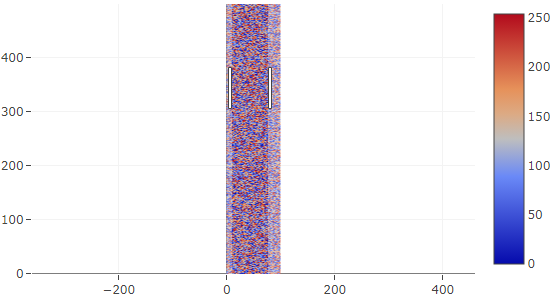
Thanks!
Contributor guide
First steps
- Read the whole issue, then the project's contributing guide.
- Comment on the issue to say you are picking it up — it saves two people doing the same work.
- Fork the repository and make your change on a branch.
- Open a pull request that references the issue number.
Research direction
No file or test is named in the issue. Start by tracing the heatmap rectangular zoom-selection behavior and its configuration options, then check how related settings are documented. Done means a configuration option can disable the near-zero mouse Δy conversion while preserving the existing behavior by default, with coverage for both modes.
Written by the indexing model from the issue text.
Assessment
- Tech stack
- javascript
- Domain
- data-visualization
- Issue type
- Feature
- Difficulty
- 4/5
- Estimated time
- 3-5 days
- Activity status
- Active
- Clarity
- Mostly clear
- Newbie friendliness
- 52/100