`ggplotly` uses colour that doesn't match the displayed gradient when providing one single numeric value to `fill` or `colour`
Nobody has claimed this yet.
- Dominant language
- R
- Stars
- 2.7k
- Forks
- 641
- PR merge metrics
- No merged PRs in 30d
Description
When converting from a ggplot object to a plotly interactive visualisation with ggplotly(), if there is only one numeric value for fill or colour, the wrong gradient colour is used according to the displayed legend. The legend uses a white-to-red gradient that doesn't match the blue gradient used in ggplot2.
library(ggplot2)
library(plotly)
# fill takes one numeric value
(single_value <- ggplot(mapping = aes(x = 1, y = 1, fill = 1)) +
  geom_col())

Convert to plotly:
# ggplotly(single_value)
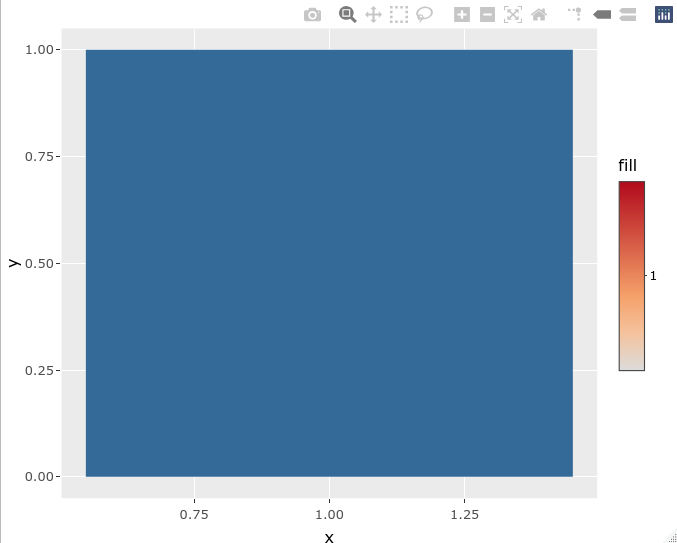
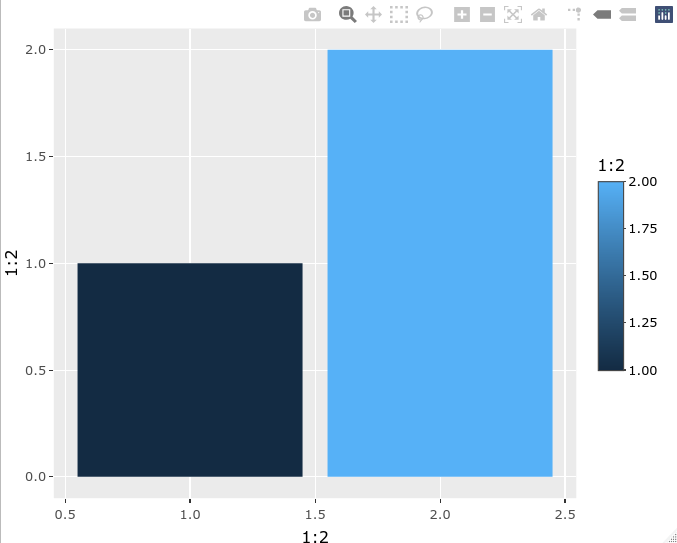
Using two numeric values works well:
# fill takes 2 numeric values
(two_values <- ggplot(mapping = aes(x = 1:2, y = 1:2, fill = 1:2)) +
    geom_col())

Convert to plotly:
# ggplotly(two_values)
Using:
- R 4.1.0
- ggplot2 3.3.3
- plotly 4.9.3
Contributor guide
First steps
- Read the whole issue, then the project's contributing guide.
- Comment on the issue to say you are picking it up — it saves two people doing the same work.
- Fork the repository and make your change on a branch.
- Open a pull request that references the issue number.
Research direction
Start by running the single-value and two-value examples in the issue and compare ggplot2 with ggplotly output, focusing on the fill or colour gradient and legend. The issue is done when a single numeric value produces a rendered gradient colour that matches its displayed legend, with a regression test covering both fill and colour.
Written by the indexing model from the issue text.
Assessment
- Tech stack
- r
- Domain
- data-visualization
- Issue type
- Bug
- Difficulty
- 3/5
- Estimated time
- 1-2 days
- Activity status
- Stale
- Clarity
- Mostly clear
- Newbie friendliness
- 48/100