selected_row_ids property of DataTable is None in callback after refreshing a persisted table
Dieses Issue hat noch niemand übernommen.
- Vorherrschende Sprache
- Python
- Sterne
- 24.4k
- Forks
- 2.3k
- Ø Merge
- 2 T. 7 Std.
- Gemergte PRs (30 T.)
- 13
Beschreibung
Describe your context
I'm running Dash app from a python program.
- replace the result of
pip list | grep dashbelow
dash                              2.0.0
dash-bootstrap-components         1.0.0
dash-core-components              2.0.0
dash-html-components              2.0.0
dash-renderer                     1.9.1
dash-table                        5.0.0
dash-ui                           0.4.0
-
if frontend related, tell us your Browser, Version and OS
- OS: Windows 10
- Browser Firefox, Chrome
- Version 94, 96 (respectively)
Describe the bug
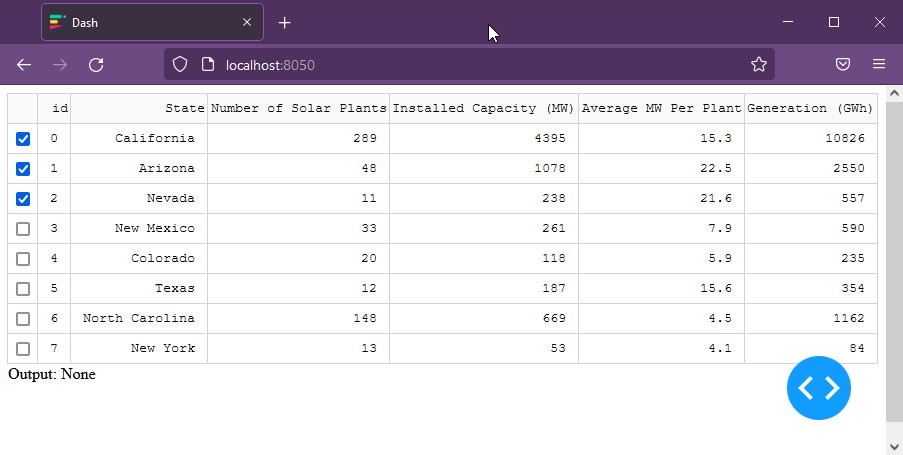
My app has a DataTable and a callback that renders Tabs based on rows selected in the table. I've enabled persistence recently and I find that after a page refresh in the browser, the row selection is persisted in the table but the selected_row_ids are empty when passed to my callback.
Steps to reproduce:
- Store the program below in a python file.
- Run the file with dependencies as show above.
- In the browser a table will be shown. Choose a few rows using their checkboxes.
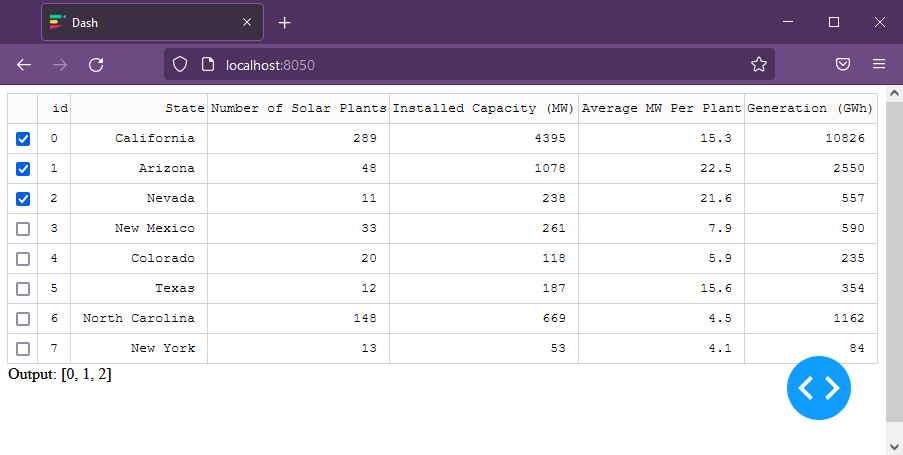
- Notice that the id's of the selected rows are now listed below the table.
- Refresh the page.
Code:
import dash
import dash_table
import pandas as pd
from dash import Input, Output
from dash import html

df = pd.read_csv("https://raw.githubusercontent.com/plotly/datasets/master/solar.csv")
df.insert(loc=0, column="id", value=range(0, 8))
app = dash.Dash(__name__)

app.layout = html.Div(
    [
        dash_table.DataTable(
            id="table",
            columns=[{"name": i, "id": i} for i in df.columns],
            data=df.to_dict("records"),
            persistence=True,
            row_selectable="multi",
            cell_selectable=False,
        ),
        html.Div(id="output"),
    ]
)

@app.callback(
    Output("output", "children"),
    Input("table", "selected_row_ids"),
)
def render_plot_tabs_from_selected_experiments_table_rows(
    selected_row_ids,
):
    return f"Output: {selected_row_ids}"

if __name__ == "__main__":
    app.run_server(debug=True)
Expected behavior
After the page is refreshed, when the callback function is invoked, the argument selected_row_ids should contain the ids of rows that are selected. These values should appear in the output div on screen.
Actual behavior
While selected rows still show as selected in the table, the value of selected_row_ids is None in the callback. The list of values appears empty below the table.
Screenshots
Expected:
Actual:
Beitragsleitfaden
Erste Schritte
- Lies das ganze Issue und danach den Beitragsleitfaden des Projekts.
- Schreib ins Issue, dass du es übernimmst — das erspart doppelte Arbeit.
- Forke das Repository und arbeite in einem Branch.
- Öffne einen Pull Request, der die Issue-Nummer nennt.
Rechercherichtung
Beginne mit der bereitgestellten Python-Reproduktion und konzentriere dich auf das Persistenzverhalten von DataTable und die Callback-Eingabe selected_row_ids. Die Payload nennt keine Repository-Dateien oder Tests. Die Aufgabe ist erledigt, wenn eine Aktualisierung der Seite die ausgewählten Zeilen-IDs im Callback beibehält und sie im Ausgabe-div anzeigt.
Vom Indexierungsmodell aus dem Issue-Text verfasst.
Bewertung
- Tech-Stack
- python
- Bereich
- frontend
- Issue-Typ
- Bug
- Schwierigkeit
- 3/5
- Geschätzter Aufwand
- 1-2 Tage
- Aktivitätsstatus
- Veraltet
- Klarheit
- Klar beschrieben
- Anfängerfreundlichkeit
- 38/100