nvim-tree / nvim-tree/nvim-tree.lua
Treat symbolic links as valid tree paths for root purposes
Dieses Issue hat noch niemand übernommen.
- Vorherrschende Sprache
- Lua
- Sterne
- 8.6k
- Forks
- 638
- Ø Merge
- 1 T. 14 Std.
- Gemergte PRs (30 T.)
- 2
Beschreibung
Is this a question?
No.
Can this functionality be implemented utilizing API?
Don't think so.
Is your feature request related to a problem? Please describe.
I'm editing some project files that are symbolically linked in from somewhere else but his precludes nvim-tree showing a common root that isn't system root (/). For example:
the true path to these files is in /mnt/hgfs/vmshare/ . I am editing various files in /home/russianguyovic/project/ and have the files linked into /home/russianguyovic/project/headers/ (e.g. ln -s /mnt/hgfs/vmshare/ /home/russianguyovic/project/headers/). My tree root for all other files in the project is /home/russianguyovic/project/, however for the symbolically linked files that is not possible; the closest common root nvim-tree will acknowledge is the system root, / (root). If, while focused on some file /mnt/hgfs/vmshare/stuff.h one uses :cd /home/russianguyovic/project/, the tree very briefly blinks to the new root and then goes back to /mnt/hgfs/vmshare/. The solution would be for nvim-tree to look at link location rather than the target and treat that as the leaf from which to build a path back up towards system root.
Describe the solution you'd like
nvim-tree should look at the link location, not the target, to determine where that leaf is relative to system root. (I feel like I'm doing a terrible job of explaining this. I would like the two groups of files mentioned above to both be able to use /home/russianguyovic/project/ as their nvim-tree root, to reference my hypothetical example.)
Describe alternatives you've considered
The alternative is to just live with it.
Additional context
Imagine a directory structure like so with a linked-in folder, highlighted by a red box below:
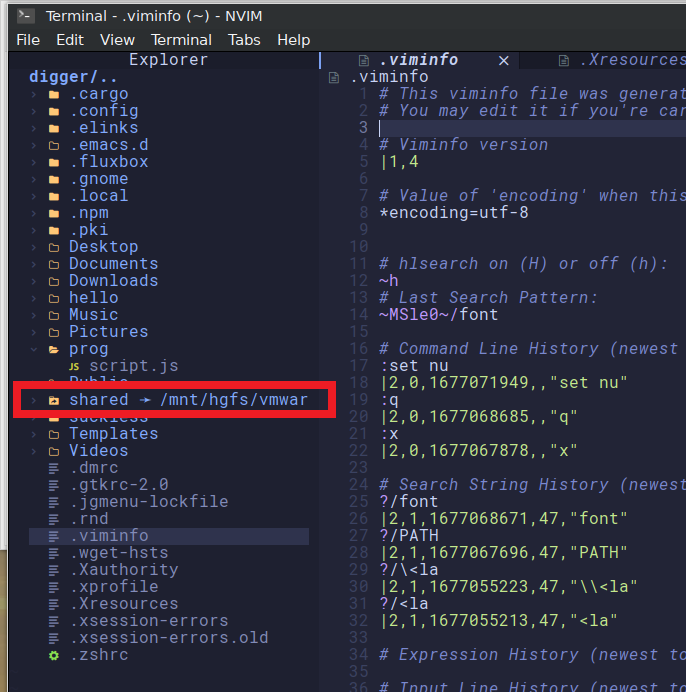
nvim-tree correctly shows the target of the symbolic link, which is cool, but it uses only the target for directory traversal pathing to determine possible roots:
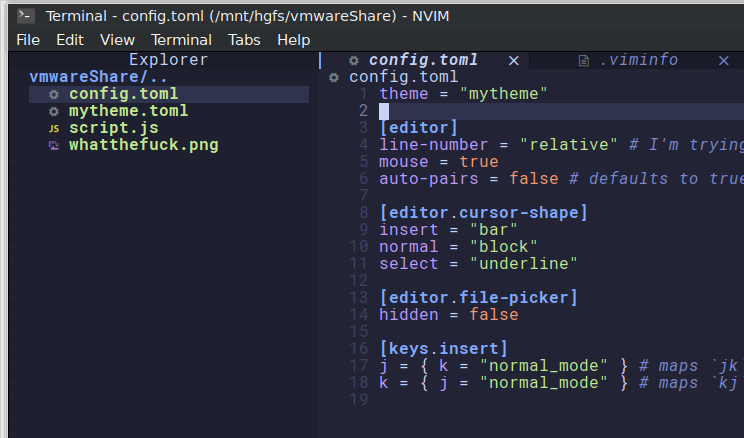
If I would like to see both .viminfo and config.toml in the tree at the same time, I can only do so by using system root as the root of the nvim-tree tree:

This is less than ideal.
Beitragsleitfaden
Erste Schritte
- Lies das ganze Issue und danach den Beitragsleitfaden des Projekts.
- Schreib ins Issue, dass du es übernimmst — das erspart doppelte Arbeit.
- Forke das Repository und arbeite in einem Branch.
- Öffne einen Pull Request, der die Issue-Nummer nennt.
Rechercherichtung
Beginne damit, das im Issue verlinkte Verzeichnisbeispiel zu reproduzieren und nachzuverfolgen, wie nvim-tree ausgehend von einer fokussierten Datei ein gemeinsames Stammverzeichnis bestimmt. Vergleiche während der Traversierung den Speicherort des Symlinks mit seinem Ziel. Erledigt ist es, wenn Dateien unter /mnt/hgfs/vmshare/ und /home/russianguyovic/project/ /home/russianguyovic/project/ als Stammverzeichnis des Baums gemeinsam verwenden können, ohne auf / zurückzufallen.
Vom Indexierungsmodell aus dem Issue-Text verfasst.
Bewertung
- Tech-Stack
- lua
- Bereich
- devtools
- Issue-Typ
- Feature
- Schwierigkeit
- 4/5
- Geschätzter Aufwand
- 3-5 Tage
- Aktivitätsstatus
- Veraltet
- Klarheit
- Größtenteils klar
- Anfängerfreundlichkeit
- 35/100