[MU4 Issue] Can't edit Kontakt patch/VST after initial playback
@RomanPudashkin is already working on this.
Since Aug 31, 2023.
Assessment
This issue has not been assessed yet.
Description
Editing and Navigating Patches
Background
Most libraries have multiple panes to edit their patches.
Problem
- This cannot be done in MuseScore 4 after the initial playback.
- Once you have hit "play", the patch only allows you to interact with the last page or screen of the patch used before playback.
- Other Kontakt-specific buttons and UI work ("Edit Instrument", for example) do work. The volume fader does not update with more playback or returns to normal when pausing (see screenshots).
To Reproduce
- Start a score, write a staff.
- Open the Mixer and start an instance of Kontakt. Try to navigate around the patch (preferably, a patch with multiple panes/screens/windows/whatever).
- Play what you wrote. Your score should sound with the patch's samples.
- Try to navigate the patch. You shouldn't be able to. It'll be stuck on the last section/window/pane you used before your first playback attempt. You can interact with that screen alone.
Expected behavior
I should be able to navigate around the patch at any point in the progress of writing. Before, during, and after the first playback (as is the case when loading patches in other DAWs).
Screenshots
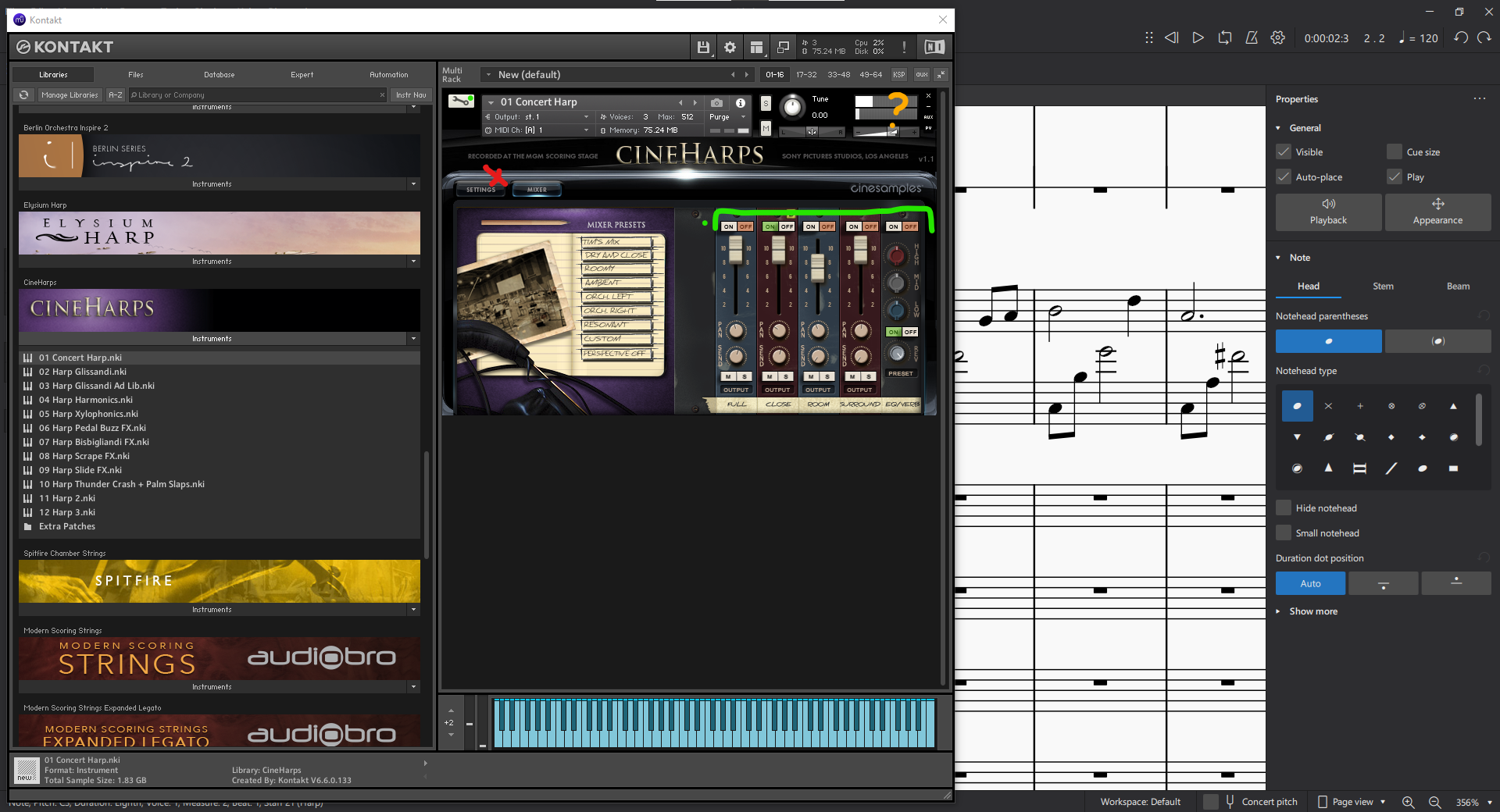
MuseScore 4: Alpha 2. A Kontakt instance with CineHarps. Green lines represent what continues to work after playback, red represents what doesn't. And I have no idea what's going on with the volume meter.
Platform information
Edition: Windows 10 Pro
Version: 21H1
Installed on: Jul 26, 2021
OS build: 19043.1889
Experience: Windows Feature Experience Pack 120.2212.4180.0
Additional Info.
- When I am able to revert the instrument to use SoundFonts, playback works fine. I haven't noticed any issues after reverting from a VST... so far.
- Dominant language
- C++
- Stars
- 15.1k
- Forks
- 3.3k
- Avg merge
- 2d 2h
- Merged PRs (30d)
- 91
Contributor guide
First steps
- Read the whole issue, then the project's contributing guide.
- Comment on the issue to say you are picking it up — it saves two people doing the same work.
- Fork the repository and make your change on a branch.
- Open a pull request that references the issue number.
More from musescore/MuseScore
-
engraving P3 UI
Difficulty 2/5 1-3 hours Newbie friendliness 68/100
-
needs design
Difficulty 2/5 1-3 hours Newbie friendliness 68/100
-
community P3 UI
Difficulty 2/5 1-3 hours Newbie friendliness 68/100
-
Difficulty 2/5 1-3 hours Newbie friendliness 76/100
-
regression nightly UX/interaction
Difficulty 2/5 1-3 hours Newbie friendliness 68/100
All issues in musescore/MuseScore
Similar issues
-
Difficulty 2/5 1-3 hours Newbie friendliness 86/100
-
Sensor initialization takes very long when `--initial-sim-time` is set to current UNIX timestamp Open
Difficulty 2/5 1-3 hours Newbie friendliness 78/100
gazebosim/gz-sensors#662 · 1 comment ·
-
enhancement
Difficulty 2/5 1-3 hours Newbie friendliness 76/100
-
comp-datalake
Difficulty 2/5 1-3 hours Newbie friendliness 88/100
ClickHouse/ClickHouse#121222 ·
-
Difficulty 2/5 1-3 hours Newbie friendliness 68/100
LadybirdBrowser/ladybird#12123 ·