microsoft / microsoft/vscode-java-debug
Breakpoints not set when using org.mockito:mockito-inline
Offen
@testforstephen arbeitet bereits daran.
Seit 08.3.2021.
ai-triaged
bug
variables
- Vorherrschende Sprache
- TypeScript
- Sterne
- 591
- Forks
- 429
- Ø Merge
- 1 T. 9 Std.
- Gemergte PRs (30 T.)
- 19
Beschreibung
When using org.mockito:mockito-inline in unit tests, trying to debug the tests is harder because upon starting the debug breakpoint will have to be created after all mocks/spies are created.
In addition all live context becomes invisible.
Environment
- Operating System: MacOS
- JDK version:
openjdk version "11.0.7" 2020-04-14 OpenJDK Runtime Environment AdoptOpenJDK (build 11.0.7+10) OpenJDK 64-Bit Server VM AdoptOpenJDK (build 11.0.7+10, mixed mode) - Visual Studio Code version:
1.53.2 622cb03f7e070a9670c94bae1a45d78d7181fbd4 x64 - Java extension version: v0.12.1
- Java Debugger extension version: v0.31.0
Steps To Reproduce
- run
git clone https://github.com/sfrank-mc/vscode-java-debug-bug(or go through the code and replicate locally) - open the workspace inside the
vscode-java-debug-bugwith vscode - open file at
src/main/java/vscode/java/debug/bug/App.javaand place a breakpoint at line 8 - open file at
src/test/java/vscode/java/debug/bug/AppTest.javaanddebugthe test calledtestAppHasAGreeting - notice test will pass without breakpoint being hit.
Workaround and second issue:
- open file at
src/test/java/vscode/java/debug/bug/AppTest.javaand set a breakpoint at line 15 debugthe test calledtestAppHasAGreeting- breakpoint at line 15 is hit. don't continue.
- open file at
src/main/java/vscode/java/debug/bug/App.java - remove the breakpoint at line 8
- re-create the breakpoint at line 8
- continue running the debug session (F5)
- notice breakpoint is hit.
- notice there is no live context info:
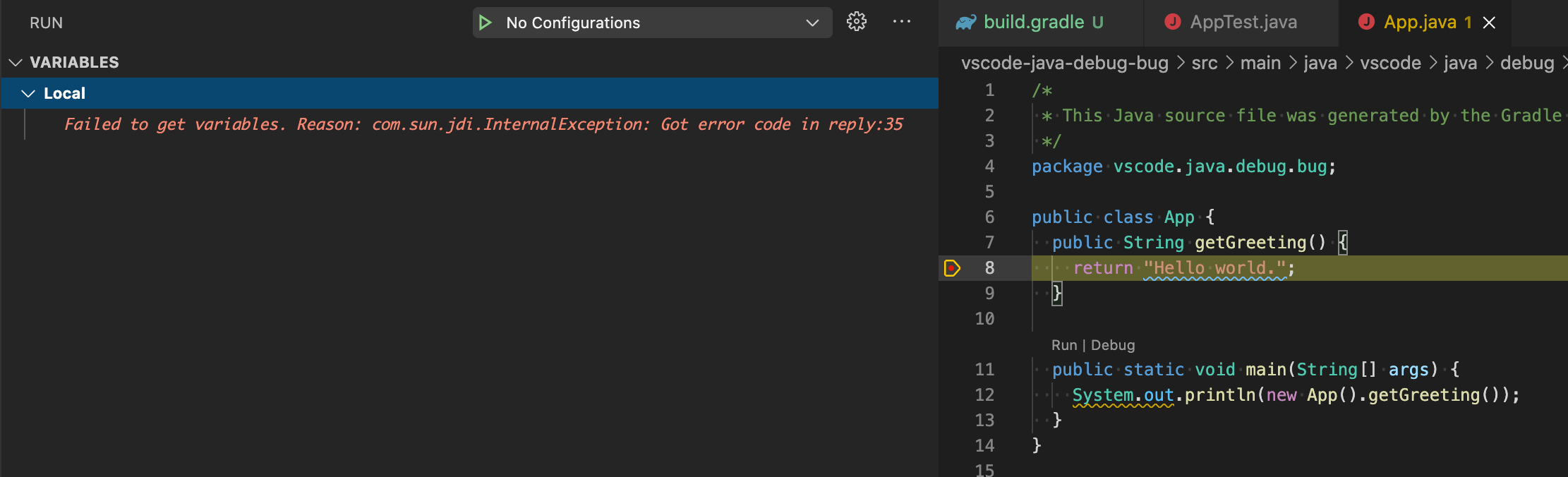
Control check:
- open file at
build.gradle - comment line 30
- uncomment line 31
- perform steps 3 and 4.
- notice breakpoint is hit.
Current Result
Debug breakpoints broken in every run
No debug info even if breakpoint is re-created
Expected Result
Debug breakpoints should be maintained between runs
Debug info should be available
Beitragsleitfaden
Erste Schritte
- Lies das ganze Issue und danach den Beitragsleitfaden des Projekts.
- Schreib ins Issue, dass du es übernimmst — das erspart doppelte Arbeit.
- Forke das Repository und arbeite in einem Branch.
- Öffne einen Pull Request, der die Issue-Nummer nennt.
Bewertung
Dieses Issue wurde noch nicht bewertet.