microsoft / microsoft/vscode-java-debug
maven-jar-plugin use app-to-import setting make debug error
Dieses Issue hat noch niemand übernommen.
- Vorherrschende Sprache
- TypeScript
- Sterne
- 591
- Forks
- 429
- Ø Merge
- 1 T. 9 Std.
- Gemergte PRs (30 T.)
- 19
Beschreibung
[provide a description of the issue]
Environment
- Operating System:
Windows_NT x64 10.0.17763 - JDK version:
java version "1.8.0_202"
Java(TM) SE Runtime Environment (build 1.8.0_202-b08)
Java HotSpot(TM) 64-Bit Server VM (build 25.202-b08, mixed mode) - Visual Studio Code version:
version: 1.48.1 (system setup)
commit: 3dd905126b34dcd4de81fa624eb3a8cbe7485f13 - Java extension version:
v0.10.0 - Java Debugger extension version:
v0.10.0
Steps To Reproduce
- [step 1]
I have two module in a project.They are all application.The gvt-bdp-stats-scheduler module dependent on gvt-bdp-app module.
the A module's setting like this.
			<plugin>
				<groupId>org.apache.maven.plugins</groupId>
				<artifactId>maven-jar-plugin</artifactId>
				<executions>
					<execution>
						<goals>
							<goal>jar</goal>
						</goals>
						<phase>package</phase>
						<configuration>
							<!--to be imported on other projects-->
							<classifier>app-to-import</classifier>
							<includes>
								<include>**/entity/*</include>
							</includes>
						</configuration>
					</execution>
				</executions>
			</plugin>
the B module's setting like this.
        <dependency>
            <groupId>com.gvt.bdp</groupId>
            <artifactId>gvt-bdp-app</artifactId>
            <version>${revision}</version>
            <classifier>app-to-import</classifier>
        </dependency>
[attach a sample project reproducing the error]
attach logs
Current Result
It's normal when I run with jar.But in debug, it cause java.lang.TypeNotPresentException: Type com.entity.OrderStatsEntity not present
Expected Result
The project work in Idea is well.
Additional Informations
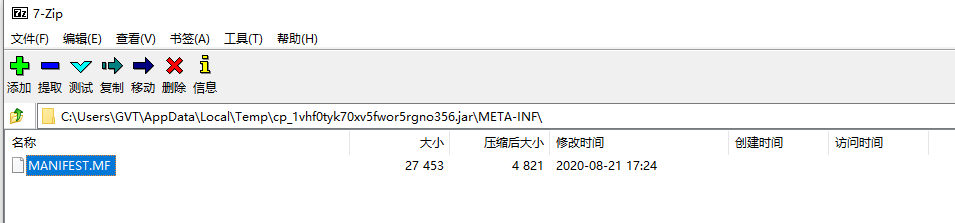
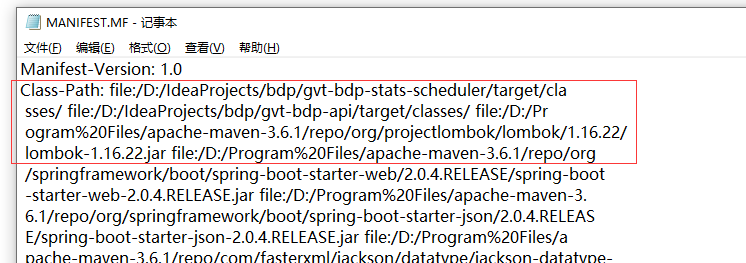
When I open the run jar file of temp, the MANIFEST.MF there is no gvt-bdp-app's class-path definition in the file when I debug gvt-bdp-stats-scheduler.
Beitragsleitfaden
Erste Schritte
- Lies das ganze Issue und danach den Beitragsleitfaden des Projekts.
- Schreib ins Issue, dass du es übernimmst — das erspart doppelte Arbeit.
- Forke das Repository und arbeite in einem Branch.
- Öffne einen Pull Request, der die Issue-Nummer nennt.
Rechercherichtung
Beginne mit den im Issue gezeigten Maven-Plugin- und Abhängigkeitskonfigurationen und reproduziere anschließend den Debug-Start mit dem beschriebenen Zwei-Modul-Projekt. Vergleiche das beim Debuggen erzeugte Manifest der temporären JAR mit dem normalen Lauf; abgeschlossen ist die Aufgabe, wenn der Abhängigkeits-Classpath beim Debuggen vorhanden ist und TypeNotPresentException nicht mehr auftritt.
Vom Indexierungsmodell aus dem Issue-Text verfasst.
Bewertung
- Tech-Stack
- java
- Bereich
- devtools
- Issue-Typ
- Bug
- Schwierigkeit
- 4/5
- Geschätzter Aufwand
- 3-5 Tage
- Aktivitätsstatus
- Veraltet
- Klarheit
- Muss geklärt werden
- Anfängerfreundlichkeit
- 20/100