microsoft / microsoft/vscode-java-debug
ETIMEDOUT error 1 times on 2 after vscode update
Nobody has claimed this yet.
- Dominant language
- TypeScript
- Stars
- 591
- Forks
- 429
- Avg merge
- 1d 9h
- Merged PRs (30d)
- 19
Description
After I installed any version of VS Code after March 2021 (version 1.55), when I click on "run java", one times on two I have this error :
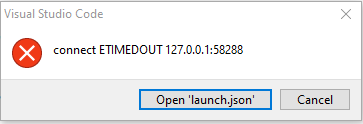
and it doesn't run.
If I go back to March 2021 (version 1.55), I no more have this problem
My firewall is deactivated, and I am not behind a proxy, to my knowledge.
Environment
- Operating System: Windows 10
- JDK version: 1.8
- Visual Studio Code version: 1.56+
- Java extension version: 0.80.0
- Java Debugger extension version: 0.34.0
Steps To Reproduce
- click on "run java"
this error happen to me for any project
Contributor guide
First steps
- Read the whole issue, then the project's contributing guide.
- Comment on the issue to say you are picking it up — it saves two people doing the same work.
- Fork the repository and make your change on a branch.
- Open a pull request that references the issue number.
Research direction
Reproduce the failure by opening a Java project in VS Code on Windows 10 and clicking “run java” with the listed Java and extension versions. Compare runs that succeed with runs showing ETIMEDOUT, then verify that the intermittent launch failure is resolved without requiring a proxy or firewall change.
Written by the indexing model from the issue text.
Assessment
- Tech stack
- java, typescript, vscode
- Domain
- developer-experience, devtools
- Issue type
- Bug
- Difficulty
- 4/5
- Estimated time
- 3-5 days
- Activity status
- Stale
- Clarity
- Needs clarification
- Newbie friendliness
- 28/100