microsoft / microsoft/vscode-cpptools
Call to consteval function "std::source_location::current()" did not produce a valid constant expression
Nessuno ha ancora preso questa issue.
- Lingua principale
- TypeScript
- Stelle
- 6.2k
- Fork
- 1.7k
- Merge medio
- 14h 46m
- PR unite (30g)
- 61
Descrizione
Bug type: Language Service
Describe the bug
- OS and Version: Windows 10
- VS Code Version: 1.65.0
- C/C++ Extension Version: v1.9.2 Pre-Release
- Compiler: MinGW-w64 x64 from MSYS2
- Other extensions you installed (and if the issue persists after disabling them): CMakeTools
- A clear and concise description of what the bug is, including information about the workspace (i.e. is the workspace a single project or multiple projects, size of the project, etc).
Small CMake project with C++20.
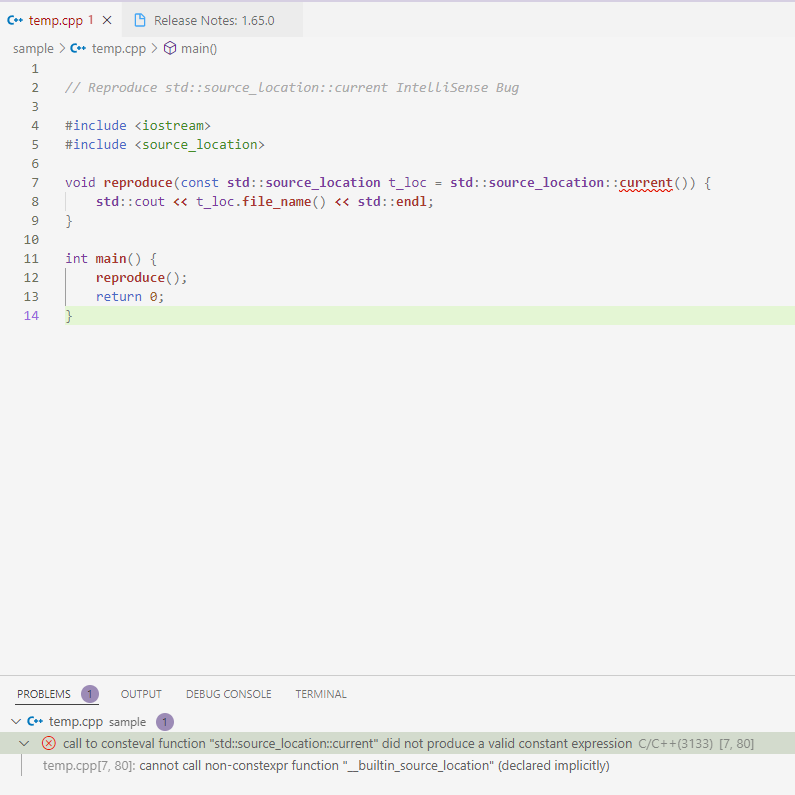
When using std::source_location::current() as a default parameter, IntelliSense throws this warning:
call to consteval function "std::source_location::current" did not produce a valid constant expression
However, the code compiles without errors and follows the examples from https://en.cppreference.com/w/cpp/utility/source_location
Steps to reproduce
- Install and activate C/C++ Extension Pack
- Create a .cpp file containing a sample program using std::source_location::current()
- If IntelliSense for C++ is set up, you should see the error message shown in the screenshot.
Expected behavior
IntelliSese should not throw an error, as this is valid C++ code: https://en.cppreference.com/w/cpp/utility/source_location
Code sample and logs
- Code sample
// Reproduce std::source_location::current IntelliSense Bug

#include <iostream>
#include <source_location>

void reproduce(const std::source_location t_loc = std::source_location::current()) {
    std::cout << t_loc.file_name() << std::endl;
}

int main() {
    reproduce();
    return 0;
}
-
Configurations in
c_cpp_properties.json
Didn't find c_cpp_properties.json. Everything stored in settings.json, I guess. -
Logs from running
C/C++: Log Diagnosticsfrom the VS Code command palette
-------- Diagnostics - 7.3.2022, 11:28:13
Version: 1.9.2
Current Configuration:
{
"name": "Win32",
"includePath": [
"${workspaceFolder}/"
],
"defines": [
"_DEBUG",
"UNICODE",
"_UNICODE"
],
"windowsSdkVersion": "10.0.19041.0",
"compilerPath": "C:/Program Files (x86)/Microsoft Visual Studio/2019/Community/VC/Tools/MSVC/14.28.29910/bin/Hostx64/x64/cl.exe",
"intelliSenseMode": "windows-msvc-x64",
"compilerArgs": [],
"cStandard": "c17",
"cppStandard": "c++20",
"intelliSenseModeIsExplicit": false,
"cStandardIsExplicit": true,
"cppStandardIsExplicit": true,
"mergeConfigurations": false,
"compilerPathIsExplicit": false,
"configurationProvider": "ms-vscode.cmake-tools",
"browse": {
"path": [
"${workspaceFolder}/"
],
"limitSymbolsToIncludedHeaders": true
}
}
Custom browse configuration:
{
"browsePath": [
"d:/entwicklung/working/molog/build/test/cmakefiles",
"d:/entwicklung/working/molog/src/"./"",
"d:/entwicklung/working/molog/src",
"d:/entwicklung/working/molog/src/molog",
"d:/entwicklung/working/molog/sample"
],
"standard": "gnu++20",
"compilerPath": "d:/programme/msys2/mingw64/bin/g++.exe",
"compilerArgs": [
"-Wall",
"-Wextra",
"-g",
"-DDebug",
"-std=gnu++20"
]
}
Custom configurations:
[ D:\Entwicklung\working\molog\sample\temp.cpp ]
{
"defines": [
"Debug"
],
"standard": "gnu++20",
"includePath": [
"d:/entwicklung/working/molog/src"
],
"compilerPath": "d:/programme/msys2/mingw64/bin/g++.exe",
"compilerArgs": [
"-Wall",
"-Wextra",
"-g",
"-DDebug",
"-std=gnu++20"
]
}
Translation Unit Mappings:
[ D:\Entwicklung\working\molog\sample\temp.cpp ]:
D:\Entwicklung\working\molog\sample\temp.cpp
Translation Unit Configurations:
[ D:\Entwicklung\working\molog\sample\temp.cpp ]:
Process ID: 2040
Memory Usage: 74 MB
Compiler Path: d:/programme/msys2/mingw64/bin/g++.exe
Includes:
D:\ENTWICKLUNG\WORKING\MOLOG\SRC
D:\PROGRAMME\MSYS2\MINGW64\INCLUDE\C++\11.2.0
D:\PROGRAMME\MSYS2\MINGW64\INCLUDE\C++\11.2.0\X86_64-W64-MINGW32
D:\PROGRAMME\MSYS2\MINGW64\INCLUDE\C++\11.2.0\BACKWARD
D:\PROGRAMME\MSYS2\MINGW64\LIB\GCC\X86_64-W64-MINGW32\11.2.0\INCLUDE
D:\PROGRAMME\MSYS2\MINGW64\INCLUDE
D:\PROGRAMME\MSYS2\MINGW64\LIB\GCC\X86_64-W64-MINGW32\11.2.0\INCLUDE-FIXED
D:\PROGRAMME\MSYS2\MINGW64\X86_64-W64-MINGW32\INCLUDE
Defines:
Debug
Debug
Standard Version: c++20
IntelliSense Mode: windows-gcc-x64
Other Flags:
--g++
--gnu_version=110200
Total Memory Usage: 74 MB
------- Workspace parsing diagnostics -------
Number of files discovered (not excluded): 5809
- Logs from the language server logging
loggingLevel: Information
Code browsing service initialized
Folder: C:/PROGRAM FILES (X86)/MICROSOFT VISUAL STUDIO/2019/COMMUNITY/VC/TOOLS/MSVC/14.28.29910/ATLMFC/INCLUDE/* will be indexed
Folder: C:/PROGRAM FILES (X86)/MICROSOFT VISUAL STUDIO/2019/COMMUNITY/VC/TOOLS/MSVC/14.28.29910/INCLUDE/* will be indexed
Folder: C:/PROGRAM FILES (X86)/WINDOWS KITS/10/INCLUDE/10.0.19041.0/CPPWINRT/ will be indexed
Folder: C:/PROGRAM FILES (X86)/WINDOWS KITS/10/INCLUDE/10.0.19041.0/SHARED/ will be indexed
Folder: C:/PROGRAM FILES (X86)/WINDOWS KITS/10/INCLUDE/10.0.19041.0/UCRT/ will be indexed
Folder: C:/PROGRAM FILES (X86)/WINDOWS KITS/10/INCLUDE/10.0.19041.0/UM/ will be indexed
Folder: C:/PROGRAM FILES (X86)/WINDOWS KITS/10/INCLUDE/10.0.19041.0/WINRT/ will be indexed
Folder: D:/ENTWICKLUNG/WORKING/MOLOG/ will be indexed
Discovering files...
Querying compiler for default C++ language standard using command line: "d:/programme/msys2/mingw64/bin/g++.exe" -x c++ -E -dM nul
Processing folder (non-recursive): C:/PROGRAM FILES (X86)/MICROSOFT VISUAL STUDIO/2019/COMMUNITY/VC/TOOLS/MSVC/14.28.29910/ATLMFC/INCLUDE
Processing folder (non-recursive): C:/PROGRAM FILES (X86)/MICROSOFT VISUAL STUDIO/2019/COMMUNITY/VC/TOOLS/MSVC/14.28.29910/INCLUDE
Processing folder (recursive): C:/PROGRAM FILES (X86)/WINDOWS KITS/10/INCLUDE/10.0.19041.0/CPPWINRT/
Processing folder (recursive): C:/PROGRAM FILES (X86)/WINDOWS KITS/10/INCLUDE/10.0.19041.0/SHARED/
Processing folder (recursive): C:/PROGRAM FILES (X86)/WINDOWS KITS/10/INCLUDE/10.0.19041.0/UCRT/
Processing folder (recursive): C:/PROGRAM FILES (X86)/WINDOWS KITS/10/INCLUDE/10.0.19041.0/UM/
Detected language standard version: gnu++17
Querying compiler for default C language standard using command line: "d:/programme/msys2/mingw64/bin/g++.exe" -x c -E -dM nul
Processing folder (recursive): C:/PROGRAM FILES (X86)/WINDOWS KITS/10/INCLUDE/10.0.19041.0/WINRT/
Detected language standard version: gnu17
Querying compiler's default target using command line: "d:/programme/msys2/mingw64/bin/g++.exe" -dumpmachine
Processing folder (recursive): D:/ENTWICKLUNG/WORKING/MOLOG/
Discovering files: 4954 file(s) processed
Compiler returned default target value: x86_64-w64-mingw32
Custom configuration provider 'CMake Tools' registered
Unable to retrieve file system information for d:/entwicklung/working/molog/src/"./". error = -1
Folder: D:/PROGRAMME/MSYS2/MINGW64/LIB/GCC/X86_64-W64-MINGW32/11.2.0/INCLUDE/ will be indexed
Folder: D:/PROGRAMME/MSYS2/MINGW64/INCLUDE/ will be indexed
Folder: D:/PROGRAMME/MSYS2/MINGW64/LIB/GCC/X86_64-W64-MINGW32/11.2.0/INCLUDE-FIXED/ will be indexed
Folder: D:/PROGRAMME/MSYS2/MINGW64/X86_64-W64-MINGW32/INCLUDE/ will be indexed
Folder: D:/ENTWICKLUNG/WORKING/MOLOG/BUILD/TEST/CMAKEFILES/ will be indexed
Folder: D:/ENTWICKLUNG/WORKING/MOLOG/SRC/ will be indexed
Folder: D:/ENTWICKLUNG/WORKING/MOLOG/SAMPLE/ will be indexed
0 file(s) removed from database
IntelliSense Engine = Default.
Enhanced Colorization is enabled.
Error squiggles are enabled if all header dependencies are resolved.
Autocomplete is enabled.
Done discovering files.
Discovering files...
IntelliSense Engine = Default.
Enhanced Colorization is enabled.
Error squiggles are enabled if all header dependencies are resolved.
Autocomplete is enabled.
IntelliSense Engine = Default.
Enhanced Colorization is enabled.
Error squiggles are enabled if all header dependencies are resolved.
Autocomplete is enabled.
Processing folder (recursive): D:/PROGRAMME/MSYS2/MINGW64/LIB/GCC/X86_64-W64-MINGW32/11.2.0/INCLUDE/
Processing folder (recursive): D:/PROGRAMME/MSYS2/MINGW64/INCLUDE/
Processing folder (recursive): D:/PROGRAMME/MSYS2/MINGW64/LIB/GCC/X86_64-W64-MINGW32/11.2.0/INCLUDE-FIXED/
Processing folder (recursive): D:/PROGRAMME/MSYS2/MINGW64/X86_64-W64-MINGW32/INCLUDE/
Processing folder (recursive): D:/ENTWICKLUNG/WORKING/MOLOG/BUILD/TEST/CMAKEFILES/
Processing folder (recursive): D:/ENTWICKLUNG/WORKING/MOLOG/SRC/
Processing folder (recursive): D:/ENTWICKLUNG/WORKING/MOLOG/SAMPLE/
Discovering files: 5809 file(s) processed
4945 file(s) removed from database
Done discovering files.
Populating include completion cache.
Parsing remaining files...
Parsing: 0 files(s) processed
Done parsing remaining files.
Checking for syntax errors: D:\Entwicklung\working\molog\src\molog\Logger.hpp
Shutting down IntelliSense server: D:\Entwicklung\working\molog\sample\temp.cpp
Checking for syntax errors: D:\Entwicklung\working\molog\src\molog\Logger.hpp
Shutting down IntelliSense server: D:\Entwicklung\working\molog\sample\temp.cpp
Shutting down IntelliSense server: D:\Entwicklung\working\molog\sample\temp.cpp
Checking for syntax errors: D:\Entwicklung\working\molog\src\molog\Logger.hpp
Shutting down IntelliSense server: D:\Entwicklung\working\molog\sample\temp.cpp
Checking for syntax errors: D:\Entwicklung\working\molog\src\molog\Logger.hpp
Checking for syntax errors: D:\Entwicklung\working\molog\src\molog\Logger.hpp
Checking for syntax errors: D:\Entwicklung\working\molog\src\molog\Log.hpp
Checking for syntax errors: D:\Entwicklung\working\molog\src\molog\Log.hpp
Checking for syntax errors: D:\Entwicklung\working\molog\src\molog\Log.hpp
Checking for syntax errors: D:\Entwicklung\working\molog\src\molog\Log.hpp
Checking for syntax errors: D:\Entwicklung\working\molog\src\molog\Log.hpp
Checking for syntax errors: D:\Entwicklung\working\molog\src\molog\Log.hpp
Checking for syntax errors: D:\Entwicklung\working\molog\src\molog\Log.hpp
Checking for syntax errors: D:\Entwicklung\working\molog\src\molog\Log.hpp
IntelliSense Engine = Default.
Enhanced Colorization is enabled.
Error squiggles are enabled if all header dependencies are resolved.
Autocomplete is enabled.
IntelliSense Engine = Default.
Enhanced Colorization is enabled.
Error squiggles are enabled if all header dependencies are resolved.
Autocomplete is enabled.
IntelliSense Engine = Default.
Enhanced Colorization is enabled.
Error squiggles are enabled if all header dependencies are resolved.
Autocomplete is enabled.
IntelliSense Engine = Default.
Enhanced Colorization is enabled.
Error squiggles are enabled if all header dependencies are resolved.
Autocomplete is enabled.
Checking for syntax errors: D:\Entwicklung\working\molog\sample\temp.cpp
Checking for syntax errors: D:\Entwicklung\working\molog\src\molog\Log.hpp
IntelliSense Engine = Default.
Enhanced Colorization is enabled.
Error squiggles are enabled if all header dependencies are resolved.
Autocomplete is enabled.
Checking for syntax errors: D:\Entwicklung\working\molog\sample\temp.cpp
Checking for syntax errors: D:\Entwicklung\working\molog\sample\temp.cpp
Checking for syntax errors: D:\Entwicklung\working\molog\sample\temp.cpp
...
Screenshots
Guida per i contributori
Apri la guida per i contributori
Come iniziare
- Leggi tutta la issue e poi la guida ai contributi del progetto.
- Commenta sulla issue per dire che te ne occupi tu — evita che due persone facciano lo stesso lavoro.
- Fai un fork del repository e lavora su un branch.
- Apri una pull request che faccia riferimento al numero della issue.
Direzione di ricerca
Riproducete la diagnostica con l’esempio C++20 fornito utilizzando la configurazione MinGW-w64 e CMake Tools indicata. Iniziate dalla gestione di std::source_location::current() in un parametro predefinito da parte del servizio linguistico C++, e verificate che IntelliSense non segnali più alcun errore mentre l’esempio continua a compilare correttamente.
Scritto dal modello di indicizzazione a partire dal testo della issue.
Valutazione
- Stack tecnologico
- cpp
- Ambito
- devtools
- Tipo di issue
- Bug
- Difficoltà
- 4/5
- Tempo stimato
- 3-5 giorni
- Stato di attività
- Ferma
- Chiarezza
- Specificata chiaramente
- Idoneità per principianti
- 35/100