microsoft / microsoft/vscode-cpptools
Find All References cannot find typedef'ed structure for function argument correctly.
Dieses Issue hat noch niemand übernommen.
- Vorherrschende Sprache
- TypeScript
- Sterne
- 6.2k
- Forks
- 1.7k
- Ø Merge
- 14 Std. 46 Min.
- Gemergte PRs (30 T.)
- 61
Beschreibung
Bug type: Language Service
Describe the bug
Find All References cannot find typedef'ed structure for function argument correctly.
- OS and Version:
- Windows 10 Pro 19043.1237
- VS Code Version:
- 1.60.2
- C/C++ Extension Version:
- 1.6.0
- Other extensions you installed (and if the issue persists after disabling them):
- many extensions...
- If using SSH remote, specify OS of remote machine:
- both local and remote (Ubuntu 20.04.3 LTS)
- A clear and concise description of what the bug is, including information about the workspace (i.e. is the workspace a single project or multiple projects, size of the project, etc).
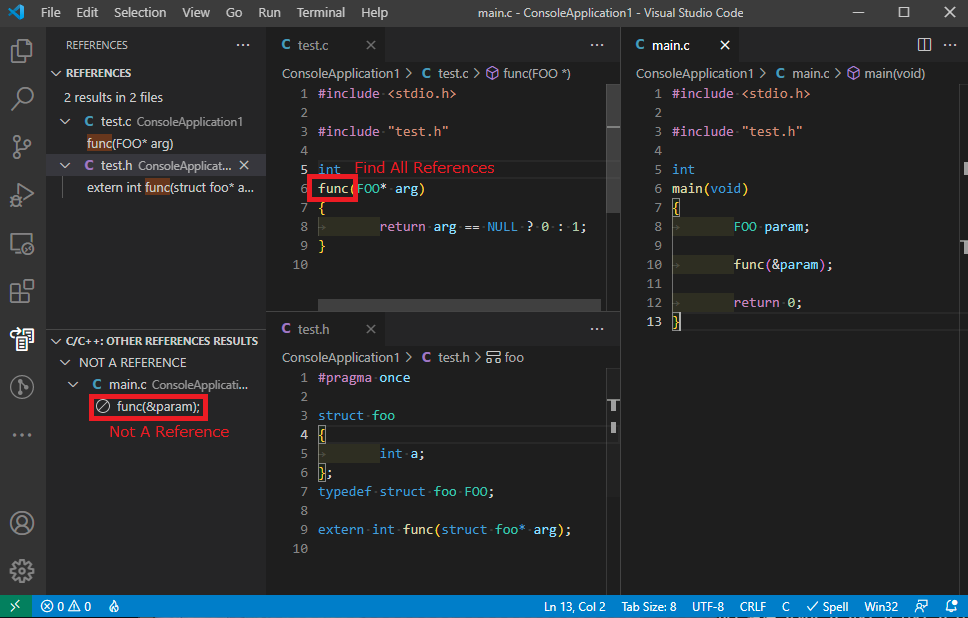
- When structure is typedef'ed, extern definition uses struct and real function's argument is typedef'ed struct, "Find All References" shows some references and some other references result.
- For same files, Visual Studio (!Code) can find all references correctly.
Steps to reproduce
- Open folder containg sample codes. (see screenshot)
- Right click and "Find All References" on func() in test.c
- See result. (REFERENCES and OTHER REFERENCES RESULTS)
Expected behavior
All reference can be see in REFERENCES, not in OTHER REFERENCES RESULTS.
Code sample and logs
- Code sample
- Code and result are in screenshots section.
- Configurations in
c_cpp_properties.json- None. (file not exist)
- Logs from running
C/C++: Log Diagnosticsfrom the VS Code command palette
------- Diagnostics - 2021/9/23 8:35:59
Version: 1.6.0
Current Configuration:
{
    "name": "Win32",
    "includePath": [
        "${workspaceFolder}/**",
        "${vcpkgRoot}/x64-windows/include",
        "${vcpkgRoot}/x64-windows-static/include",
        "${vcpkgRoot}/x86-windows/include",
        "${vcpkgRoot}/x86-windows-static/include"
    ],
    "defines": [
        "_DEBUG",
        "UNICODE",
        "_UNICODE"
    ],
    "windowsSdkVersion": "10.0.20348.0",
    "compilerPath": "C:\\Program Files (x86)\\Microsoft Visual Studio\\2019\\Professional\\VC\\Tools\\MSVC\\14.29.30133\\bin\\Hostx64\\x64\\cl.exe",
    "cStandard": "c17",
    "cppStandard": "c++17",
    "intelliSenseMode": "windows-msvc-x64",
    "compilerPathIsExplicit": true,
    "cStandardIsExplicit": true,
    "cppStandardIsExplicit": true,
    "intelliSenseModeIsExplicit": true,
    "compilerArgs": [],
    "browse": {
        "path": [
            "${workspaceFolder}/**",
            "${vcpkgRoot}/x64-windows/include",
            "${vcpkgRoot}/x64-windows-static/include",
            "${vcpkgRoot}/x86-windows/include",
            "${vcpkgRoot}/x86-windows-static/include"
        ],
        "limitSymbolsToIncludedHeaders": true,
        "databaseFilename": "${workspaceFolder}/.vscode/.browse.VC.db"
    }
}
Translation Unit Mappings:
[ D:\home\kit\workspace\ConsoleApplication1\ConsoleApplication1\test.c ]:
    D:\HOME\KIT\WORKSPACE\CONSOLEAPPLICATION1\CONSOLEAPPLICATION1\TEST.C
Translation Unit Configurations:
[ D:\home\kit\workspace\ConsoleApplication1\ConsoleApplication1\test.c ]:
    Process ID: 18080
    Memory Usage: 13 MB
    Compiler Path: C:\Program Files (x86)\Microsoft Visual Studio\2019\Professional\VC\Tools\MSVC\14.29.30133\bin\Hostx64\x64\cl.exe
    Includes:
        D:\DATA\SOURCE\VCPKG\INSTALLED\X64-WINDOWS\INCLUDE
        D:\DATA\SOURCE\VCPKG\INSTALLED\X64-WINDOWS-STATIC\INCLUDE
        D:\DATA\SOURCE\VCPKG\INSTALLED\X86-WINDOWS\INCLUDE
        D:\DATA\SOURCE\VCPKG\INSTALLED\X86-WINDOWS-STATIC\INCLUDE
        C:\PROGRAM FILES (X86)\MICROSOFT VISUAL STUDIO\2019\PROFESSIONAL\VC\TOOLS\MSVC\14.29.30133\INCLUDE
        C:\PROGRAM FILES (X86)\MICROSOFT VISUAL STUDIO\2019\PROFESSIONAL\VC\TOOLS\MSVC\14.29.30133\ATLMFC\INCLUDE
        C:\PROGRAM FILES (X86)\WINDOWS KITS\10\INCLUDE\10.0.20348.0\UM
        C:\PROGRAM FILES (X86)\WINDOWS KITS\10\INCLUDE\10.0.20348.0\UCRT
        C:\PROGRAM FILES (X86)\WINDOWS KITS\10\INCLUDE\10.0.20348.0\SHARED
        C:\PROGRAM FILES (X86)\WINDOWS KITS\10\INCLUDE\10.0.20348.0\WINRT
        C:\PROGRAM FILES (X86)\WINDOWS KITS\10\INCLUDE\10.0.20348.0\CPPWINRT
    Defines:
        _DEBUG
        UNICODE
        _UNICODE
    Standard Version: ms_c17
    IntelliSense Mode: windows-msvc-x64
Total Memory Usage: 13 MB

------- Workspace parsing diagnostics -------
Number of files discovered (not excluded): 5672
Number of files parsed: 23
- Logs from the language server logging
  tag parsing file: C:\PROGRAM FILES (X86)\MICROSOFT VISUAL STUDIO\2019\PROFESSIONAL\VC\TOOLS\MSVC\14.29.30133\INCLUDE\CODEANALYSIS\SOURCEANNOTATIONS.H
sending compilation args for D:\HOME\KIT\WORKSPACE\CONSOLEAPPLICATION1\CONSOLEAPPLICATION1\MAIN.C
  include: D:\DATA\SOURCE\VCPKG\INSTALLED\X64-WINDOWS\INCLUDE
  include: D:\DATA\SOURCE\VCPKG\INSTALLED\X64-WINDOWS-STATIC\INCLUDE
  include: D:\DATA\SOURCE\VCPKG\INSTALLED\X86-WINDOWS\INCLUDE
  include: D:\DATA\SOURCE\VCPKG\INSTALLED\X86-WINDOWS-STATIC\INCLUDE
  include: C:\PROGRAM FILES (X86)\MICROSOFT VISUAL STUDIO\2019\PROFESSIONAL\VC\TOOLS\MSVC\14.29.30133\INCLUDE
  include: C:\PROGRAM FILES (X86)\MICROSOFT VISUAL STUDIO\2019\PROFESSIONAL\VC\TOOLS\MSVC\14.29.30133\ATLMFC\INCLUDE
  include: C:\PROGRAM FILES (X86)\WINDOWS KITS\10\INCLUDE\10.0.20348.0\UM
  include: C:\PROGRAM FILES (X86)\WINDOWS KITS\10\INCLUDE\10.0.20348.0\UCRT
  include: C:\PROGRAM FILES (X86)\WINDOWS KITS\10\INCLUDE\10.0.20348.0\SHARED
  include: C:\PROGRAM FILES (X86)\WINDOWS KITS\10\INCLUDE\10.0.20348.0\WINRT
  include: C:\PROGRAM FILES (X86)\WINDOWS KITS\10\INCLUDE\10.0.20348.0\CPPWINRT
  define: _DEBUG
  define: UNICODE
  define: _UNICODE
Shutting down IntelliSense server: D:\HOME\KIT\WORKSPACE\CONSOLEAPPLICATION1\CONSOLEAPPLICATION1\MAIN.C
Screenshots
Additional context
Yes, this is not good code, I think.
But compilers do not warn and Visual Studio works correctly. I'm happy if VSCode also shows correct results.
Beitragsleitfaden
Erste Schritte
- Lies das ganze Issue und danach den Beitragsleitfaden des Projekts.
- Schreib ins Issue, dass du es übernimmst — das erspart doppelte Arbeit.
- Forke das Repository und arbeite in einem Branch.
- Öffne einen Pull Request, der die Issue-Nummer nennt.
Rechercherichtung
Reproduzieren Sie das Problem anhand der als test.c und main.c referenzierten Beispieldateien und untersuchen Sie anschließend die Ergebnisse und Diagnosen von Find All References des C/C++ language server. Erledigt ist die Aufgabe, wenn Verweise auf die typedef-definierte Struktur, die als Funktionsargument verwendet wird, gemeinsam unter REFERENCES erscheinen, anstatt auf OTHER REFERENCES RESULTS aufgeteilt zu werden.
Vom Indexierungsmodell aus dem Issue-Text verfasst.
Bewertung
- Tech-Stack
- c
- Bereich
- devtools
- Issue-Typ
- Bug
- Schwierigkeit
- 4/5
- Geschätzter Aufwand
- 3-5 Tage
- Aktivitätsstatus
- Veraltet
- Klarheit
- Muss geklärt werden
- Anfängerfreundlichkeit
- 35/100