microsoft / microsoft/vscode-cpptools
Find All References cannot find typedef'ed structure for function argument correctly.
Nobody has claimed this yet.
- Dominant language
- TypeScript
- Stars
- 6.2k
- Forks
- 1.7k
- Avg merge
- 14h 46m
- Merged PRs (30d)
- 61
Description
Bug type: Language Service
Describe the bug
Find All References cannot find typedef'ed structure for function argument correctly.
- OS and Version:
- Windows 10 Pro 19043.1237
- VS Code Version:
- 1.60.2
- C/C++ Extension Version:
- 1.6.0
- Other extensions you installed (and if the issue persists after disabling them):
- many extensions...
- If using SSH remote, specify OS of remote machine:
- both local and remote (Ubuntu 20.04.3 LTS)
- A clear and concise description of what the bug is, including information about the workspace (i.e. is the workspace a single project or multiple projects, size of the project, etc).
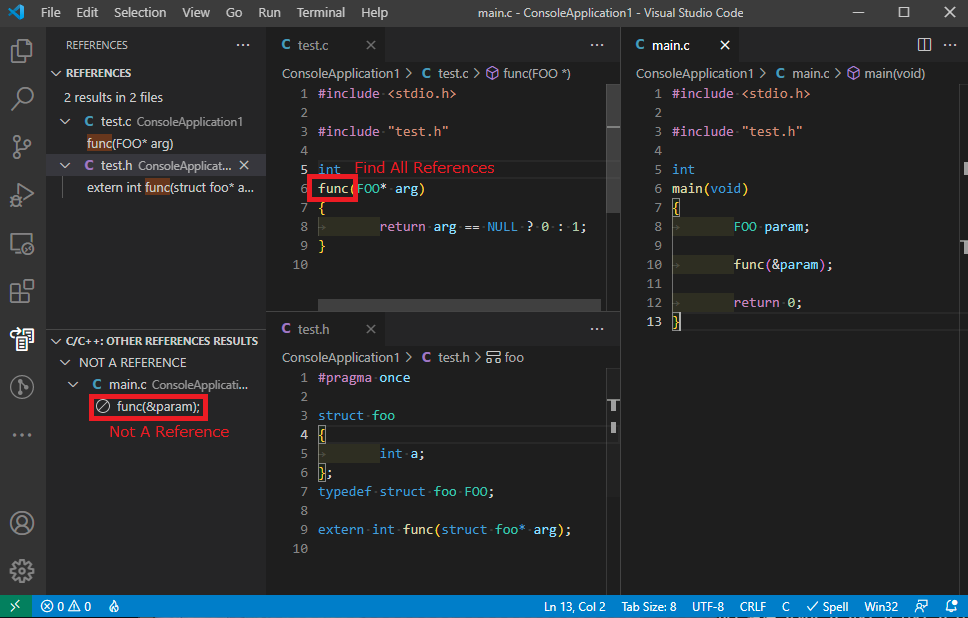
- When structure is typedef'ed, extern definition uses struct and real function's argument is typedef'ed struct, "Find All References" shows some references and some other references result.
- For same files, Visual Studio (!Code) can find all references correctly.
Steps to reproduce
- Open folder containg sample codes. (see screenshot)
- Right click and "Find All References" on func() in test.c
- See result. (REFERENCES and OTHER REFERENCES RESULTS)
Expected behavior
All reference can be see in REFERENCES, not in OTHER REFERENCES RESULTS.
Code sample and logs
- Code sample
- Code and result are in screenshots section.
- Configurations in
c_cpp_properties.json- None. (file not exist)
- Logs from running
C/C++: Log Diagnosticsfrom the VS Code command palette
------- Diagnostics - 2021/9/23 8:35:59
Version: 1.6.0
Current Configuration:
{
    "name": "Win32",
    "includePath": [
        "${workspaceFolder}/**",
        "${vcpkgRoot}/x64-windows/include",
        "${vcpkgRoot}/x64-windows-static/include",
        "${vcpkgRoot}/x86-windows/include",
        "${vcpkgRoot}/x86-windows-static/include"
    ],
    "defines": [
        "_DEBUG",
        "UNICODE",
        "_UNICODE"
    ],
    "windowsSdkVersion": "10.0.20348.0",
    "compilerPath": "C:\\Program Files (x86)\\Microsoft Visual Studio\\2019\\Professional\\VC\\Tools\\MSVC\\14.29.30133\\bin\\Hostx64\\x64\\cl.exe",
    "cStandard": "c17",
    "cppStandard": "c++17",
    "intelliSenseMode": "windows-msvc-x64",
    "compilerPathIsExplicit": true,
    "cStandardIsExplicit": true,
    "cppStandardIsExplicit": true,
    "intelliSenseModeIsExplicit": true,
    "compilerArgs": [],
    "browse": {
        "path": [
            "${workspaceFolder}/**",
            "${vcpkgRoot}/x64-windows/include",
            "${vcpkgRoot}/x64-windows-static/include",
            "${vcpkgRoot}/x86-windows/include",
            "${vcpkgRoot}/x86-windows-static/include"
        ],
        "limitSymbolsToIncludedHeaders": true,
        "databaseFilename": "${workspaceFolder}/.vscode/.browse.VC.db"
    }
}
Translation Unit Mappings:
[ D:\home\kit\workspace\ConsoleApplication1\ConsoleApplication1\test.c ]:
    D:\HOME\KIT\WORKSPACE\CONSOLEAPPLICATION1\CONSOLEAPPLICATION1\TEST.C
Translation Unit Configurations:
[ D:\home\kit\workspace\ConsoleApplication1\ConsoleApplication1\test.c ]:
    Process ID: 18080
    Memory Usage: 13 MB
    Compiler Path: C:\Program Files (x86)\Microsoft Visual Studio\2019\Professional\VC\Tools\MSVC\14.29.30133\bin\Hostx64\x64\cl.exe
    Includes:
        D:\DATA\SOURCE\VCPKG\INSTALLED\X64-WINDOWS\INCLUDE
        D:\DATA\SOURCE\VCPKG\INSTALLED\X64-WINDOWS-STATIC\INCLUDE
        D:\DATA\SOURCE\VCPKG\INSTALLED\X86-WINDOWS\INCLUDE
        D:\DATA\SOURCE\VCPKG\INSTALLED\X86-WINDOWS-STATIC\INCLUDE
        C:\PROGRAM FILES (X86)\MICROSOFT VISUAL STUDIO\2019\PROFESSIONAL\VC\TOOLS\MSVC\14.29.30133\INCLUDE
        C:\PROGRAM FILES (X86)\MICROSOFT VISUAL STUDIO\2019\PROFESSIONAL\VC\TOOLS\MSVC\14.29.30133\ATLMFC\INCLUDE
        C:\PROGRAM FILES (X86)\WINDOWS KITS\10\INCLUDE\10.0.20348.0\UM
        C:\PROGRAM FILES (X86)\WINDOWS KITS\10\INCLUDE\10.0.20348.0\UCRT
        C:\PROGRAM FILES (X86)\WINDOWS KITS\10\INCLUDE\10.0.20348.0\SHARED
        C:\PROGRAM FILES (X86)\WINDOWS KITS\10\INCLUDE\10.0.20348.0\WINRT
        C:\PROGRAM FILES (X86)\WINDOWS KITS\10\INCLUDE\10.0.20348.0\CPPWINRT
    Defines:
        _DEBUG
        UNICODE
        _UNICODE
    Standard Version: ms_c17
    IntelliSense Mode: windows-msvc-x64
Total Memory Usage: 13 MB

------- Workspace parsing diagnostics -------
Number of files discovered (not excluded): 5672
Number of files parsed: 23
- Logs from the language server logging
  tag parsing file: C:\PROGRAM FILES (X86)\MICROSOFT VISUAL STUDIO\2019\PROFESSIONAL\VC\TOOLS\MSVC\14.29.30133\INCLUDE\CODEANALYSIS\SOURCEANNOTATIONS.H
sending compilation args for D:\HOME\KIT\WORKSPACE\CONSOLEAPPLICATION1\CONSOLEAPPLICATION1\MAIN.C
  include: D:\DATA\SOURCE\VCPKG\INSTALLED\X64-WINDOWS\INCLUDE
  include: D:\DATA\SOURCE\VCPKG\INSTALLED\X64-WINDOWS-STATIC\INCLUDE
  include: D:\DATA\SOURCE\VCPKG\INSTALLED\X86-WINDOWS\INCLUDE
  include: D:\DATA\SOURCE\VCPKG\INSTALLED\X86-WINDOWS-STATIC\INCLUDE
  include: C:\PROGRAM FILES (X86)\MICROSOFT VISUAL STUDIO\2019\PROFESSIONAL\VC\TOOLS\MSVC\14.29.30133\INCLUDE
  include: C:\PROGRAM FILES (X86)\MICROSOFT VISUAL STUDIO\2019\PROFESSIONAL\VC\TOOLS\MSVC\14.29.30133\ATLMFC\INCLUDE
  include: C:\PROGRAM FILES (X86)\WINDOWS KITS\10\INCLUDE\10.0.20348.0\UM
  include: C:\PROGRAM FILES (X86)\WINDOWS KITS\10\INCLUDE\10.0.20348.0\UCRT
  include: C:\PROGRAM FILES (X86)\WINDOWS KITS\10\INCLUDE\10.0.20348.0\SHARED
  include: C:\PROGRAM FILES (X86)\WINDOWS KITS\10\INCLUDE\10.0.20348.0\WINRT
  include: C:\PROGRAM FILES (X86)\WINDOWS KITS\10\INCLUDE\10.0.20348.0\CPPWINRT
  define: _DEBUG
  define: UNICODE
  define: _UNICODE
Shutting down IntelliSense server: D:\HOME\KIT\WORKSPACE\CONSOLEAPPLICATION1\CONSOLEAPPLICATION1\MAIN.C
Screenshots
Additional context
Yes, this is not good code, I think.
But compilers do not warn and Visual Studio works correctly. I'm happy if VSCode also shows correct results.
Contributor guide
First steps
- Read the whole issue, then the project's contributing guide.
- Comment on the issue to say you are picking it up — it saves two people doing the same work.
- Fork the repository and make your change on a branch.
- Open a pull request that references the issue number.
Research direction
Reproduce the issue using the sample files referenced as test.c and main.c, then inspect the C/C++ language server's Find All References results and diagnostics. Done means references to the typedef'ed structure used in the function argument appear together under REFERENCES rather than being split into OTHER REFERENCES RESULTS.
Written by the indexing model from the issue text.
Assessment
- Tech stack
- c
- Domain
- devtools
- Issue type
- Bug
- Difficulty
- 4/5
- Estimated time
- 3-5 days
- Activity status
- Stale
- Clarity
- Needs clarification
- Newbie friendliness
- 35/100