microsoft / microsoft/vscode-cpptools
IntelliSense reports error when template default argument is decltype(lambda) (C++20)
Dieses Issue hat noch niemand übernommen.
- Vorherrschende Sprache
- TypeScript
- Sterne
- 6.2k
- Forks
- 1.7k
- Ø Merge
- 14 Std. 46 Min.
- Gemergte PRs (30 T.)
- 61
Beschreibung
Type: LanguageService
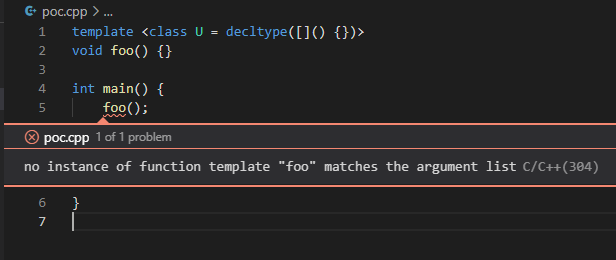
IntelliSense reports error with this example:
template <class U = decltype([]() {})>
void foo() {}

int main() {
    foo(); // <-- error here: no instance of function template "foo" matches the argument list
}
While this code perfectly compiles with GCC and C++20: https://godbolt.org/z/b5a7hj
It won't compile with C++17 tho, so I believe the problem lies in C++20 compatibility.
Describe the bug
- OS and Version: Windows 10 2004, on WSL2 Ubuntu 20.04
- VS Code Version: 1.52.1
- C/C++ Extension Version: v1.2.0-insiders2
- Other extensions you installed (and if the issue persists after disabling them): issue persists without any other extension
- Does this issue involve using SSH remote to run the extension on a remote machine?: WSL2
- A clear and concise description of what the bug is, including information about the workspace (i.e. is the workspace a single project or multiple projects, size of the project, etc). Reproduceable with single file
Steps to reproduce
The code above with configuration:
{
    "configurations": [
        {
            "name": "Linux",
            "includePath": [
                "${workspaceFolder}/**"
            ],
            "defines": [],
            "compilerPath": "/usr/bin/gcc",
            "cStandard": "gnu17",
            "cppStandard": "c++20", // gnu++20 results in same issue
            "intelliSenseMode": "linux-gcc-x64"
        }
    ],
    "version": 4
}
Expected behavior
For IntelliSense to not report false error when using C++20.
Logs
-------- Diagnostics - 1/21/2021, 1:56:40 PM
Version: 1.2.0-insiders2
Current Configuration:
{
    "name": "Linux",
    "includePath": [
        "${workspaceFolder}/**"
    ],
    "defines": [],
    "compilerPath": "/usr/bin/gcc",
    "cStandard": "c17",
    "cppStandard": "c++20",
    "intelliSenseMode": "linux-gcc-x64",
    "compilerArgs": [],
    "intelliSenseModeIsExplicit": true,
    "cStandardIsExplicit": true,
    "cppStandardIsExplicit": true,
    "compilerPathIsExplicit": true,
    "browse": {
        "path": [
            "${workspaceFolder}/**"
        ],
        "limitSymbolsToIncludedHeaders": true
    }
}
Translation Unit Mappings:
[ /home/oliver/pro/lulu/poc/poc.cpp ]:
    /home/oliver/pro/lulu/poc/poc.cpp
Translation Unit Configurations:
[ /home/oliver/pro/lulu/poc/poc.cpp ]:
    Process ID: 15806
    Memory Usage: 16 MB
    Compiler Path: /usr/bin/gcc
    Includes:
        /usr/include/c++/10
        /usr/include/x86_64-linux-gnu/c++/10
        /usr/include/c++/10/backward
        /usr/lib/gcc/x86_64-linux-gnu/10/include
        /usr/local/include
        /usr/include/x86_64-linux-gnu
        /usr/include
    Standard Version: c++20
    IntelliSense Mode: linux-gcc-x64
    Other Flags:
        --g++
        --gnu_version=100200
Total Memory Usage: 16 MB

------- Workspace parsing diagnostics -------
Number of folders and files enumerated: 3585
Number of files discovered (not excluded): 3424
Screenshots
Beitragsleitfaden
Erste Schritte
- Lies das ganze Issue und danach den Beitragsleitfaden des Projekts.
- Schreib ins Issue, dass du es übernimmst — das erspart doppelte Arbeit.
- Forke das Repository und arbeite in einem Branch.
- Öffne einen Pull Request, der die Issue-Nummer nennt.
Rechercherichtung
Beginnen Sie mit dem einteiligen C++20-Beispiel und der in der Issue gezeigten c_cpp_properties.json-Konfiguration, und reproduzieren Sie die falsche IntelliSense-Diagnose, während Sie das Ergebnis von GCC vergleichen. Abgeschlossen ist die Aufgabe, wenn das Template mit einem Standardargument von decltype(lambda) von IntelliSense ohne den gemeldeten Function-Template-Fehler akzeptiert wird.
Vom Indexierungsmodell aus dem Issue-Text verfasst.
Bewertung
- Tech-Stack
- cpp
- Bereich
- devtools
- Issue-Typ
- Bug
- Schwierigkeit
- 4/5
- Geschätzter Aufwand
- 3-5 Tage
- Aktivitätsstatus
- Veraltet
- Klarheit
- Klar beschrieben
- Anfängerfreundlichkeit
- 35/100