microsoft / microsoft/vscode-cpptools
Compound configuration with two C applications; sometimes doesn't launch both application
@WardenGnaw ci sta già lavorando.
Dal 6/11/2020.
- Lingua principale
- TypeScript
- Stelle
- 6.2k
- Fork
- 1.7k
- Merge medio
- 14h 46m
- PR unite (30g)
- 61
Descrizione
Type: Debugger
Describe the bug
- OS and Version: Windows 10
- VS Code Version: 1.50.1
- C/C++ Extension Version: 1.1.0-insider3
- Other extensions you installed (and if the issue persists after disabling them): Bookmarks, ccls, GitHub pull request and issue, Gitlens, macros, meld diff, numbered bookmark, python, scope4code, text marker, todo tree, yangster.
- A clear and concise description of what the bug is - Compound configuration with two C applications launches; sometimes doesn't launch both application
To Reproduce
Please include a code sample and launch.json configuration.
Steps to reproduce the behavior:
- Have launch configuration to launch an C application - App1
- Have launch configuration to launch another C application - App2
- Create a compound configuration to launch both of them together like -
{
    "launch": {
        // Use IntelliSense to learn about possible attributes.
        // Hover to view descriptions of existing attributes.
        // For more information, visit: https://go.microsoft.com/fwlink/?linkid=830387
        "version": "0.2.0",
        "configurations": [
            {
                "name": "App1",
                "type": "cppdbg",
                "request": "launch",
                "program": "${workspaceFolder}/path/to/the/executable/x86_64bi_linux-abc",
                "args": [
                    "102"
                ],
                "presentation": {
                    "hidden": false,
                    "group": "NonGDB",
                    "order": 1
                },
                "stopAtEntry": false,
                "cwd": "/another/path/where/necessary/data/file/is/present",
                "environment": [],
                "externalConsole": false,
                "MIMode": "gdb",
                "miDebuggerPath": "/path/to/gdb-8.1.2",
                "setupCommands": [
                    {
                        "description": "Enable pretty-printing for gdb",
                        "text": "-enable-pretty-printing",
                        "ignoreFailures": true
                    }
                ]
            },
             {
                "name": "App2",
                "type": "cppdbg",
                "request": "launch",
                "program": "${workspaceFolder}/path/to/the/executable/x86_64bi_linux-abc",
                "args": [
                    "102"
                ],
                "presentation": {
                    "hidden": false,
                    "group": "NonGDB",
                    "order": 1
                },
                "stopAtEntry": false,
                "cwd": "/another/path/where/necessary/data/file/is/present",
                "environment": [],
                "externalConsole": false,
                "MIMode": "gdb",
                "miDebuggerPath": "/path/to/gdb-8.1.2",
                "setupCommands": [
                    {
                        "description": "Enable pretty-printing for gdb",
                        "text": "-enable-pretty-printing",
                        "ignoreFailures": true
                    }
                ]
            }
		],
		"compounds": [
            {
                "name": "App1/App1",
                "configurations": ["App1", "App1"]
            }
        ]
    }
- Now select this launch configuration -
App1/App2and thenRun. - It launches both the application in two separate integrated terminal groups. All fine.
- Now stop the debugging for both the application.
- After stopping the debugging, the integrated terminal groups which were created will still be there.
- Now try launching the same configuration
App1/App2and you see only one of the application eitherApp1orApp2would get launched.
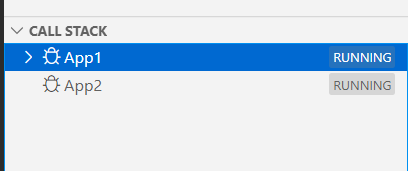
As you can see from the above picture that only one application - App1 is launched and the other application App2 didn't get launched.
This is an intermittent issue.
Additional context
If applicable, please include logging by adding "logging": { "engineLogging": true, "trace": true, "traceResponse": true } in your launch.json
Add any other context about the problem here including log or error messages in your Debug Console or Output windows.
Guida per i contributori
Apri la guida per i contributori
Come iniziare
- Leggi tutta la issue e poi la guida ai contributi del progetto.
- Commenta sulla issue per dire che te ne occupi tu — evita che due persone facciano lo stesso lavoro.
- Fai un fork del repository e lavora su un branch.
- Apri una pull request che faccia riferimento al numero della issue.
Valutazione
Questa issue non è ancora stata valutata.