microsoft / microsoft/vscode-cpptools
Debugger cannot pass arguments to the internal console correctly
@pieandcakes arbeitet bereits daran.
Seit 24.9.2019.
- Vorherrschende Sprache
- TypeScript
- Sterne
- 6.2k
- Forks
- 1.7k
- Ø Merge
- 14 Std. 46 Min.
- Gemergte PRs (30 T.)
- 61
Beschreibung
Type: Debugger
VSCode Version: 1.36.1
C/C++: 0.25.1
OS Version: Windows 7
Hello everybody,
I am currently debugging an application with the following debug configuration:
{
 "name": "Debug SIM -c -meas -b -s -1",
 "type": "cppdbg",
 "request": "launch",
 "program": "${workspaceFolder}/tools/sim/sim.exe",
 "windows": {
 "args": [
 "-c",
 "-d",
 "${file}",
 "-b",
 "-s",
 "-1"
 ]
 },
 "stopAtEntry": true,
 "cwd": "${workspaceFolder}",
 "externalConsole": true,
 "MIMode": "gdb",
 "miDebuggerPath": "${workspaceFolder}/tools/mingw64/bin/gdb.exe",
 "setupCommands": [
 {
 "description": "Enable pretty-printing for gdb",
 "text": "-enable-pretty-printing",
 "ignoreFailures": true
 }
 ]
 },
Unfortunately, I can only debug using the external console ("externalConsole": true).
If I try to do the same in the internal console ("externalConsole": false), the debugger passes incorrectly three additional arguments at the end, that were not supposed to be passed. These are "2>CON", "1>CON" and "<CON".
So the array of the passed arguments looks in the following way:
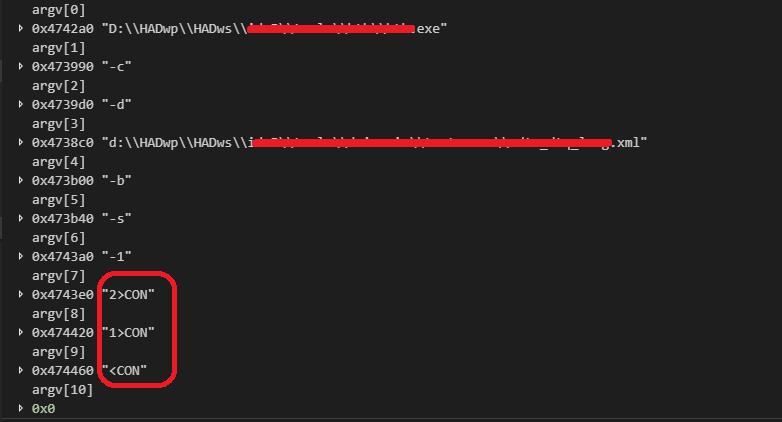
Of course, I could modify my application in the way it would ignore the arguments, but I am not sure, if these additional arguments at the end were a developer's intention and not a bug:)
Thank you in advance!!!
Beitragsleitfaden
Erste Schritte
- Lies das ganze Issue und danach den Beitragsleitfaden des Projekts.
- Schreib ins Issue, dass du es übernimmst — das erspart doppelte Arbeit.
- Forke das Repository und arbeite in einem Branch.
- Öffne einen Pull Request, der die Issue-Nummer nennt.
Bewertung
Dieses Issue wurde noch nicht bewertet.