microsoft / microsoft/TypeScript
[Remote-SSH Bug]: Open root `/` will (almost) 100% cause server DoS
Abierto
@sheetalkamat ya está trabajando en esto.
Desde el 13/12/2023.
Needs Investigation
- Lenguaje dominante
- Go
- Estrellas
- 111k
- Forks
- 14.4k
- Merge medio
- 1 d 19 h
- PR fusionados (30 d)
- 117
Descripción
Is there an existing issue for this bug?
- I have searched the existing issues
Required Troubleshooting Steps
- I have followed these troubleshooting steps
- I have tried both values of the
remote.SSH.useLocalServersetting
Connect Locally
It connects successfully
->
When opening / on a remote SSH host it will directly crash the remote after seconds, and the monitor says the disk read is 100% and halts all IO
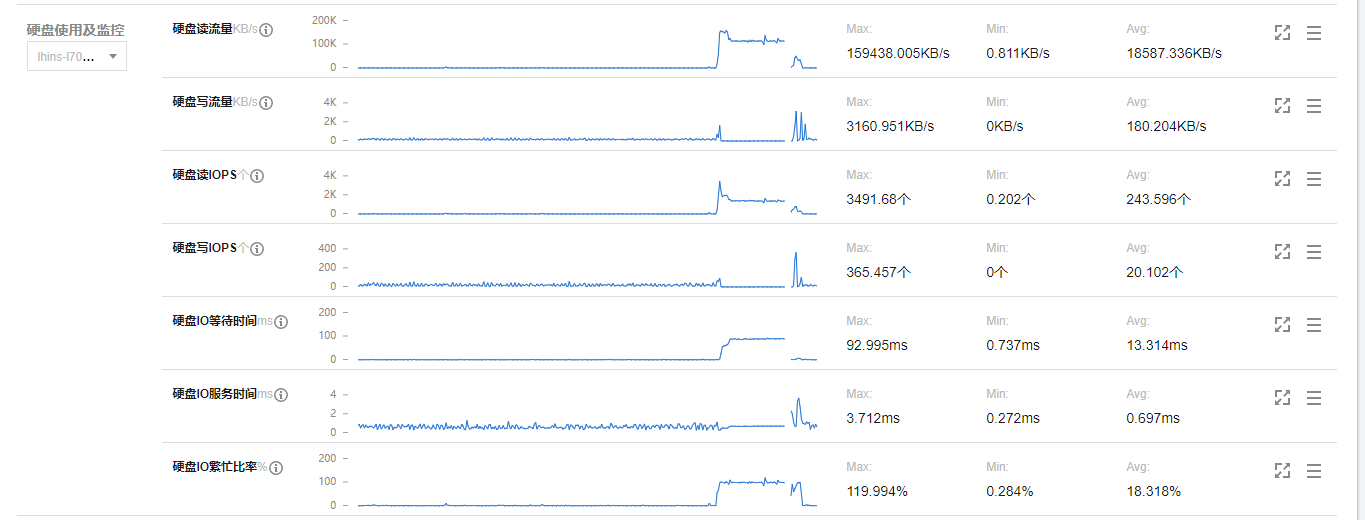
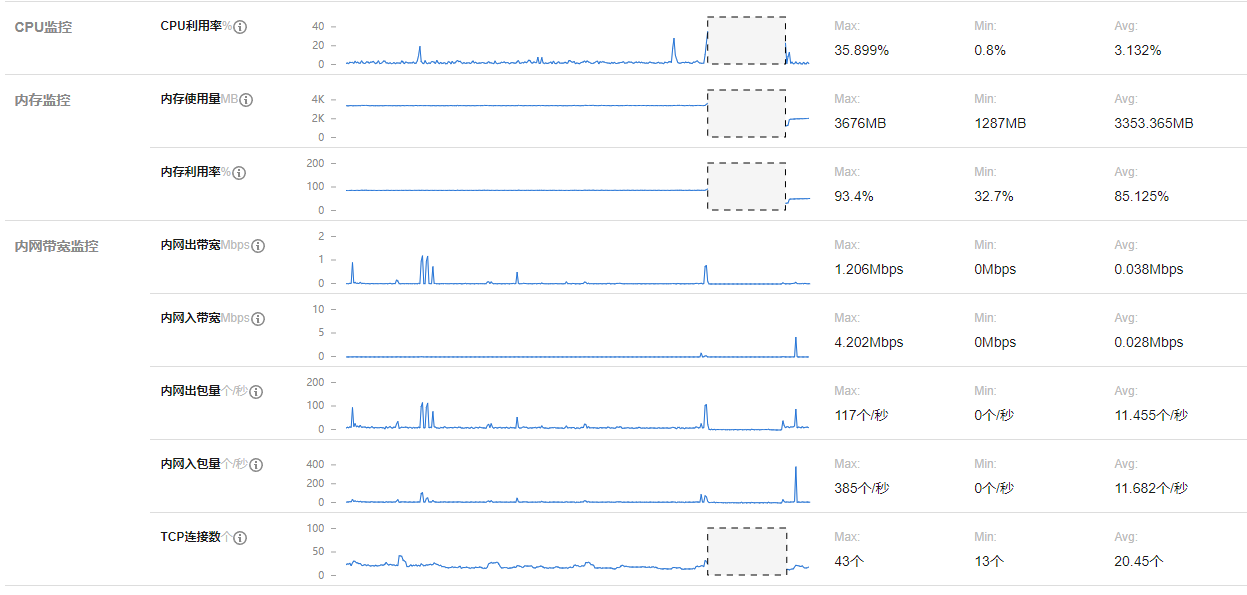
Specifically, the remote is hosted on Tencent Cloud Lighthouse, 4C4G8M
NOTE: After a forced reboot, the remote SSH can work on that device for a long time.
Expected Behavior
The remote SSH shouldn't crash SSH and halt the harddisk IO.
Steps To Reproduce
No response
Remote-SSH Log
The crashed log was not able to retrive, this is a log with a successful connection.
Remote-SSH Log
[19:40:01.145] Log Level: 2
[19:40:01.152] VS Code version: 1.75.1
[19:40:01.152] Remote-SSH version: remote-ssh@0.98.0
[19:40:01.152] win32 x64
[19:40:01.157] SSH Resolver called for "ssh-remote+7b22686f73744e616d65223a2254656e63656e74227d", attempt 1
[19:40:01.157] "remote.SSH.useLocalServer": false
[19:40:01.157] "remote.SSH.showLoginTerminal": false
[19:40:01.158] "remote.SSH.remotePlatform": {"Tencent":"linux","AWS":"linux","SoVits":"linux","SoVits-4":"linux"}
[19:40:01.158] "remote.SSH.path": undefined
[19:40:01.158] "remote.SSH.configFile": undefined
[19:40:01.158] "remote.SSH.useFlock": true
[19:40:01.158] "remote.SSH.lockfilesInTmp": false
[19:40:01.158] "remote.SSH.localServerDownload": auto
[19:40:01.158] "remote.SSH.remoteServerListenOnSocket": false
[19:40:01.158] "remote.SSH.showLoginTerminal": false
[19:40:01.158] "remote.SSH.defaultExtensions": []
[19:40:01.158] "remote.SSH.loglevel": 2
[19:40:01.158] "remote.SSH.enableDynamicForwarding": true
[19:40:01.158] "remote.SSH.enableRemoteCommand": false
[19:40:01.158] "remote.SSH.serverPickPortsFromRange": {}
[19:40:01.158] "remote.SSH.serverInstallPath": {}
[19:40:01.160] SSH Resolver called for host: Tencent
[19:40:01.160] Setting up SSH remote "Tencent"
[19:40:01.162] Using commit id "441438abd1ac652551dbe4d408dfcec8a499b8bf" and quality "stable" for server
[19:40:01.164] Install and start server if needed
[19:40:01.166] Checking ssh with "C:\Program Files\Common Files\Oracle\Java\javapath\ssh.exe -V"
[19:40:01.168] Got error from ssh: spawn C:\Program Files\Common Files\Oracle\Java\javapath\ssh.exe ENOENT
[19:40:01.168] Checking ssh with "C:\Program Files (x86)\Common Files\Oracle\Java\javapath\ssh.exe -V"
[19:40:01.168] Got error from ssh: spawn C:\Program Files (x86)\Common Files\Oracle\Java\javapath\ssh.exe ENOENT
[19:40:01.169] Checking ssh with "C:\Program Files\NVIDIA GPU Computing Toolkit\CUDA\v12.0\bin\ssh.exe -V"
[19:40:01.169] Got error from ssh: spawn C:\Program Files\NVIDIA GPU Computing Toolkit\CUDA\v12.0\bin\ssh.exe ENOENT
[19:40:01.169] Checking ssh with "C:\Program Files\NVIDIA GPU Computing Toolkit\CUDA\v12.0\libnvvp\ssh.exe -V"
[19:40:01.170] Got error from ssh: spawn C:\Program Files\NVIDIA GPU Computing Toolkit\CUDA\v12.0\libnvvp\ssh.exe ENOENT
[19:40:01.170] Checking ssh with "C:\Program Files\PlasticSCM5\server\ssh.exe -V"
[19:40:01.171] Got error from ssh: spawn C:\Program Files\PlasticSCM5\server\ssh.exe ENOENT
[19:40:01.171] Checking ssh with "C:\Program Files\PlasticSCM5\client\ssh.exe -V"
[19:40:01.171] Got error from ssh: spawn C:\Program Files\PlasticSCM5\client\ssh.exe ENOENT
[19:40:01.171] Checking ssh with "C:\Program Files\Microsoft\jdk-11.0.12.7-hotspot\bin\ssh.exe -V"
[19:40:01.172] Got error from ssh: spawn C:\Program Files\Microsoft\jdk-11.0.12.7-hotspot\bin\ssh.exe ENOENT
[19:40:01.172] Checking ssh with "C:\Windows\system32\ssh.exe -V"
[19:40:01.173] Got error from ssh: spawn C:\Windows\system32\ssh.exe ENOENT
[19:40:01.173] Checking ssh with "C:\Windows\ssh.exe -V"
[19:40:01.173] Got error from ssh: spawn C:\Windows\ssh.exe ENOENT
[19:40:01.173] Checking ssh with "C:\Windows\System32\Wbem\ssh.exe -V"
[19:40:01.174] Got error from ssh: spawn C:\Windows\System32\Wbem\ssh.exe ENOENT
[19:40:01.174] Checking ssh with "C:\Windows\System32\WindowsPowerShell\v1.0\ssh.exe -V"
[19:40:01.175] Got error from ssh: spawn C:\Windows\System32\WindowsPowerShell\v1.0\ssh.exe ENOENT
[19:40:01.175] Checking ssh with "C:\Windows\System32\OpenSSH\ssh.exe -V"
[19:40:01.194] > OpenSSH_for_Windows_8.6p1, LibreSSL 3.4.3

[19:40:01.198] Running script with connection command: "C:\Windows\System32\OpenSSH\ssh.exe" -T -D 3208 "Tencent" bash
[19:40:01.199] Terminal shell path: C:\WINDOWS\System32\cmd.exe
[19:40:04.133] > 731784a61440: running
> ]0;C:\WINDOWS\System32\cmd.exe
[19:40:04.133] Got some output, clearing connection timeout
[19:40:04.165] > Acquiring lock on /home/ubuntu/.vscode-server/bin/441438abd1ac652551dbe4d408dfcec8a499b8bf/vscode-remote-lock.ubuntu.441438abd1ac652551dbe4d408dfcec8a499b8bf
> Found existing installation at /home/ubuntu/.vscode-server/bin/441438abd1ac652551dbe4d408dfcec8a499b8bf...
> Checking /home/ubuntu/.vscode-server/.441438abd1ac652551dbe4d408dfcec8a499b8bf.log and /home/ubuntu/.vscode-server/.441438abd1ac652551dbe4d408dfcec8a499b8bf.pid for a running server
> Looking for server with pid: 1142921
[19:40:04.172] > Running ssh connection command... /home/ubuntu/.vscode-server/bin/441438abd1ac652551dbe4d408dfcec8a499b8bf/bin/code-server --start-server --host=127.0.0.1 --accept-server-license-terms --enable-remote-auto-shutdown --port=0 --telemetry-level all   &> "/home/ubuntu/.vscode-server/.441438abd1ac652551dbe4d408dfcec8a499b8bf.log" < /dev/null
> printenv:
>     SHELL=/bin/bash
>     LANGUAGE=zh_CN.utf8:
>     PWD=/home/ubuntu
>     LOGNAME=ubuntu
>     XDG_SESSION_TYPE=tty
>     MOTD_SHOWN=pam
>     HOME=/home/ubuntu
>     LANG=zh_CN.utf8
>     VSCODE_AGENT_FOLDER=/home/ubuntu/.vscode-server
>     SSH_CONNECTION=222.94.125.44 3214 10.0.16.11 22
>     XDG_SESSION_CLASS=user
>     USER=ubuntu
>     SHLVL=0
>     XDG_SESSION_ID=21
>     XDG_RUNTIME_DIR=/run/user/1000
>     SSH_CLIENT=222.94.125.44 3214 22
>     PATH=/usr/local/sbin:/usr/local/bin:/usr/sbin:/usr/bin:/sbin:/bin:/usr/games
> s:/usr/local/games
>     DBUS_SESSION_BUS_ADDRESS=unix:path=/run/user/1000/bus
>     _=/usr/bin/printenv
> Removing old logfile at /home/ubuntu/.vscode-server/.441438abd1ac652551dbe4d408d
> dfcec8a499b8bf.log
> Spawned remote server: 9062
> Waiting for server log...
[19:40:04.201] > Waiting for server log...
[19:40:04.210] >
[19:40:04.234] > Waiting for server log...
[19:40:04.242] >
[19:40:04.267] > Waiting for server log...
[19:40:04.276] >
[19:40:04.300] > Waiting for server log...
[19:40:04.308] >
[19:40:04.332] > Waiting for server log...
[19:40:04.340] >
[19:40:04.364] > Waiting for server log...
[19:40:04.373] >
[19:40:04.398] > Waiting for server log...
[19:40:04.406] >
[19:40:04.430] > Waiting for server log...
[19:40:04.438] >
[19:40:04.463] > Waiting for server log...
[19:40:04.470] >
[19:40:04.496] > Waiting for server log...
[19:40:04.503] >
[19:40:04.527] > Waiting for server log...
[19:40:04.535] >
[19:40:04.560] > Waiting for server log...
[19:40:04.568] >
[19:40:04.593] > Waiting for server log...
[19:40:04.602] >
[19:40:04.626] > Waiting for server log...
[19:40:04.634] >
[19:40:04.659] >
> *
> * Visual Studio Code Server
> *
> * By using the software, you agree to
> * the Visual Studio Code Server License Terms (https://aka.ms/vscode-server-lice
> ense) and
> * the Microsoft Privacy Statement (https://privacy.microsoft.com/en-US/privacyst
> tatement).
> *
>
[19:40:04.665] >
> 731784a61440: start
> SSH_AUTH_SOCK====
[19:40:04.672] > DISPLAY====
> webUiAccessToken====
> listeningOn==40201==
> osReleaseId==ubuntu==
> arch==x86_64==
> tmpDir==/run/user/1000==
> platform==linux==
> unpackResult====
> didLocalDownload==0==
> downloadTime====
> installTime====
> extInstallTime====
> serverStartTime==495==
> connectionToken==a1a1a111-11aa-1111-1aa1-1aa1aa111111==
> 731784a61440: end
[19:40:04.672] Received install output:
SSH_AUTH_SOCK====
DISPLAY====
webUiAccessToken====
listeningOn==40201==
osReleaseId==ubuntu==
arch==x86_64==
tmpDir==/run/user/1000==
platform==linux==
unpackResult====
didLocalDownload==0==
downloadTime====
installTime====
extInstallTime====
serverStartTime==495==
connectionToken==a1a1a111-11aa-1111-1aa1-1aa1aa111111==

[19:40:04.672] Remote server is listening on 40201
[19:40:04.672] Parsed server configuration: {"serverConfiguration":{"remoteListeningOn":{"port":40201},"osReleaseId":"ubuntu","arch":"x86_64","webUiAccessToken":"","sshAuthSock":"","display":"","tmpDir":"/run/user/1000","platform":"linux","connectionToken":"a1a1a111-11aa-1111-1aa1-1aa1aa111111"},"serverStartTime":495,"installUnpackCode":""}
[19:40:04.674] Starting forwarding server. localPort 3218 -> socksPort 3208 -> remotePort 40201
[19:40:04.675] Forwarding server listening on 3218
[19:40:04.675] Waiting for ssh tunnel to be ready
[19:40:04.676] [Forwarding server 3218] Got connection 0
[19:40:04.677] Tunneled 40201 to local port 3218
[19:40:04.677] Resolved "ssh-remote+7b22686f73744e616d65223a2254656e63656e74227d" to "127.0.0.1:3218"
[19:40:04.682] ------


[19:40:04.763] [Forwarding server 3218] Got connection 1
[19:40:04.954] [Forwarding server 3218] Got connection 2
[19:40:05.434] [Forwarding server 3218] Got connection 3
[19:40:05.434] [Forwarding server 3218] Got connection 4
[19:40:05.435] [Forwarding server 3218] Got connection 5
Anything else?
No response
Guía de contribución
Primeros pasos
- Lee el issue completo y luego la guía de contribución del proyecto.
- Comenta en el issue que vas a ocuparte — evita que dos personas hagan lo mismo.
- Haz un fork del repositorio y trabaja en una rama.
- Abre un pull request que haga referencia al número del issue.
Evaluación
Este issue todavía no se ha evaluado.