microsoft / microsoft/TypeScript
VSCode unable to retrieve typing information with composite, emitDeclarationOnly and strict
@sandersn arbeitet bereits daran.
Seit 01.9.2021.
- Vorherrschende Sprache
- Go
- Sterne
- 111k
- Forks
- 14.4k
- Ø Merge
- 1 T. 19 Std.
- Gemergte PRs (30 T.)
- 117
Beschreibung
TL;DR
Exactly the same as #43909 with addition of "strict": true re-exposing the same issue, and also tested and reproing against TS 4.3.5 and 4.4.2. I've updated the same repro to cover this case.
Bug Report
🔎 Search Terms
composite project references emit declaration emitdeclarationonly vscode strict
🕗 Version & Regression Information
- This is the behavior in every version I tried, and I reviewed the FAQ for entries about: declarationEmitOnly and composite/project references
I've tried:
- 4.3.5
- 4.4.2
⏯ Playground Link
I don't think it's possible to set up multiple projects using project references in Playground. If I'm mistaken, please let me know. For now I've created the smallest repro I can below.
💻 Code
As this uses project references I set up a basic monorepo with no external deps other than typescript.
To repro (also in README.md):
- clone https://github.com/JasonGore/ts-composite-declaration.git
- run
yarn cd packages/emit-standardyarn tsccd ../packages/emit-compositeyarn tsc(although I don't think this should technically be needed for projrefs)
Open VSCode from repo root and open packages/consumer/src/index.ts and note comments.
🙁 Actual behavior
This is an emitDeclarationOnly example emitting type information for packages that have .js files. The only difference between emit-standard and emit-composite is that one has composite set to true and is a reference of consumer package.
In VSCode, emit-composite seems unable to retrieve typing information, whether or not emit-composite/lib output exists:
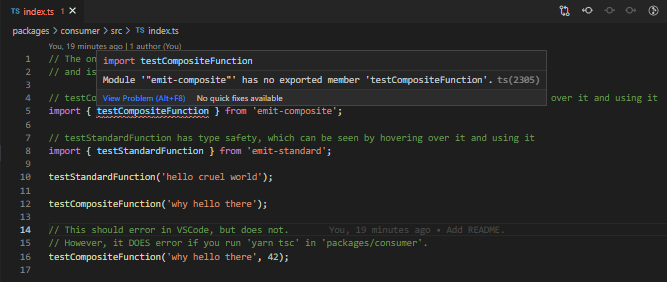
However, if you run yarn tsc in packages/consumer, typing information DOES seem to be available. I'm not sure if this is a TS or VSCode bug. For each TS version I tried above I ensured that VSCode was using "workspace version" and all exhibit this behavior.
🙂 Expected behavior
Typing information should be available in VSCode for both cases.
Beitragsleitfaden
Erste Schritte
- Lies das ganze Issue und danach den Beitragsleitfaden des Projekts.
- Schreib ins Issue, dass du es übernimmst — das erspart doppelte Arbeit.
- Forke das Repository und arbeite in einem Branch.
- Öffne einen Pull Request, der die Issue-Nummer nennt.
Bewertung
Dieses Issue wurde noch nicht bewertet.